A digital agency helps businesses manage the parts of marketing and online growth that are difficult to handle with a small in-house team. Depending on the agency, that can include search engine optimization (SEO), paid advertising, social media, content, web design, email marketing, and analytics.
The important point is that agencies are not all built the same. One may be strong in SEO and content but have little experience with paid media. Another may focus on website development and conversion optimization. Before hiring one, you need to understand what you actually need, how the work will be measured, and what you should expect from the relationship.
What Is a Digital Agency?
A digital agency is a company that provides seo services to help brands build, manage, and improve their presence across digital channels. The exact scope varies, but the work usually connects marketing, creative, technology, and measurement.
For a local business, that might mean improving Google visibility, running search ads, and creating landing pages. For ecommerce, the work may involve product pages, shopping campaigns, social media, email, and conversion tracking. Larger companies may use an agency for one specialist function or several teams working together.
A digital agency should not be judged only by how many services it lists. The better question is whether its team can connect the work to a business goal.
7 Key Services a Digital Agency May Provide
1. SEO and organic search
SEO focuses on helping relevant pages appear in unpaid search results. Typical work includes technical SEO, keyword research, content planning, on-page improvements, internal linking, and digital PR or link acquisition.
A sound SEO program should look beyond rankings. Organic leads, qualified traffic, conversions, and revenue are usually more useful measures.
For basic search optimization principles, see Google’s SEO Starter Guide.
2. Paid advertising
Paid media includes campaigns on platforms such as Google Ads and Meta. Depending on the objective, campaigns can be built for leads, sales, website traffic, app installs, or awareness. Google explains that advertisers choose campaign goals, budgets, targeting, and bidding options based on the outcome they want to achieve.
A digital agency managing paid media should be able to explain where the budget is going, which audiences are being targeted, and how conversions are tracked.
3. Social media marketing
Social media work can cover strategy, content calendars, creative production, community management, influencer activity, and paid social campaigns.
The right mix depends on the audience. A B2B software company may need a different approach from a restaurant, education brand, or online retailer. Frequent posting is not the same as having a useful social media strategy .
4. Content marketing
Content can include blog posts, case studies, landing pages, guides, videos, emails, and other formats. Good content should answer real customer questions and support a clear stage of the buying journey.
Google’s guidance on people-first content emphasizes original value, useful information, clear sourcing, and content created for readers rather than search engines.
That is a useful standard when reviewing an agency’s content work. A large publishing calendar is less important than whether the content is accurate, relevant, and genuinely useful.
5. Web design and development
Some agencies also build or improve websites using practical web design techniques such as UX design, responsive development, landing page optimization, ecommerce development, speed improvements, analytics setup, and conversion rate optimization.
The marketing and website teams should work together. Bringing more visitors to a page will not help much if the page is confusing, slow, difficult to navigate, or poorly matched to the campaign.
6. Email and customer lifecycle marketing
Email marketing helps businesses stay connected with prospects and existing customers. An agency may handle campaign planning, copy, design, segmentation, automation, and reporting.
For ecommerce and subscription businesses, lifecycle work can be especially useful because marketing does not stop after the first purchase. Follow-up emails, onboarding, retention, and reactivation can all be part of the same customer journey.
7. Analytics and conversion tracking
Analytics is the part that ties the other services together. A digital agency may set up event tracking, conversion goals, dashboards, attribution reporting, and tests that show what is contributing to business outcomes.
Google Analytics provides tools for measuring website and app activity. Google Search Console provides reports on search queries, clicks, impressions, indexing, and other search performance data.
These are useful measurement sources an agency should be comfortable working with when they are relevant to the business.
How Does a Digital Agency Work With a Business?
A typical engagement starts with a review of the business, audience, current marketing activity, competitors, website, and existing data. From there, the agency and client agree on priorities, deliverables, timelines, and measures of success.
The work is usually divided into planning, implementation, measurement, and ongoing improvement.
A good reporting cycle should answer simple questions: What was done? What changed? What worked? What did not work? What will happen next?
You should also know who owns important assets such as advertising accounts, analytics properties, domains, creative files, and audience data. Ownership should not depend on whether the relationship with the agency continues.
When Should You Hire a Digital Agency?
Hiring makes sense when the business has a clear need but lacks the in-house time, specialist skills, or capacity to handle it well.
Common situations include launching a website, entering a new market, fixing weak lead generation, scaling paid campaigns, rebuilding SEO, or improving conversion rates.
It may be less useful to hire an agency simply because competitors are doing it. If the business cannot define the problem, budget, audience, or desired outcome, the agency may spend too much time trying to establish basic direction.
How to Choose the Right Digital Agency
Start with the problem, not the service list.
Ask each agency to explain how it would approach your specific situation. Look at relevant case studies and ask what the agency actually did, which channels were involved, how results were measured, and over what period.
Pay attention to the people who will work on the account. The sales presentation may come from senior staff while the day-to-day work is handled by a different team.
Also ask about reporting, meeting frequency, communication, turnaround times, revision limits, and contract terms. If paid advertising is involved, confirm whether the media budget is separate from the agency fee.
A short trial project or clearly defined first phase can be useful when both sides are unsure whether a long-term relationship will work.
How Much Does a Digital Agency Cost?
There is no single standard price. Agencies commonly use monthly retainers, project fees, hourly billing, or a combination of these models.
The total cost depends on the scope of work, number of channels, market, team size, technical requirements, and advertising budget. A small SEO engagement and a full ecommerce growth program are very different jobs.
When comparing proposals, do not compare only the monthly fee. Compare the work included, deliverables, reporting, strategic input, and exclusions.
What Should You Measure?
The right KPIs depend on the business model and the work being done.
For SEO, useful measures can include qualified organic traffic, leads, conversions, revenue, and visibility for commercially relevant searches. For paid advertising, businesses may track cost per lead, conversion rate, customer acquisition cost, revenue, and return on ad spend. For social media, reach and engagement can matter, but they should be connected to broader business goals when possible.
Avoid reports filled with numbers that never affect a decision. A useful dashboard helps decide what to continue, change, or stop.
Final Thoughts
A digital agency can fill important gaps in strategy, execution, technology, and measurement, but the value of the partnership depends on the fit between the agency and the business.
The strongest starting point is a clear business problem, a realistic budget, and a simple way to measure progress. From there, choose a team that can explain its work, show relevant evidence, communicate clearly, and work with the data and systems your business already uses.
That makes it easier to compare agencies on substance rather than presentation alone.
Frequently Asked Questions
1. What does a digital agency do?
A digital agency helps businesses improve their online presence and reach business goals through services such as SEO, paid advertising, social media marketing, content marketing, web development, email marketing, and analytics.
2. How much does a digital agency charge?
The cost varies depending on the services, project scope, market, and agency pricing model. Agencies may charge a monthly retainer, project-based fee, hourly rate, or a combination of these.
3. Why should a business hire a digital agency?
A business may hire a digital agency when it needs specialist skills, additional marketing capacity, or help managing multiple digital channels. An agency can also provide strategy, execution, and performance reporting.
4. How do I choose the right digital agency?
Compare agencies based on relevant experience, services, case studies, communication, reporting, pricing, and the team assigned to your account. Make sure the agency understands your business goals before starting the engagement.
5. How long does it take to see results from a digital agency?
The timeline depends on the service and business. SEO can take longer to show meaningful growth, while paid advertising and website changes may produce measurable results sooner. Results should be evaluated against agreed goals and KPIs.
Choosing the wrong SEO tool is an expensive mistake. You lock into an annual plan, spend weeks learning the interface, build your reporting around its metrics, and then discover it doesn’t track the one thing your clients actually care about. Multiply that by a $1,500 to $5,000 yearly subscription and the cost of guessing wrong becomes obvious. Here’s the honest starting point for any Semrush vs Ahrefs vs Moz comparison: there is no perfect tool. Each of the big three dominates a different part of the SEO workflow, and the right choice depends on what you do most, who you do it for, and what you can spend. This guide breaks down where each one wins, including a section on local SEO that most SEO software comparisons skip entirely.
The Big Three: A Quick Overview
Semrush positions itself as a massive, all-in-one digital marketing suite. Beyond core SEO, it covers PPC research, content marketing, social media scheduling, and competitive intelligence, with add-on toolkits for advertising, local, and AI visibility. It’s the natural fit for teams that want a unified workflow rather than stitching together five separate tools.
Ahrefs is the industry standard for link building and competitor research. It boasts the largest backlink index in the business, with over 35 trillion known links, and a clean, fast interface that SEO professionals consistently praise for deep research.
Moz is the pioneer of the industry and the creator of Domain Authority (DA), the metric that became shorthand for site strength across the entire SEO world. It remains the most beginner-friendly and accessible tool for small businesses, with the lowest entry price of the three and an education-first approach.
Use this interactive matrix to easily visualize which tool dominates in specific feature categories.
Keyword Research & Backlink Depth Compared
Keyword Database
On raw numbers, the two heavyweights are close. Semrush’s keyword database exceeds 27 billion keywords across 140+ geographic databases, while Ahrefs reports 28 billion or more. In practice, both will surface virtually any query with meaningful search volume, making them powerful tools for keyword research; the differences show up in how they present the data.
Semrush leads with raw search volume and its Keyword Magic Tool, which groups thousands of related terms into subtopics and filters by intent. Ahrefs’ distinctive metric is Traffic Potential, which estimates the total traffic the top-ranking page receives across every keyword it ranks for, not just the one you searched. A keyword with 500 monthly searches might have a Traffic Potential of 5,000, because the page ranking for it also captures dozens of long-tail variants. That single number changes how you prioritize content.
Both tools calculate keyword difficulty on different scales, so never compare a Semrush KD score directly to an Ahrefs one. Moz’s keyword database is smaller and simpler, fine for small sites but limiting for large-scale content planning and broader keyword research.
Geo-Friendly Tactics: Which Tool Wins for Local SEO?
Local SEO software has different requirements than national campaigns, and the big three diverge sharply here.
The Moz Advantage
Moz Local remains the gold standard for brick-and-mortar stores needing citation management. It pushes your Name, Address, and Phone data to dozens of directories and data aggregators, monitors for inconsistencies, and flags duplicate listings automatically. Priced per physical location, it’s affordable for single-location businesses and scales cleanly for multi-location brands. If your local search visibility depends on clean citations across the web, Moz Local does the tedious work better than anything Ahrefs offers.
Semrush’s Granularity
Semrush allows strict city-level and even ZIP-code-level rank tracking, which is vital for local service businesses that rank differently across neighborhoods. Its Local toolkit adds a Map Rank Tracker with geo-grid heatmaps, showing exactly where in a city you appear in the map pack and where you don’t, plus Google Business Profile management, listing distribution, and review monitoring. For agencies managing local clients, this combination of granular tracking and reporting is the most complete option of the three.
Ahrefs’ Weakness
Ahrefs’ Rank Tracker does support location targeting down to city and postal code, and it can monitor local pack positions. What it lacks is a dedicated local SEO toolkit: there’s no citation or listing management, no Google Business Profile integration, no review monitoring, and no geo-grid map tracking. For purely local campaigns, especially multi-location businesses, Ahrefs requires pairing with a separate local tool, which makes it less ideal as a standalone choice.
2026 Pricing Breakdown: What Is the Real Cost?
Entry-level SEO tool pricing tells only part of the story:
Moz Pro Starter: $49/month ($39/month billed annually), one site, 50 tracked keywords. Standard at $99/month is the realistic tier for most small businesses.
Ahrefs Lite: $129/month ($108/month annually), 5 projects, 750 tracked keywords. A stripped-down Starter plan exists at $29/month for testing.
Now the hidden costs. Ahrefs runs a metered credit system: Lite and Standard plans include monthly usage credits for reports and crawls, and heavy users can exhaust them mid-month or pay for overages. Content Explorer, its most powerful link-prospecting tool, only unlocks at Standard ($249/month). Extra user seats cost $40 to $80 per month each.
Semrush’s pain point is additional user seats: $45 per user on Pro, $80 on Guru, and $100 on Business. A three-person team on Pro pays roughly $230/month, not $139.95. Its AI visibility features also sit in a separate Semrush One tier starting at $199/month, or as a $99/month per-domain add-on.
Moz has the fewest surprises, though Moz Local is billed separately per location, and its lower tiers cap keyword tracking tightly.
Not sure which plan fits your agency or freelance budget? Try out this interactive allocator to get a tailored recommendation.
Frequently Asked Questions
Which SEO tool is best for beginners?
Moz is widely considered the most beginner-friendly of the three, thanks to its simplified dashboard, straightforward metrics like Domain Authority, extensive free learning resources, and the lowest starting price at $49/month.
Do any of these tools offer a free version?
Yes. Ahrefs offers Ahrefs Webmaster Tools for free, giving you site audits and backlink data for your own verified websites. Semrush has a limited free account allowing 10 requests per day. Moz offers a free version of Link Explorer with limited queries and the free MozBar Chrome extension for checking DA on any page.
Which tool is better for agencies: Semrush or Ahrefs?
Semrush is usually the better agency choice. It includes white-label reporting, client dashboards, and integrates PPC and social metrics alongside SEO data, so one platform covers every service line. Ahrefs is the better pick if the agency specializes in high-end link building, where its data depth matters more than reporting polish.
How do these tools track AI search engines?
Both Semrush and Ahrefs introduced AI visibility tracking in 2025 and 2026 to monitor how brands appear in ChatGPT, Perplexity, Google AI Overviews, and similar tools. Semrush requires its higher-priced Semrush One tier (or the AI Visibility Toolkit add-on) for full access. Ahrefs bundles basic Brand Radar with a small allowance of tracked AI prompts into its Lite, Standard, and Advanced plans, with expanded monitoring available as a paid add-on.
Most SEO advice is written for blogs: publish helpful articles, earn links, watch traffic grow. Ecommerce SEO is a completely different beast. An online store might have ten thousand product pages, hundreds of categories, and filters that spawn millions of URL variations, all competing for crawl budget and ranking signals.
And the goal isn’t readers. It’s buyers with their wallets already out. Success depends far less on blog content and far more on product architecture, category pages, and capturing searches from people who are one click from checkout.
Whether you run a Shopify store, a WooCommerce site, or a custom platform, this guide covers the online store SEO fundamentals that turn search visibility into revenue.
The Core of Ecommerce SEO: Understanding Keyword Intent
Every search query carries an intent, and ecommerce SEO keywords live at the bottom of the funnel.
Informational intent describes someone gathering knowledge: “how to choose a laptop,” “best running shoes for flat feet,” “what is a mechanical keyboard.” These searchers may buy eventually, but not today, and the results they see are guides and comparison articles.
Transactional intent describes someone ready to purchase: “buy Apple MacBook Pro M3 online,” “Nike Pegasus 41 size 10,” “mechanical keyboard under $100 free shipping.” The query itself contains a product, a model number, a price qualifier, or a purchase verb. These searchers want a product page, not an article.
Between the two sits commercial search intent: “MacBook Pro M3 vs Dell XPS 15,” “best mechanical keyboards 2026.” The user is comparing options and will buy soon.
Ecommerce SEO relies heavily on optimizing product and category pages for transactional and commercial keywords, because those are the searches where a single click can become a sale. A blog post ranking for “how to choose a laptop” might convert at 1%. A category page ranking for “buy gaming laptop” might convert at 5% or more. Map your product pages to model-specific and long-tail transactional terms, and your category pages to broader commercial terms, so every stage of buying intent has a page built to capture it.
Optimizing Your Ecommerce Site Architecture
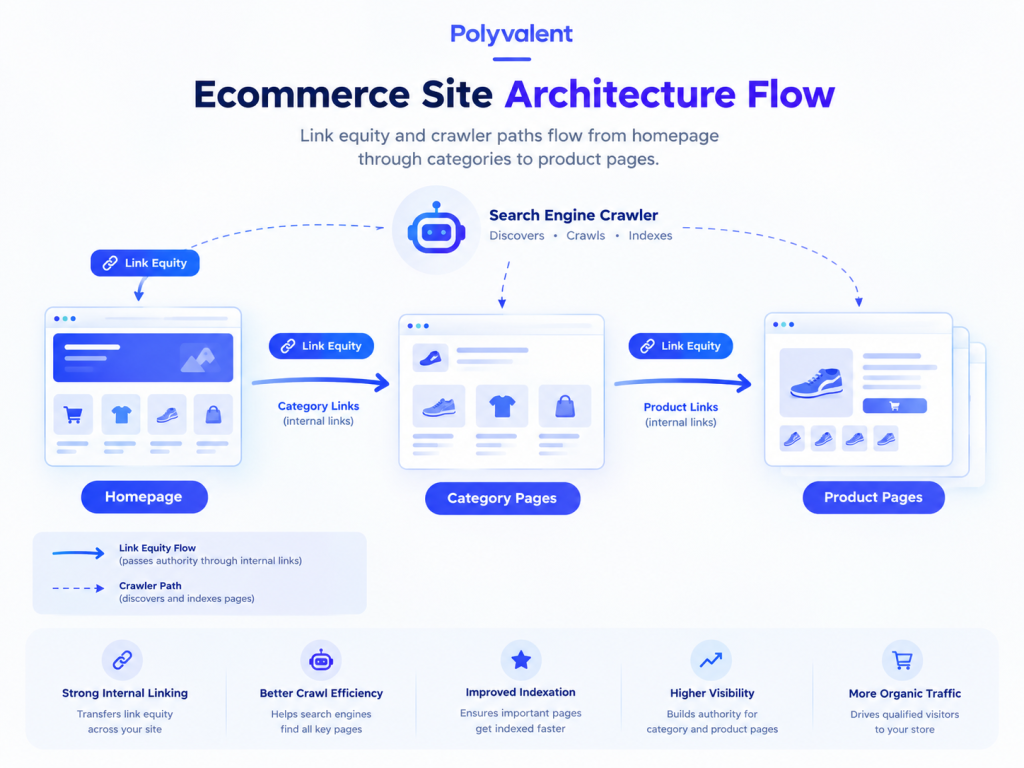
Site structure determines whether crawlers can find your products and whether ranking authority reaches the pages that make money.
The “3-Click Rule”
Any product should be reachable within three clicks from the homepage: Home → Category → Subcategory → Product. Deeper pages receive less internal link equity and are crawled less often, which means new products can sit unindexed for weeks. A flat structure also helps shoppers, who abandon sites that bury products. Use breadcrumb navigation on every page to reinforce the hierarchy for both users and search engines.
Category Page Optimization
Category pages are often the most lucrative pages on an ecommerce site. They target broad commercial keywords with high volume (“women’s trail running shoes”), and they consolidate ranking signals from every product beneath them. Yet most stores leave them as bare product grids.
Give each category page a unique, keyword-focused title tag and H1, plus 150 to 300 words of genuinely useful descriptive copy (above or below the grid) that explains what the category includes and helps shoppers choose. Add FAQ content where it fits. Build internal linking between related categories and from blog content back to categories, so authority flows toward the pages that convert.
Handling Out-of-Stock Products
Products run out, and how you handle it affects rankings:
Temporarily out of stock: Keep the page live with a clear back-in-stock date, an email alert option, and links to similar products. Deleting it throws away accumulated authority.
Permanently discontinued with a replacement: Use a 301 redirect to the newest equivalent product or the parent category. This preserves link equity and sends shoppers somewhere useful.
Discontinued with no equivalent and no backlinks: A 404 (or better, a 410 “gone”) is acceptable. Don’t redirect everything to the homepage; Google treats mass irrelevant redirects as soft 404s.
Visualize how traffic naturally flows through a well-optimized ecommerce structure.
Geo-Friendly Tactics: Localizing Your Ecommerce Brand
Local ecommerce SEO matters whenever you have physical locations, regional shipping differences, or customers who care about where a product ships from.
“Available Near Me”
If you run a hybrid model with brick-and-mortar stores plus online sales, connect your point-of-sale inventory to Google Merchant Center and enable local inventory ads and free local listings. When someone nearby searches for a product you carry, Google can show it as “in stock at [your store, 2.1 mi]” in Shopping results and on Maps. This captures shoppers who want the item today and won’t wait for delivery, and it’s one of the few ways an online store can compete directly with big-box retailers on immediacy.
Shipping & Location Pages
Shoppers frequently search “[product] shipping to Canada” or “does [brand] deliver to Texas.” Create dedicated pages detailing shipping times, costs, and policies for specific regions or countries. These pages rank for location-qualified queries, reduce cart abandonment by answering questions before checkout, and give you a natural place to link to region-appropriate product categories. If you serve multiple countries, pair them with correct hreflang tags and localized currency.
Local Schema Markup
Implement LocalBusiness schema on store location pages (with address, hours, and geo-coordinates) and Product schema on every product page (with price, currency, availability, and ratings). When combined with Merchant Center data, this lets search engines display your local pricing and stock status directly in rich snippets, so a searcher sees “$89.99 · In stock · Pickup today” before ever clicking.
The Biggest Technical SEO Issues for Online Stores
Ecommerce platforms generate technical problems at a scale blogs never face.
Duplicate Content from Faceted Navigation
Product filters for size, color, price, and brand each append URL parameters (?color=blue&size=m&sort=price). A single category with a dozen filters can create thousands of parameter URLs, all showing nearly identical content. This is faceted navigation SEO’s central problem: crawlers waste budget on filter combinations while your real pages compete against their own duplicates.
The fix has three layers. First, place a canonical tag on every filtered URL pointing to the clean category URL, so ranking signals consolidate. Second, apply noindex or block low-value parameter patterns in robots.txt (sorting and pagination parameters especially). Third, for filter combinations with genuine search demand (“blue running shoes”), create a proper indexable landing page with its own URL, title, and copy rather than relying on a parameter.
Optimizing Product Images
Google Image Search drives meaningful traffic for visual products like apparel, furniture, and décor. Compress images to keep pages fast (WebP format, under 100 KB for thumbnails), use descriptive file names (“navy-linen-sofa-3-seater.webp” instead of “IMG_4821.jpg”), and write alt text that names the product and its key attributes. Include multiple angles, submit an image sitemap, and make sure the Product schema references your primary image so it appears in rich results.
Frequently Asked Questions About Ecommerce SEO
What are the best types of keywords for an ecommerce site?
Transactional and commercial keywords. Prioritize terms that include “buy,” “price,” “discount,” “free shipping,” or specific product model numbers, since they signal a searcher who is ready to purchase rather than research.
How do I handle product pages for items that change every season?
Don’t delete the URL. Use a 301 redirect to point the old seasonal URL to the new equivalent product or to the main category page. This preserves the SEO value and backlinks the old page earned and keeps shoppers on a relevant page.
Should my ecommerce site have a blog?
Yes. Product pages capture bottom-of-funnel buyers, but a blog captures top-of-funnel informational searches like “how to choose” and “best of” queries. This builds topical authority and gives you a natural place to internally link back to your product categories.
A website can lose traffic without experiencing a major ranking penalty or a visible server failure. Sometimes the problem is much simpler: visitors and search engine crawlers are reaching URLs that no longer exist.
These URLs usually return a 404 Not Found status. A few 404 errors are normal on almost every website. The problem starts when broken URLs become common, especially when they affect important pages, internal links, backlinks, or URLs that previously received organic traffic.
A 404 error means the server could not find the requested resource. It does not automatically mean that a website has an SEO problem. The correct response depends on why the URL is returning 404, whether the page should still exist, and whether there is a relevant replacement.
This guide explains how to find 404 errors, decide which ones need fixing, choose between 301 redirects and 410 responses, create a useful custom 404 page, and prevent broken URLs from accumulating.
Key Takeaways
A 404 means the requested URL cannot be found on the server.
Not every 404 needs to be redirected.
Use a 301 redirect when a relevant replacement page exists.
A 410 response can be used when content has been permanently removed with no replacement.
Broken internal links should usually be fixed at the source.
Important backlinks pointing to deleted URLs may justify a redirect.
Regular site crawls can catch broken links before they affect users.
What Is a 404 Error?
A 404 Not Found error is an HTTP status response indicating that the server cannot find the resource requested at a particular URL.
For example, suppose a website previously had this page:
polyvalent.com/services/seo-audit
The page is later deleted, but someone visits the old URL. If the server cannot find a resource at that address, it can return a 404 response.
A 404 can happen because:
A page was deleted
A URL was changed
An internal link contains a typo
An old URL was removed during a redesign
A product or service was discontinued
An external website still links to an old URL
A page was moved without a redirect
A URL was incorrectly entered by a visitor
The important distinction is between an expected 404 and a broken 404.
If a page was intentionally removed and has no useful replacement, returning 404 can be perfectly appropriate. If a valuable page was moved to a new URL and the old address now returns 404, the situation should usually be corrected.
Are 404 Errors Bad for SEO?
A 404 error by itself is not automatically harmful to SEO.
Search engines expect websites to contain URLs that disappear over time. The problem is the underlying situation that caused the 404.
For example, a deleted page with no traffic, no backlinks, and no relevant replacement may not require any action.
A different case is an important service page that used to rank for valuable keywords and receive links from other websites. Allowing that URL to return 404 without considering a replacement can result in lost traffic and missed link value.
Broken internal links are another concern. When a page on your website links to a URL that returns 404, users encounter a dead end. Search engine crawlers encounter the same broken path.
That is why 404 management should be based on the value and purpose of the URL rather than the number of errors alone.
How to Find 404 Errors on Your Website
Finding broken URLs is the first step. The best approach is to combine search engine data with a complete website crawl.
Google Search Console
Google Search Console can reveal URLs that Google has encountered and that are returning errors.
Review the indexing reports and inspect individual URLs to understand whether the page is currently accessible, indexed, redirected, or returning an error.
Search Console is particularly useful because it shows problems from Google’s crawling perspective rather than only from the website’s internal link structure.
Website Crawlers
Tools such as Screaming Frog, Sitebulb, Semrush, and Ahrefs can crawl a website and identify links returning 404 responses.
A crawl can reveal:
Broken internal links
Broken external links
Deleted pages still referenced internally
Redirects
Redirect chains
Broken images and resources
URLs returning server errors
For large websites, a crawler is often much faster than checking URLs manually.
Server Logs
Server logs provide another layer of information.
They can show which URLs are actually being requested, including URLs that may not appear in your current internal linking structure. This can reveal old URLs still being visited by search bots, users, or external websites.
Manual Checks
Manual testing is still useful when investigating a specific URL.
Open the URL directly and check the HTTP response. Browser developer tools can help confirm the status code and identify whether other resources on the page are failing.
How to Fix a 404 Error
There is no single fix for every 404. The correct solution depends on what happened to the original page.
1. Fix the Internal Link
If the page still exists but an internal link points to the wrong URL, correct the link.
For example:
/services/seo-audi
may have been linked instead of:
/services/seo-audit
In this situation, there is no reason to create a redirect. Correct the source link so users and crawlers reach the intended page directly.
2. Use a 301 Redirect When a Relevant Replacement Exists
A 301 redirect tells browsers and search engines that a URL has permanently moved to another location.
Use a 301 when the old page has a genuine replacement.
For example:
/old-seo-guide → /seo-guide
A redirect makes sense when:
A URL has changed
A website has been migrated
A page has been consolidated
A product has moved to a new URL
An old article has been replaced by a substantially relevant updated page
The destination should match the original page’s purpose as closely as possible.
Redirecting every deleted URL to the homepage is not a good substitute for proper URL management. If the homepage does not satisfy the intent of the old page, the redirect provides little value to the user.
3. Use 410 When Content Is Permanently Gone
A 410 Gone response can be used when a resource has been intentionally and permanently removed and there is no relevant replacement.
The distinction is useful:
404: The requested resource was not found.
410: The resource has been intentionally removed and is no longer available.
For example, a discontinued campaign page with no replacement may reasonably return 410.
This provides a clearer signal that the URL is permanently gone rather than temporarily unavailable.
4. Remove Dead URLs From XML Sitemaps
Your XML sitemap should contain URLs that you want search engines to discover and consider.
A deleted URL returning 404 or 410 should generally not remain in the sitemap.
Keeping removed URLs in the sitemap creates conflicting signals. The sitemap effectively says, “Here is a URL you should know about,” while the server responds, “This URL does not exist.”
After deleting or changing URLs, review the sitemap and remove obsolete entries.
5. Update External Links Where Possible
Sometimes a broken URL still receives valuable referral traffic or backlinks.
If another website links to an old page on your domain, check whether the old page has a suitable replacement.
If it does, a 301 redirect can preserve the user journey. In cases where the referring website is important and accessible, you can also contact its owner and request that the link be updated.
This is particularly useful after major website migrations, URL restructures, or content consolidation.
301 Redirect vs 404 vs 410
Choosing the right response is easier when the purpose of the old URL is clear.
Situation
Recommended response
Page still exists but link is incorrect
Fix the link
Page moved to a relevant new URL
301 redirect
Several pages consolidated into one relevant page
301 redirect
Page permanently removed with no replacement
410 or 404
Temporary server problem
Fix the server issue
Deleted page has a strong relevant replacement
301 redirect
Random URL or typo with no useful destination
404
The goal is not to eliminate every 404 response. The goal is to make sure every important URL has the correct response.
How 404 Errors Happen During Website Migration
Website migrations are one of the most common sources of broken URLs.
Changing the CMS, domain structure, category system, permalink format, or website architecture can create hundreds or thousands of old URLs.
For example:
Old structure
/blog/seo-guide
New structure
/resources/seo-guide
If the old URL is simply deleted, users who have bookmarked it, search engines that know about it, and external websites linking to it may encounter a 404.
This is why redirect mapping should happen before a migration goes live.
Create a spreadsheet containing:
Old URL
New URL
Redirect Type
Status
/old-page
/new-page
301
Tested
/old-service
/services/new-service
301
Tested
/expired-offer
None
410
Tested
After launch, crawl the new website and verify that important old URLs resolve correctly.
A proper migration audit should not stop at redirects. Review internal links, XML sitemaps, canonical URLs, indexation, and navigation as well.
Designing a Useful Custom 404 Page
Even with careful maintenance, visitors will occasionally reach a URL that does not exist.
A custom 404 page gives them a way forward.
A basic server error saying only “404 Not Found” provides no context and no useful next action. A well-designed 404 page can turn that dead end into another opportunity to continue browsing.
What Should a Custom 404 Page Include?
Clear messaging
Tell the visitor that the page cannot be found without blaming the user.
Search functionality
A search bar can help visitors find the information they originally wanted.
Useful navigation
Include links to important sections such as services, products, resources, or the homepage.
Relevant content
Popular articles, categories, or frequently visited pages can give users another route.
A clear CTA
If the website is designed to generate enquiries, include an appropriate contact or consultation option.
The 404 page should still return an actual 404 HTTP status. A visually friendly error page should not pretend that the missing URL exists.
Best Practices for Preventing 404 Errors
Fixing broken URLs is useful, but preventing them is better.
Plan Redirects Before Website Changes
Whenever URLs will change, prepare a redirect map before the new website goes live.
This is especially important for:
Website redesigns
CMS migrations
Domain changes
URL structure changes
Content consolidation
Category restructuring
Do not wait until traffic drops to start investigating old URLs.
Audit Internal Links Regularly
Broken internal links are often a symptom of a larger site-architecture problem. When URLs change, links across older articles, service pages, category pages, and navigation elements can continue pointing to the previous address. This is why internal links should be reviewed whenever URLs are changed, rather than waiting for a crawler to report them as broken.
Crawl the Website Regularly
A quarterly crawl is a reasonable starting point for many websites, while larger or frequently updated websites may benefit from more frequent checks.
Look for:
4xx errors
5xx errors
Redirect chains
Redirect loops
Broken internal links
Broken external links
URLs in the sitemap returning errors
A technical SEO audit should treat broken links as one part of the wider website health check rather than as an isolated problem.
Monitor Important External Links
Not every external backlink can be controlled, but valuable referring links can be monitored.
If a high-quality website links to a URL that has been deleted, determine whether the old page should redirect to a relevant replacement.
This can recover referral opportunities while preserving a cleaner user journey.
404 Errors and AI Search Visibility
Website accessibility matters beyond traditional search.
AI-powered search systems and answer engines need to retrieve and process information from accessible web pages. If important content disappears, returns errors, or becomes difficult to discover through the site’s structure, its availability for retrieval can be affected.
This does not mean every 404 directly causes an AI visibility problem. The more practical concern is broader technical accessibility.
A site that consistently maintains working URLs, clear internal links, accurate sitemaps, and accessible content gives search crawlers and other retrieval systems a cleaner source to work with.
This is one reason broken URLs should be considered alongside other technical SEO issues rather than treated as a purely cosmetic website problem.
A Practical 404 Audit Checklist
Before closing a 404 issue, ask:
Does the page still need to exist?
Is there a genuinely relevant replacement?
Should the old URL return 301, 404, or 410?
Are any internal links still pointing to it?
Is the URL still present in the XML sitemap?
Does the URL have valuable backlinks?
Did the error appear after a website migration?
Are there similar broken URLs elsewhere on the site?
Does the custom 404 page help users continue their journey?
Has the fix been tested after implementation?
The answers will usually make the correct action clear.
Frequently Asked Questions
1. What does a 404 error mean?
A 404 means the server cannot find the resource requested at that URL. The URL may have been deleted, moved, mistyped, or incorrectly linked.
2. Are 404 errors bad for SEO?
Not necessarily. A small number of expected 404s is normal. Problems arise when valuable pages, internal links, or important URLs return 404 without an appropriate solution.
3. Should every 404 URL be redirected?
No. Redirect a 404 when there is a relevant replacement. If no suitable replacement exists, keeping the URL as 404 or using 410 may be more appropriate.
4. What is the difference between 301 and 404?
A 301 tells search engines and browsers that a page has permanently moved to another URL. A 404 says that the requested resource cannot be found.
5. What is a 410 error?
410 Gone indicates that a resource has been permanently removed. It can be appropriate when a page has no replacement and the removal is intentional.
6. How can I find broken links on my website?
Google Search Console, Screaming Frog, Sitebulb, Semrush, and Ahrefs can help identify URLs returning 404 responses. Server logs can provide additional information about requests to missing URLs.
7. Can broken internal links hurt user experience?
Yes. A broken internal link takes visitors to a page that does not exist, interrupting their journey and potentially preventing them from reaching important information.
8. Should 404 pages be included in an XML sitemap?
No. XML sitemaps should contain the URLs you want search engines to discover and process. Deleted URLs returning 404 or 410 should generally be removed.
9. How often should I check for 404 errors?
A quarterly crawl is a useful baseline for many websites. Websites that publish frequently, change products regularly, or undergo development work may need more frequent monitoring.
10. How do I prevent 404 errors during a website migration?
Create a URL redirect map before launch, redirect old URLs to relevant new destinations, update internal links, remove obsolete sitemap entries, and crawl the new website after launch to verify the implementation.
Conclusion
404 errors are not automatically a sign of poor SEO. The real issue is failing to understand why a URL is broken and what should happen to it.
Some URLs should be corrected. Some should redirect to a relevant replacement. Others should remain 404 or return 410 because the content is genuinely gone.
The best approach is proactive. Monitor broken links, maintain clean internal linking, keep XML sitemaps accurate, plan redirects before migrations, and review important URLs regularly.
A technically healthy website does not need to eliminate every 404. It needs to make sure that valuable pages remain accessible and that removed pages return the response that best reflects their current status.
Search is one of the first places people go when they need information, compare products, find a service provider, or decide what to buy. Yet most searchers focus on the first page of results, which makes organic visibility a serious business advantage.
SEO marketing is the strategic process of improving a website and its online presence so that search engines can understand, rank, and surface its pages for relevant searches. The goal is not simply to increase rankings. Effective SEO marketing brings the right visitors to a website and turns that visibility into leads, sales, enquiries, or other business outcomes.
For businesses, this makes SEO more than a traffic channel. It becomes a long-term system for building visibility, authority, and demand without paying for every individual visit.
Key Takeaways
SEO marketing improves organic visibility for relevant searches.
It combines on-page, technical, and off-page SEO.
Search intent should guide keyword and content decisions.
Local SEO helps businesses reach customers in specific locations.
SEO requires continuous measurement, improvement, and content updates.
Strong SEO can support both traditional search and emerging AI-powered search experiences.
Why SEO Marketing Matters for Your Business
SEO marketing matters because it connects businesses with people who are already looking for something they provide.
1. It Brings High-Intent Traffic
Someone searching for “enterprise SEO services in India” has a different level of intent from someone casually reading about what SEO means.
SEO helps businesses target these different stages of the buying journey. Informational searches can introduce a brand to potential customers, commercial searches can help users compare options, and transactional searches can capture people who are ready to take action.
The value comes from matching the right page to the right search intent rather than trying to rank every page for the same broad keywords.
2. It Builds Long-Term Search Value
Paid advertising can generate immediate visibility, but that visibility generally depends on continued advertising spend.
SEO works differently. A well-optimized page can continue attracting organic visitors after it is published. As a website builds useful content, relevant links, stronger internal connections, and greater topical authority, its overall search presence can improve.
SEO is not free traffic. It requires investment in research, content, technology, and expertise. Its long-term advantage is that the value created by that investment can continue after the initial work is completed.
3. It Strengthens Brand Credibility
Users often associate prominent organic search results with businesses that are established and relevant to their query.
Ranking well does not automatically make a business trustworthy, but strong search visibility can contribute to brand recognition. When a company consistently appears for useful, relevant searches, users have more opportunities to encounter and evaluate the brand.
This is especially valuable when organic visibility is supported by reviews, authoritative third-party mentions, useful content, and a technically reliable website.
4. It Improves the Website Experience
Good SEO and good user experience often support the same goals.
Clear navigation, readable content, fast-loading pages, mobile responsiveness, descriptive headings, accessible images, and logical page structures make a website easier for both users and search engines to understand.
SEO therefore should not be treated as a layer added after a website is built. Search visibility should be considered when content, design, development, and site architecture are planned.
The Three Pillars of Modern SEO Marketing
A complete SEO strategy usually brings together three connected areas: on-page SEO, technical SEO, and off-page SEO.
1. On-Page SEO: Content and Relevance
On-page SEO focuses on the information and elements that exist on a website.
The process begins with keyword research, but modern keyword research is about more than collecting phrases with high search volume. SEO teams need to understand why someone is searching, what information they expect, and what type of page should answer that need.
Search intent generally falls into categories such as informational, commercial investigation, and transactional intent.
Once the target intent is clear, important on-page elements include:
Page titles and meta descriptions
H1, H2, and H3 headings
Content structure and topical coverage
Internal links
Image alt text
URLs
Relevant entities and terminology
Clear calls to action
Content should answer the user’s question directly and provide enough context to be genuinely useful.
For a deeper look at how keyword research supports this process, see Polyvalent’s Keyword Research for SEO guide.
2. Technical SEO: Performance and Structure
Technical SEO deals with how efficiently search engines can access, crawl, render, and understand a website.
Important areas include page speed, Core Web Vitals, mobile responsiveness, canonical URLs, XML sitemaps, robots.txt, redirects, structured data, indexation, JavaScript rendering, and site architecture.
A technically strong website reduces barriers between its content and search engines.
Technical problems can remain hidden because a website may look perfectly normal to a visitor while search engines encounter crawling, rendering, or indexing problems. A detailed review of technical SEO issues affecting AI visibility can be particularly useful for websites that want their content to remain accessible across both traditional and AI-powered search.
3. Off-Page SEO: Authority and Trust
Off-page SEO focuses on signals generated outside the website.
Backlinks remain an important part of this work, but quality matters more than simply collecting a large number of links. A relevant editorial mention from a respected website can be more meaningful than dozens of unrelated links.
Off-page SEO can include:
Earning relevant backlinks
Digital PR
Industry publications
Brand mentions
Expert contributions
Reviews and reputation signals
Partnerships and relevant business listings
The broader objective is to establish the website and brand as credible sources within their subject area.
Local SEO: Winning Your Geographic Market
For businesses serving specific cities or regions, ranking nationally may not be the main objective.
A customer searching for “dentist near me,” “SEO agency in Gurugram,” or “best interior designer in Delhi” has a geographic requirement. Local SEO helps businesses become visible for these searches.
Google Business Profile
A properly configured Google Business Profile gives search engines and potential customers essential business information such as the business name, category, location, hours, website, phone number, photos, and reviews.
The profile should accurately represent the real business and remain consistent with information published elsewhere.
Local Citations and Reviews
Consistent Name, Address, and Phone number (NAP) information helps maintain a clear business identity across directories and other websites.
Reviews are equally important for local businesses. Genuine customer feedback can influence how potential customers evaluate a company and can strengthen the overall local presence of a business.
Local SEO is particularly valuable for service businesses, healthcare providers, restaurants, retailers, professional firms, and companies with physical locations.
The SEO Marketing Blueprint
SEO becomes easier to manage when it is treated as a structured process rather than a collection of isolated tasks.
Step 1: Conduct an SEO Audit
Start by understanding the current state of the website.
An audit should examine technical health, indexation, page performance, content quality, internal linking, metadata, site architecture, backlinks, and existing search visibility.
The objective is to identify the issues that are limiting growth before new work begins.
Step 2: Map Keywords and Competitors
Next, identify the searches that matter to the business.
Group keywords by intent, topic, location, funnel stage, and business value. Then compare the website with competitors to identify topics, pages, and search opportunities that are currently missing.
This prevents content production from becoming a volume exercise.
Step 3: Create and Optimize Content
Each important search topic should have a clear page or content asset designed around the user’s needs.
A strong SEO page answers the primary question early, explains the subject clearly, covers relevant subtopics, and gives readers a logical next step.
Existing pages should not be ignored. Updating a page that already has search visibility can sometimes produce better results than creating another page targeting a similar query.
Step 4: Build Authority
Once the website has useful content and a sound technical foundation, authority building becomes more effective.
Focus on earning relevant links, securing legitimate industry mentions, contributing useful expertise, and building relationships with publications or organizations that are relevant to the business.
Authority building should support the site’s subject matter rather than operate as a separate numbers game.
Step 5: Measure and Improve
SEO needs measurement because rankings alone do not tell the whole story.
Google Analytics 4 can help measure website engagement and conversions, while Google Search Console provides information about search queries, impressions, clicks, indexing, and search performance.
Businesses should connect these metrics to commercial outcomes. A keyword ranking in position one has limited value if it attracts visitors who never become customers.
The better question is: Which organic search activities are creating qualified business opportunities?
SEO Best Practices for Long-Term Growth
The strongest SEO strategies tend to follow a few consistent principles.
Write for Search Intent, Not Keyword Density
Repeating a keyword does not make a page more useful.
Instead, understand what the searcher wants and build the page around that need. Use related concepts and terminology naturally so that both readers and search engines can understand the subject.
Keep Important Pages Updated
Search results change, industries change, and business information changes.
Review important pages periodically. Update outdated statistics, product information, examples, references, screenshots, pricing information, and other details where necessary.
Content freshness should have a purpose. Changing a publication date without improving the content does not create meaningful value.
Build a Clear Site Architecture
Search engines need to understand how pages relate to one another.
A logical hierarchy helps distribute authority across important pages and makes it easier for visitors to find related information. Internal links should connect pages where the relationship is genuinely useful to the reader.
For a deeper explanation, see Polyvalent’s Internal Linking Strategy for SEO guide.
Prepare for AI-Powered Search
Search is increasingly incorporating AI-generated answers, summaries, and conversational interfaces.
This does not make traditional SEO irrelevant. Technical accessibility, useful content, authority, structured information, and strong site architecture remain important foundations.
The opportunity is to create content that clearly explains a subject, demonstrates expertise, establishes relationships between entities, and provides information that search systems can confidently understand and reference.
How Long Does SEO Marketing Take to Work?
SEO does not have a universal timeline.
A new website in a competitive industry may require significant time to establish authority, while an established website with strong technical foundations may see improvements sooner after fixing important issues.
The timeline depends on factors such as competition, website history, technical condition, content quality, search demand, authority, and the amount of work being implemented.
The most useful way to evaluate SEO is through progress over time across organic visibility, qualified traffic, conversions, rankings, and other business metrics.
Frequently Asked Questions About SEO Marketing
1. What is SEO marketing?
SEO marketing is the process of improving a website and its online presence so it can appear more prominently in organic search results for relevant searches.
2. What are the main types of SEO?
The main areas are on-page SEO, technical SEO, and off-page SEO. Local SEO is another important specialization for businesses serving specific locations.
3. Is SEO marketing the same as digital marketing?
No. SEO is one part of digital marketing. Digital marketing can include SEO, paid advertising, social media, email marketing, content marketing, and other channels.
4. Why is keyword research important for SEO?
Keyword research helps identify what people search for, how they phrase their needs, and what type of content can satisfy those searches. It helps businesses prioritize topics based on relevance and intent.
5. How does technical SEO affect rankings?
Technical SEO helps search engines access, crawl, render, and index website content efficiently. Technical problems can prevent important pages from being properly discovered or understood.
6. Are backlinks still important for SEO?
Yes. Relevant, trustworthy backlinks can contribute to a website’s authority. However, acquiring large numbers of low-quality links is not a substitute for useful content and a strong website.
7. What is local SEO?
Local SEO focuses on improving visibility for searches connected to a specific geographic area. It is particularly useful for businesses with physical locations or defined service areas.
8. How long does SEO take to show results?
Results vary by website, industry, competition, authority, and the quality of the SEO work. SEO should generally be viewed as a long-term growth strategy rather than a short-term campaign.
9. Does SEO help with AI search?
Yes. Strong technical foundations, useful content, clear information, authority, structured data, and relevant mentions can support visibility across modern search experiences, including AI-assisted search.
10. Can a small business benefit from SEO marketing?
Yes. Small businesses can use SEO to target specific services, locations, customer needs, and niche topics where competition may be more manageable. Local SEO can be particularly valuable for businesses serving a defined geographic market.
Conclusion
SEO marketing is not a one-time optimization project. It is an ongoing process of understanding search demand, improving a website, publishing useful content, building authority, measuring outcomes, and adapting as search behavior changes.
The strongest SEO programs connect technical performance with useful content and genuine business objectives. When these areas work together, organic search can become a reliable source of qualified traffic and long-term business growth.
Content marketing works best when it is treated as part of the sales process, not as a publishing task. A useful article can bring someone to your website, answer a question they have been researching, establish your expertise, and give them a reason to take the next step.
That is very different from putting up a sales message and waiting for visitors to respond.
A good content strategy connects what people need to know with what your business sells. It covers search demand, customer questions, educational content, distribution, and conversion points. This guide explains how to build that process, from choosing the right topics to turning content into a consistent source of traffic and leads.
What Is Content Marketing?
Content marketing is the process of creating and distributing useful information to attract a specific audience and move potential customers closer to a purchase.
Traditional advertising usually asks for attention first and provides the sales message immediately. Content marketing takes another route. It gives the audience something useful before asking for a sale.
For example, a software company could publish a guide explaining how to compare project management tools. A financial service could explain how businesses should prepare their documents before applying for funding. A B2B agency could publish a practical guide to choosing an SEO partner.
The subject changes, but the principle stays the same: answer a real question for the people you want as customers.
Three elements make this approach work.
Intent alignment: The topic should match something your audience genuinely wants to know.
Editorial quality: The information needs to be accurate, clear, useful, and better organised than a generic explanation.
Consistency: A single article may generate some traffic, but a well-planned collection of relevant content can build a much stronger acquisition channel.
Keyword research plays a central role here because it helps identify the subjects people are actively searching for. A structured approach to finding those opportunities can also prevent a content calendar from becoming a collection of random topics.
Why Content Marketing Matters for Business Growth
The commercial value of content goes beyond page views.
A strong article can attract visitors through organic search months after publication. It can answer objections before a sales conversation. It can support social media, email campaigns, sales presentations, and landing pages. It can also create useful entry points for people who are not yet ready to contact your business.
Organic Traffic Without Paying for Every Visit
Paid advertising can produce immediate visibility, but every additional visit has a cost. Content has a different model.
Once a useful page earns search visibility, it can continue attracting relevant visitors without paying for each individual click. The result depends on competition, search demand, content quality, authority, and ongoing optimisation, but the underlying advantage is clear: content can keep working after its initial publication.
A Shorter Path to the Sales Conversation
People rarely arrive at a sales call with zero questions.
They may want to know how a service works, what it costs, what mistakes to avoid, which option suits their situation, or how one provider compares with another. Content can address those questions before a salesperson gets involved.
That makes the eventual conversation more focused. Instead of explaining the basics, the sales team can spend more time discussing the customer’s actual requirements.
Content Builds Brand Equity
A useful library of articles gives your business a body of knowledge that visitors can explore.
Over time, people may encounter your brand through several different pieces of content. One page might answer an early research question, while another helps them evaluate solutions. This repeated exposure can make the company more familiar when the person eventually reaches the buying stage.
Better Control Over Customer Acquisition Costs
Content does not make customer acquisition free. Research, writing, design, optimisation, distribution, and maintenance all require resources.
The difference is that a successful content asset can generate value repeatedly. That makes content useful for balancing paid campaigns with organic acquisition channels.
The Content Matrix: 7 Formats Worth Using
A content marketing strategy should not depend entirely on blog posts. Different formats serve different customer needs.
1. Articles and Written Guides
Detailed articles are useful for answering search queries, explaining complicated subjects, and building topical depth. They are especially valuable when customers need information before making a decision.
2. Infographics and Visual Data
Some information is easier to understand visually. Research findings, processes, comparisons, statistics, and frameworks can often be turned into graphics that are easier to share and reference.
3. Social Media Content
Social posts give businesses a way to distribute ideas beyond their website. Short explanations, observations, customer questions, industry commentary, and useful tips can bring people back to deeper resources.
4. Video
Video is particularly useful when showing something is easier than explaining it with text. Product demonstrations, tutorials, customer stories, and expert explanations can all support different stages of the buying process.
5. Podcasts and Audio
Audio content can work well for specialist audiences that prefer conversations and interviews. It can also give a brand more opportunities to demonstrate expertise in a natural format.
6. Gated Resources
eBooks, templates, research reports, checklists, and whitepapers can be used when the information has enough value to justify a form submission. The goal should be lead quality, not simply collecting large numbers of email addresses.
7. PR and External Distribution
Publishing on your own website is only part of content promotion. Relevant publications, industry communities, partnerships, newsletters, and digital PR can put useful content in front of audiences that may not have discovered your site through search.
Match Content to the Buyer’s Journey
The same piece of content should not be expected to convert every visitor.
Someone discovering a problem needs different information from someone comparing providers.
Discovery
At the discovery stage, the reader is usually looking for education. They may not know which solution they need yet.
Educational articles, social posts, introductory guides, and visual explainers work well here because they answer broad questions without pushing the reader directly into a sale.
Evaluation
The reader now understands the problem and is considering possible solutions.
Comparison content, case studies, implementation guides, detailed service explanations, and practical toolkits become more useful. This is also where strong internal linking matters. Relevant pages should guide readers naturally from one subject to another instead of leaving them at the end of an article.
A well-planned internal linking strategy for SEO can help connect related resources and make important pages easier for both users and search engines to find.
Decision
At the decision stage, uncertainty is usually the biggest obstacle.
Reviews, proof of results, pricing information, consultations, free audits, demonstrations, and ROI calculations can help remove that friction.
The closer the reader is to making a purchase, the more specific the content should become.
A 6-Step Content Marketing Process
1. Define the Business Outcome
Start with the result you want. More qualified leads? Product sales? Demo requests? Organic traffic to commercial pages?
A traffic target without a business objective can produce impressive numbers that have little commercial value.
2. Research Your Audience
Understand the questions customers ask before they buy. Sales calls, support conversations, reviews, community discussions, and search data can all reveal useful topics.
3. Map Keywords to Search Intent
Do not select keywords based only on volume. Understand what the searcher expects to find.
Someone searching for “content marketing examples” needs a different page from someone searching for “content marketing agency in India.”
4. Create Content With a Clear Purpose
Every article should have a job.
It might attract organic traffic, answer a sales objection, support a service page, generate leads, or strengthen authority around a subject. The purpose should influence the format, depth, structure, and call to action.
5. Distribute Beyond the Website
Publishing is not promotion.
Repurpose useful ideas for social media, email, communities, presentations, and other relevant channels. The distribution method should match where your audience actually spends time.
6. Measure and Improve
Review organic traffic, engagement, rankings, conversions, assisted conversions, and lead quality.
A page receiving thousands of visits but generating no meaningful business may need a different topic, stronger conversion path, or better alignment with search intent.
Content performance should be reviewed as a business activity, not simply as a publishing activity.
Content Marketing in the Age of AI
AI tools can make parts of content production faster, particularly research organisation, outlining, brainstorming, and content analysis. They should not replace subject knowledge or editorial judgement.
The strongest content still needs something worth reading.
Original observations, first-hand experience, customer insights, proprietary research, expert opinions, useful examples, and clear explanations give an article substance. Simply producing more pages is unlikely to create a durable advantage.
Search is also becoming more answer-oriented. People may encounter information through traditional results as well as AI-generated answers. That makes clarity and authority increasingly valuable. Businesses should focus on creating genuinely useful resources that can stand on their own rather than writing solely to satisfy a search algorithm.
For businesses already investing in search, content and SEO should work together. A strong content strategy creates the information, while SEO helps that information reach people who are actively looking for it.
Frequently Asked Questions About Content Marketing
1. What is content marketing?
Content marketing is a strategy where a business creates useful and relevant content to attract potential customers, answer their questions, build trust, and support business growth.
2. Why is content marketing important for a business?
Content marketing can help businesses attract organic traffic, educate potential customers, build authority, and generate leads without relying entirely on paid advertising.
3. What types of content work best for marketing?
Common formats include blog articles, guides, videos, infographics, social media posts, podcasts, case studies, ebooks, templates, and research reports. The right format depends on the audience and business goal.
4. How does content marketing generate leads?
Content attracts people who are researching a problem or solution. Relevant calls to action, forms, consultations, product pages, and downloadable resources can then move interested visitors toward becoming leads.
5. How often should a business publish content?
There is no fixed publishing frequency that works for every business. Consistently publishing useful content is more valuable than producing a large number of low-quality articles.
6. Does content marketing help SEO?
Yes. Useful content can target relevant search queries, attract organic traffic, strengthen topical relevance, and create opportunities to link users to important pages on a website.
7. How long does content marketing take to produce results?
Results vary depending on the industry, competition, website authority, content quality, and distribution. Some content can attract visitors relatively quickly, while competitive topics may require months of consistent work.
8. Should businesses use AI to create marketing content?
AI tools can assist with research, ideas, outlines, and content analysis. However, the final content should include accurate information, original insights, expert input, and meaningful value for the reader.
9. How do you measure content marketing success?
Useful metrics include qualified organic traffic, leads, conversions, engagement, keyword visibility, assisted conversions, and revenue influenced by content. Page views alone do not show whether content is contributing to business growth.
Conclusion
Content marketing works when every piece of content has a clear purpose. Understand what your audience needs, create genuinely useful resources, distribute them where they matter, and measure their contribution to business goals.
With the right strategy and consistent execution, content can become a reliable source of traffic, trust, and qualified leads.
LLMO (Large Language Model Optimization) is the practice of making your content and brand easy for AI assistants, ChatGPT, Google Gemini and AI Overviews, Perplexity, Claude, Copilot, to find, understand, trust and cite. It builds on SEO rather than replacing it. Winning comes down to five things: answer-first content, verifiable facts, clear entity signals, technical accessibility for AI crawlers, and a consistent brand footprint across the sources LLMs read.
What is LLMO?
Large Language Model Optimization (LLMO) is the process of structuring your content, website and wider brand presence so that large language models can:
Find your content (it is crawlable, indexed and retrievable),
Understand it (it is clear, well-structured and unambiguous),
Trust it (it shows verifiable expertise and authority), and
Cite or recommend it when generating an answer.
The goal is not a ranking. The goal is a citation, a mention, or a recommendation inside an AI-generated response.
LLMO vs. GEO vs. AEO vs. AI SEO
You will see several overlapping terms. In practice, the tactics are nearly identical; the difference is mainly who uses the term and what surfaces they focus on.
Term
What it emphasises
Typical user
LLMO (Large Language Model Optimization)
Any LLM-based system: consumer chatbots, enterprise RAG tools, AI assistants
Technical practitioners, enterprise AI teams
GEO (Generative Engine Optimization)
Generative search outputs (AI Overviews, Perplexity, ChatGPT Search). Defined by the Princeton/IIT Delhi paper “GEO” (Aggarwal et al., KDD 2024)
Researchers, SEO agencies
AEO (Answer Engine Optimization)
Direct-answer surfaces: featured snippets, voice assistants, AI answers
Content marketers
AI SEO
Umbrella marketing term
Generalists
Throughout this guide we use LLMO as the umbrella, since it covers every surface where a language model decides what to say about you.
How LLMs decide what to cite
To optimise for AI answers, you need to understand how they are built. Most consumer AI systems combine two knowledge sources:
1. Training data (parametric memory)
The model learned patterns from a vast snapshot of the web, books and other text. If your brand appeared frequently and consistently in that data — in reviews, directories, news, forums, Wikipedia — the model may already “know” you. You cannot change this quickly; retraining happens on the model provider’s schedule.
2. Real-time retrieval (RAG and “query fan-out”)
For current or specific questions, the model runs live searches. It typically expands your single question into several sub-queries (Google calls this query fan-out), fetches the top passages, and then writes an answer grounded in those passages, citing sources.
This is where most LLMO leverage sits. The retrieval layer is fast-moving, so changes you make can show up in AI answers within days or weeks.
What the model looks for in a passage
When the model selects and cites passages, it is pattern-matching against what “authoritative, useful text” looks like. The foundational GEO paper (Aggarwal et al., KDD 2024) tested nine content interventions across ten AI systems and found the largest visibility gains from:
Adding quotations from named experts (~40% visibility lift)
Adding specific statistics with named sources (~30% lift)
Adding inline citations to authoritative references (~27% lift)
Keyword stuffing, by contrast, reduced visibility. The lesson: LLMs reward content that reads like a well-sourced expert wrote it — which is exactly what Google’s E-E-A-T guidelines have asked for all along.
LLMO vs. traditional SEO: what actually changes
LLMO does not replace SEO. Almost every retrieval-based AI system pulls from a search index, so if you are not indexed and reasonably well ranked, you are rarely retrieved. But the selection criteria on top of retrieval are different.
Citation share, share of voice, brand mentions, AI-referred conversions
Content rendering
JavaScript is fine
Prefer static HTML — many AI crawlers do not execute JS
Brand footprint
Nice to have
Essential — LLMs triangulate across many sources
Think of SEO as the ticket to the game and LLMO as how you play once you are in.
The LLMO framework: five pillars
Below is a practical framework you can apply to any site. Work through the pillars in order; the first two deliver the fastest results.
Pillar 1 — Answer-first content structure
LLMs extract passages, not pages. Every important section should be liftable on its own.
Lead with the answer. Open each section with a 40–60-word direct answer, then expand. Journalists call this the inverted pyramid; LLMO practitioners call these “answer capsules”.
Use question-based H2/H3 headings that mirror how people actually ask (“How long does LLMO take to work?”), because fan-out sub-queries are phrased the same way.
Keep paragraphs short (two to four sentences) and one idea per paragraph.
Favour tables, numbered steps and definition lists. Structured formats are easier to parse and are cited more often than dense prose.
Define terms explicitly. Write “LLMO (Large Language Model Optimization) is…” rather than assuming the reader knows.
Pillar 2 — Verifiable expertise (E-E-A-T)
This is where the GEO research and Google’s quality guidelines converge. To be trusted by a model, your content must look trustworthy to a human expert.
Show experience. First-hand data, screenshots, case studies and “here is what we saw when we did this” beat generic summaries.
Name real experts. Add a visible author byline with credentials, a reviewer where appropriate, and an author page. Quote named practitioners inside the article.
Cite specific, sourced statistics. “Conversion rates improved” is weak; “AI-referred visitors converted at 4.4× the organic rate (Semrush, 2025)” is strong.
Link out to authoritative sources. Research papers, official documentation, government and industry bodies. Outbound citations are a trust signal, not a leak.
Date and update your content. Show a last updated stamp and actually refresh statistics. Freshness is a major retrieval factor.
Be honest about limits. Acknowledging trade-offs and uncertainty reads as expertise; hype reads as marketing.
Pillar 3 — Entity clarity and structured data
LLMs reason in entities — people, organisations, products, concepts — and the relationships between them. Make yours unambiguous.
Use consistent naming everywhere. Same brand name, product names, founder names and descriptions across your site, LinkedIn, Crunchbase, G2, Wikipedia/Wikidata, directories and press.
Implement schema.org JSON-LD. At minimum: Organization, Person (authors), Article, FAQPage, and Product or Service where relevant. Include sameAs links to your official profiles.
Build a strong About page that states clearly who you are, what you do, for whom, and since when. This page is disproportionately read by both crawlers and models.
Create glossary and definition pages for the core concepts in your niche. These become natural citation targets for “what is X” queries.
Pillar 4 — Technical accessibility for AI crawlers
If a crawler cannot read your content, none of the above matters.
Allow AI crawlers in robots.txt unless you have a deliberate reason not to. Common user agents include GPTBot, OAI-SearchBot, ChatGPT-User, ClaudeBot, PerplexityBot, Google-Extended and Bingbot. Review the list regularly; it changes.
Serve content in static HTML. Content injected client-side by JavaScript is often invisible to AI crawlers. Use server-side rendering or static generation for anything you want cited.
Keep pages fast and clean. Remove interstitials, paywalls on key explanatory content, and heavy scripts that block rendering.
Maintain a current XML sitemap and make sure canonical tags are correct, so the right version of a page is retrieved.
Consider an llms.txt file. This emerging convention gives models a curated, plain-text map of your most important pages. Adoption is still uneven, but it is low-cost.
Pillar 5 — Off-site brand footprint
Models triangulate. If only your own site says you are the best option, the model is unlikely to believe it. If five independent sources agree, it often will.
Earn mentions on sources LLMs already trust in your niche: industry publications, comparison sites (G2, Capterra, Trustpilot), Reddit and specialist forums, YouTube, podcasts, and Wikipedia where you genuinely qualify.
Publish original research. Surveys, benchmarks and datasets get cited by others, and those citations propagate into AI answers.
Encourage detailed reviews. Models draw heavily from review text to describe what a product is good at.
Contribute expert commentary. Quotes from your team in third-party articles create exactly the “named expert” pattern that boosts citation probability.
Keep messaging consistent. Positioning that changes every quarter confuses both humans and models.
Step-by-step: implementing LLMO in 90 days
A realistic rollout for a mid-sized site.
Weeks 1–2: Audit and baseline
Run 30–50 of your most important questions through ChatGPT, Gemini, Perplexity and Claude. Record whether you are mentioned, which competitors are, and which URLs are cited.
Check robots.txt, rendering and schema coverage.
Inventory your top 20 pages by traffic and by commercial value.
Weeks 3–6: Fix foundations 4. Open crawler access and fix rendering issues. 5. Add Organization, Person and Article schema site-wide; add author bios and reviewer notes. 6. Rewrite the top 20 pages using answer-first structure: direct answer capsules, question headings, tables, sourced statistics.
Weeks 7–10: Build citation assets 7. Publish a glossary and two to three definitive explainer pages for your core topics. 8. Publish one piece of original research or data. 9. Refresh outdated statistics across the site and add visible “last updated” dates.
Weeks 11–13: Expand the footprint 10. Pitch expert commentary to three to five industry publications. 11. Launch a review-collection push on the platforms your buyers use. 12. Re-run the baseline prompts and compare citation share.
How to measure LLMO
Traditional rank trackers do not capture AI visibility. Track these instead:
Metric
What it tells you
How to measure
Citation share
% of tracked prompts where your domain is cited
Manual prompt panels or AI-visibility tools
Share of voice
How often you are mentioned vs. competitors across prompts
Same as above, competitor-weighted
Sentiment and accuracy
Whether models describe you correctly and favourably
Qualitative review of answers
AI referral traffic
Visits from chatgpt.com, perplexity.ai, gemini.google.com, etc.
Analytics referrer reports / channel grouping
AI-assisted conversions
Leads or revenue from those sessions
Analytics + CRM attribution
Crawler activity
Whether AI bots are actually fetching your pages
Server logs
A practical starting point: build a spreadsheet of 50 prompts, run them monthly in four assistants, and log mentions. It is manual, but it produces a defensible trend line before you invest in tooling.
Common LLMO mistakes
Treating LLMO as a keyword game. Repeating “best CRM software” twenty times reduces citation probability. Clarity and evidence increase it.
Publishing generic AI-generated content. Models are good at recognising text that adds nothing new. Undifferentiated content is rarely cited.
Blocking AI crawlers by default. Some sites copied restrictive robots.txt rules in 2024 and forgot about them. Check yours.
Ignoring off-site signals. On-page optimisation alone rarely moves the needle for brand recommendations.
Expecting instant results. Retrieval-based surfaces respond in weeks; parametric knowledge updates take months.
Neglecting accuracy. If an AI describes your pricing or features incorrectly, fix the source of that confusion (usually inconsistent information on your own site or stale third-party listings).
LLMO by business type
B2B SaaS: Focus on comparison and “best tools for X” queries. Comparison pages, transparent pricing, G2/Capterra reviews and integration documentation are heavily retrieved.
E-commerce: Product schema with specifications, honest review content, buying guides structured as tables, and clear shipping/returns pages. Models answer “which should I buy” questions with these.
Local services: Consistent NAP (name, address, phone) across directories, Google Business Profile completeness, and service pages that state exactly what you do and where.
Publishers and experts: Author entities, original reporting and data, and explicit expertise signals. Your bylines are your product.
The future of LLMO
Three trends to plan for:
Agentic search. Assistants will increasingly act — comparing options, booking, buying — rather than just answering. Structured, machine-readable product and availability data will matter more than prose.
Personalised answers. As assistants remember user context, “best” becomes “best for you”. Content that clearly states who a solution is for will be selected more often.
Convergence with SEO. Google’s own AI surfaces run on its index and its quality signals. Expect E-E-A-T, helpful-content standards and LLMO best practice to become one discipline.
The brands that win will not be those chasing each new acronym. They will be the ones that are consistently the clearest, most credible and most useful source on their topic — across every place a model might look.
FAQ
What does LLMO stand for?
LLMO stands for Large Language Model Optimization: the practice of making content and brands easy for AI systems such as ChatGPT, Gemini, Perplexity and Claude to find, understand, trust and cite.
Is LLMO replacing SEO?
No. Most AI assistants retrieve content from search indexes, so strong SEO is a prerequisite. LLMO adds a layer on top that focuses on being selected and cited within the generated answer rather than ranked in a list.
How long does LLMO take to show results?
Changes affecting real-time retrieval (Perplexity, ChatGPT Search, AI Overviews) can appear within two to eight weeks. Changes to what a model “knows” from training data can take several months, as they depend on the provider’s retraining cycle.
Which content formats get cited most by LLMs?
Direct answer paragraphs, definition-style sections, comparison tables, numbered step lists and FAQ blocks. Content containing named-expert quotes, sourced statistics and outbound citations to authoritative references performs best in published research.
Should I block AI crawlers to protect my content?
That is a business decision, but blocking them makes it very unlikely your content will be cited or your brand recommended. Most brands that want AI visibility allow reputable crawlers and monitor usage through server logs.
How do I know if my brand appears in AI answers?
Build a panel of 30–50 prompts your customers would ask, run them monthly in the major assistants, and record mentions and citations. Dedicated AI-visibility tools can automate this once you have a baseline.
Conclusion
LLMO is less a new discipline than a sharpening of an old one. Models reward what expert readers have always rewarded: clear answers, real evidence, named accountability, technical accessibility and a reputation that extends beyond your own website.
Start with the audit. Fix crawler access and rendering. Rewrite your most valuable pages to lead with answers and cite sources. Then build the off-site footprint that makes models believe you. Re-measure every month.
It is no longer enough to publish an article, optimize it for Google, and wait for organic traffic.
A prospect might now ask ChatGPT which project-management platform to use, ask Perplexity to compare SaaS products, use Gemini to research vendors, or see an AI-generated answer inside Google before ever clicking a traditional search result.
That changes what content teams need to measure.
You need to know whether your content answers the questions buyers are asking, whether AI systems can understand your brand and products, which competitors are appearing in generated answers, what sources those systems rely on, and where your existing content has gaps.
This is where Answer Engine Optimization (AEO) tools come in.
But there is a catch: not every AEO tool solves the same problem.
Some tools monitor how your brand appears in AI answers. Others help researchers find questions and topics. Some optimize content, while newer platforms connect visibility insights with the actual content workflow.
For SaaS companies, the best approach is therefore not simply to find “the best AEO tool.”
It is to build an AEO content stack that fits the way your team actually works.
In this guide, we compare 13 tools that can help SaaS teams research, create, optimize, manage, and measure content for search and answer engines.
What Are AEO Tools for SaaS?
AEO tools are software platforms that help businesses improve how their content, products, and brands appear in direct answers generated by search engines and AI assistants.
These environments include:
Google AI Overviews
Google AI Mode
ChatGPT
Perplexity
Gemini
Microsoft Copilot
Other AI-powered search and answer experiences
For SaaS companies, AEO goes beyond getting a webpage ranked for a keyword.
The real question becomes:
When a potential customer asks an AI assistant for a solution in your category, does your company become part of the answer?
Modern AEO platforms can help teams monitor brand mentions, analyze citations, identify competitors, evaluate content readiness, and understand which prompts and topics matter most.
But SaaS teams should think about AEO as a content operating system, not just a reporting dashboard.
The right combination of tools can make every stage more efficient.
Why SaaS Companies Need a Different AEO Strategy
SaaS content has a structural advantage and a structural problem.
The advantage is that SaaS businesses usually have a large amount of information to work with:
Product documentation
Feature pages
Comparison pages
Use cases
Customer stories
Integration pages
Help articles
Industry guides
Templates
Research
Reviews
Product-led content
The problem is that this information is often fragmented.
One page talks about a feature.
Another explains the use case.
A third discusses the industry.
A fourth compares the product with a competitor.
An AI system may understand each page individually but still struggle to build a consistent picture of the company.
That is why AEO for SaaS requires more than simply adding FAQs to blog posts.
Your content needs to establish:
Who you are → What you offer → Who it is for → Why it is different → What evidence supports those claims.
This is where a good AEO tool stack becomes valuable.
How We Evaluated These AEO Tools
Instead of ranking tools simply by the number of features they advertise, we evaluated them around the problems SaaS content teams actually need to solve.
1. AI visibility
Can the tool show whether your brand appears in AI-generated answers?
2. Content intelligence
Can it help identify what topics, questions, and content gaps matter?
3. Optimization
Can it help improve existing pages rather than only generate new content?
4. Competitive intelligence
Can you understand what competitors are doing better?
5. Workflow scalability
Can a content team use the tool repeatedly across hundreds of pages?
6. Measurement
Can you connect content changes with visibility and performance?
7. SaaS fit
Does the tool make sense for complex products, multiple personas, product comparisons, and long buying journeys?
The important point is that no single platform needs to win every category.
13 Best AEO Tools for SaaS Content Teams
1. Polyvalent Best for AI Visibility + GEO/AEO Intelligence
Polyvalent is particularly relevant for SaaS brands that want to understand how AI systems perceive and recommend their brand.
Its AI Visibility Checker analyzes high-intent queries to determine whether a brand is being cited or recommended and which competitors are appearing instead.Where Polyvalent Fits in a SaaS Content Workflow
Use Polyvalent after your content strategy is established to measure and improve AI visibility across your SaaS content workflow:
AI Visibility: Track whether AI systems mention or recommend your SaaS product.
Competitor Visibility: Identify which competitors appear instead for relevant prompts.
Commercial Prompts: Monitor visibility for high-intent queries where AI recommendations can influence buyers.
Brand Accuracy: See how AI systems describe your brand and product.
Content Gaps: Identify pages or topics that may need stronger content to improve visibility.
Visibility Trends: Track changes in AI mentions and Share of Model over time.
Polyvalent combines AI visibility and Share of Model with other visibility signals, helping SaaS teams connect AI performance with their existing SEO and content workflow.
Best for
SaaS companies building an AEO/GEO measurement layer around their existing SEO and content program. GEO Services in India can support brands looking to strengthen visibility across generative AI experiences.
The key advantage
Instead of asking only:
“Did our article rank?”
you can begin asking:
“Did our brand become part of the answer?”
2. Branviz Best for LLM Visibility and AI Share of Voice
Branviz is another strong option for SaaS companies that need to measure their presence across generative AI systems.
Its platform tracks LLM mentions, full-funnel visibility, multi-model visibility, average position, sentiment, and GEO web readiness. It currently covers environments including ChatGPT, Perplexity, Gemini, Grok, and AI Overviews.
One particularly useful concept for SaaS companies is full-funnel visibility.
A SaaS brand may be visible when someone asks:
“What is customer data management?”
but disappear when the question becomes:
“What is the best customer data platform for a mid-market SaaS company?”
Those are completely different commercial opportunities.
Branviz can help teams examine visibility across buying stages rather than treating every AI mention as equal.
Best for
SaaS marketing teams that want to understand:
LLM mention rates
AI Share of Voice
competitor visibility
average AI position
sentiment
The key advantage
It helps turn the vague question “Are we visible in AI?” into measurable visibility dimensions.
3. Profound Best for Enterprise AI Search Intelligence
Enterprise SaaS companies often need more than a simple visibility score.
They need large-scale prompt tracking, citation intelligence, competitive analysis, and reporting across multiple AI environments.
Profound is built around this type of enterprise AI-search intelligence. Current AEO comparisons commonly position it toward organizations that need deeper monitoring and reporting capabilities.
Best for
Large SaaS organizations with:
multiple markets
large content libraries
enterprise reporting requirements
dedicated SEO/AEO teams
complex competitive landscapes
Use it when
Your problem is no longer:
“Do we have AI visibility?”
but:
“How is our AI visibility changing across thousands of important prompts and markets?”
4. Peec AI Best for AI Visibility Monitoring and Competitive Analysis
Peec AI focuses on tracking how brands appear in AI-generated responses and turning those observations into actionable visibility insights.
It can be useful for SaaS teams that want to benchmark their presence against competitors rather than looking at AI mentions in isolation.
Best for
Marketing teams that want to monitor:
AI visibility
competitor presence
prompts
citations
changes in AI-generated recommendations
Why it matters for SaaS
SaaS categories are highly comparison-driven.
If your competitor consistently appears in prompts such as:
“best CRM for startups”
“best project management software”
“best analytics tools”
“best HR software”
while your brand does not, that visibility gap can represent a meaningful acquisition opportunity.
5. Semrush Best for Teams That Want AEO Inside an Existing SEO Stack
Semrush remains valuable because SaaS content teams rarely work on AEO in isolation.
Keyword research, competitor analysis, technical SEO, backlinks, content planning, and AI-search visibility all influence the same content operation.
Semrush has expanded its platform with AI-search visibility capabilities, including tracking around Google AI-generated search experiences.
Best for
SaaS teams already using Semrush for:
keyword research
competitor research
technical SEO
content planning
backlink analysis
Why it works
You don’t necessarily need another platform for every part of your workflow.
If your existing SEO infrastructure is strong, adding AEO capabilities to the same ecosystem can reduce operational complexity.
6. Ahrefs Best for Content and Competitive Research
Ahrefs remains particularly useful at the research stage of AEO.
Before you optimize content for AI answers, you need to know what people actually search for, which pages attract links, what competitors cover, and where content gaps exist.
Ahrefs is strong for those underlying SEO and content intelligence tasks.
Best for
SaaS teams researching:
content opportunities
competitors
backlinks
organic search demand
keyword clusters
existing content performance
AEO use case
Suppose you sell SaaS accounting software.
Instead of creating one generic article about “accounting software,” you can build a broader question ecosystem around:
accounting software for startups
accounting automation
bookkeeping software
accounting integrations
accounting software comparisons
accounting software pricing
accounting software alternatives
That gives your team a much stronger foundation for building answer-oriented content.
7. Surfer SEO Best for On-Page Content Optimization
Surfer SEO is primarily a content optimization platform, but that makes it useful within an AEO workflow.
Its strength is helping writers and editors evaluate how comprehensively a page covers a topic.
Best for
Content teams that already have a topic but need to improve the page.
Surfer is particularly useful when you have hundreds of existing pages and need a systematic way to identify content that needs improvement.
AEO opportunity
Don’t use content optimization tools simply to increase a score.
The goal should be to improve:
topical coverage
clarity
relevance
structure
factual completeness
user satisfaction
A page that is optimized mechanically but difficult to understand is not good AEO.
8. Frase Best for Content Research and Answer-Focused Briefs
Frase is useful for teams that want to understand the questions surrounding a topic before creating content.
That makes it particularly relevant to AEO because answer engines are fundamentally question-driven.
Best for
SaaS teams producing:
comparison articles
how-to guides
educational content
FAQs
product-led content
bottom-of-funnel pages
Example
Instead of creating:
“Complete Guide to CRM Software”
your team could identify the questions buyers actually need answered:
What is CRM software?
What does CRM software do?
How much does CRM software cost?
Is CRM useful for small businesses?
What is the difference between CRM and ERP?
Which CRM features matter most?
Those questions can then become the architecture of the content itself.
9. Clearscope Best for Editorial Quality Control
Clearscope is useful when a SaaS organization has multiple writers producing content at scale.
The bigger your content team becomes, the harder it is to maintain consistency.
One writer may produce a comprehensive article.
Another may publish a thin 800-word post.
A third may use completely different terminology for the same product concept.
Content optimization platforms can create a common editorial standard.
Best for
SaaS companies with:
internal writers
freelance writers
content agencies
large publishing calendars
multiple content managers
AEO role
Clearscope should be treated as a quality-control layer, not as an AEO strategy by itself.
The strategy comes first.
The tool helps enforce it.
10. MarketMuse Best for Topical Authority and Content Planning
MarketMuse is particularly useful when your SaaS company needs to decide what to create next.
This is an important distinction.
Many teams optimize individual articles without asking whether they are building authority across the entire topic.
AEO requires a broader view.
For example, a cybersecurity SaaS company should not publish random articles about cybersecurity.
It should develop interconnected coverage around:
threat detection
endpoint security
identity management
zero trust
ransomware
compliance
security automation
incident response
Best for
SaaS companies building large topic clusters and content libraries.
The AEO advantage
A well-connected content ecosystem gives AI systems more context about your expertise and the relationships between your products, topics, and use cases.
11. AirOps Best for Scaling Content Production
Once your SaaS company has identified hundreds of content opportunities, production becomes the bottleneck.
That is where content operations platforms such as AirOps become relevant.
Current AEO comparisons position AirOps toward teams that need to connect AI-search insights with large-scale content execution.
Best for
Large SaaS content operations involving:
programmatic content
large content libraries
repetitive workflows
multiple content templates
structured production processes
Important warning
Scale is not the same as quality.
Publishing 1,000 pages that answer the same question with slightly different wording will not create a useful content moat.
The best use of content automation is to scale valuable information, not just page count.
12. InLinks Best for Entities and Semantic Relationships
Keywords tell search engines what a page discusses.
Entities help establish what the concepts actually are and how they relate.
That distinction matters for SaaS.
Imagine a company sells an:
API management platform
Its content should establish relationships between:
API management
API gateway
authentication
rate limiting
developer portals
microservices
REST APIs
GraphQL
security
integrations
InLinks can help teams work with entities, semantic relationships, and internal linking.
Best for
SaaS companies with complex products and large content ecosystems.
AEO role
Use it to strengthen the connections between your:
product → feature → use case → industry → problem → solution
That structure is more valuable than simply repeating the same target keyword.
13. Google Search Console Best Free Source of First-Party Search Data
You do not need a specialized AEO platform for every part of the workflow.
Google Search Console remains one of the most useful sources of first-party search data for content teams.
It can reveal:
queries generating impressions
pages receiving clicks
CTR opportunities
indexing issues
search performance changes
queries you may not have explicitly targeted
Why it matters for AEO
Your real search data can become your AEO research input.
If your SaaS website receives impressions for questions you have not intentionally covered, those queries may become candidates for:
new articles
FAQ sections
comparison pages
product documentation
landing pages
content updates
This creates a powerful feedback loop:
Search data → Content opportunity → AEO optimization → AI visibility monitoring
AEO Tools for SaaS: Quick Comparison
Tool
Best Use
SaaS Content Stage
Polyvalent
AI visibility & GEO/AEO intelligence
Measure
Branviz
LLM visibility & AI Share of Voice
Measure
Profound
Enterprise AI search intelligence
Measure
Peec AI
AI visibility & competitive monitoring
Measure
Semrush
SEO + competitive research
Research
Ahrefs
Content & competitor research
Research
Surfer SEO
On-page optimization
Optimize
Frase
Questions & content briefs
Research
Clearscope
Editorial optimization
Optimize
MarketMuse
Topic planning & authority
Plan
AirOps
Content production at scale
Produce
InLinks
Entities & semantic relationships
Structure
Google Search Console
First-party search insights
Measure
The Biggest Mistake SaaS Teams Make With AEO Tools
The mistake is buying an AEO platform before deciding what problem you are trying to solve.
A dashboard showing:
AI visibility: 18%
is interesting.
But it does not automatically tell your content team what to do Monday morning.
A useful AEO workflow needs to connect measurement with action.
For example:
Problem
Your SaaS product is rarely recommended for high-intent comparison queries.
Diagnosis
Competitors are being cited more frequently.
Investigation
AI responses consistently cite third-party review sites and comparison articles.
Content gap
Your website explains the product but lacks strong comparison content.
Action
Create a detailed comparison page supported by product evidence, use cases, customer proof, and clear differentiation.
Measurement
Track whether the brand starts appearing more frequently for the relevant prompts.
That is AEO as an operating process.
Not just another dashboard.
How to Build an AEO Content Workflow for SaaS
You don’t need 13 subscriptions.
In fact, you probably shouldn’t buy them.
Instead, build your stack around seven stages.
Step 1: Discover
Use tools such as Google Search Console, Ahrefs, Semrush, Frase, or MarketMuse to identify:
questions
topics
competitors
content gaps
search demand
buyer intent
Step 2: Prioritize
Not every question deserves an article.
Prioritize topics based on:
Business value × buyer intent × content gap × competitive opportunity
A low-volume question from a buyer who is ready to purchase can be more valuable than a high-volume informational keyword.
Step 3: Build the Content Architecture
Group related questions into clusters.
For example:
CRM
→ CRM software → CRM for startups → CRM automation → CRM integrations → CRM pricing → CRM alternatives → CRM vs ERP → best CRM for SaaS
This creates a connected content ecosystem instead of a collection of unrelated blog posts.
Step 4: Create Answer-First Content
Put the answer close to the beginning.
Don’t make readersand AI systemsdig through 800 words before finding the point.
A strong structure is:
Question → Direct answer → Explanation → Evidence → Examples → Related questions
This works well for both humans and answer engines.
Step 5: Strengthen the Evidence
AI systems need sources and signals they can use to understand whether a claim is credible.
For SaaS brands, strengthen content with:
Original research
Product documentation
Customer examples
Expert commentary
Case studies
Clear authorship
Third-party references
Reviews
Relevant statistics
Demonstrable product capabilities
Don’t make every page sound like a sales brochure.
Make it useful enough that someone would cite it even if they were not buying from you.
Step 6: Monitor AI Visibility
This is where tools such as Polyvalent, Branviz, Profound, and Peec AI become important.
Track:
Brand mentions
AI recommendations
Share of Voice
Competitor visibility
Average position
Sentiment
Citations
High-intent prompts
Branviz, for example, explicitly measures LLM mention rate, full-funnel visibility, average position, multi-model tracking, sentiment, and GEO web readiness.
Step 7: Refresh Based on Evidence
Your content operation should never end at publishing.
Every month, ask:
Which pages gained visibility?
Which pages lost visibility?
Which competitors are appearing more often?
Which questions are producing new opportunities?
Which sources are AI engines citing?
Where are we mentioned but not recommended?
Which product claims are misunderstood?
Then feed those insights back into the content calendar.
SEO helps your content become discoverable and establishes the technical and authority foundations that search systems rely on.
AEO expands the goal toward being understood, surfaced, cited, and recommended in answer-driven search experiences.
The two disciplines overlap heavily.
A useful way to think about it is:
SEO asks: “How can we become more discoverable in search?”
AEO asks: “How can our information become the answer?”
AI visibility asks: “Are AI systems actually mentioning and recommending us?”
Those are connected questionsnot competing strategies.
The Future of SaaS Content Operations Is Not More Content
It is better information architecture.
A SaaS company does not need another 500 generic AI-generated blog posts.
It needs a content system where:
product information is consistent
important entities are clearly defined
customer questions are answered
supporting evidence is available
related topics are connected
content gaps are measurable
competitors are monitored
AI visibility is tracked
successful content is continuously improved
That is what makes AEO valuable.For SaaS brands, strong SaaS SEO Services can also support the broader search and content foundation that makes AEO more effective.
The goal is not to create content for an algorithm.
The goal is to create the best available source of information for the questions your buyers are asking.
If an answer engine then chooses that information, the visibility becomes a consequence of the quality and structure of the underlying content.
FAQs About AEO Tools for SaaS
What is the best AEO tool for SaaS?
There is no universal best tool. The right choice depends on the job. Polyvalent and Branviz are relevant for AI visibility measurement, while Semrush and Ahrefs are stronger for broader search and competitive research. Content-focused teams may benefit more from tools such as Surfer, Frase, or Clearscope.
How do AEO tools help SaaS companies?
AEO tools can help SaaS teams identify questions, research content opportunities, optimize pages, monitor AI-generated mentions, analyze competitors, and measure how their brand appears in AI-powered search experiences.
Is AEO the same as GEO?
The terms overlap. AEO generally focuses on appearing in direct answers, while GEO is commonly used for optimizing visibility across generative AI systems. In practice, many platforms use the terms differently, so the actual capabilities matter more than the label.
Can AEO tools guarantee ChatGPT visibility?
No. AI-generated answers depend on many factors, including the query, model, available information, sources, context, and model behavior. An AEO tool can help you measure and improve your chances of being surfaced, but no legitimate platform should guarantee a permanent recommendation.
How often should SaaS companies monitor AI visibility?
For an active AEO program, monthly tracking is a practical baseline. High-growth SaaS brands operating in competitive categories may benefit from more frequent monitoring, especially when launching products, publishing major content updates, or entering new markets.
Should a SaaS company use multiple AEO tools?
Not necessarily. A combination can make sense when different tools solve different problemsfor example, one platform for AI visibility, another for keyword research, and another for content optimization. The objective should be a connected workflow, not a large collection of dashboards.
Final Takeaway
AEO isn’t one tool that magically optimizes your site for AI. For SaaS companies it’s a cross-functional operation spanning research, briefs, editing, technical SEO, and visibility reporting. So these 13 tools aren’t competitors they cover different parts of the same problem, from AI visibility (Polyvalent, Branviz, Profound, Peec AI) to SEO research (Semrush, Ahrefs), content optimization (Surfer SEO, Clearscope, Frase, MarketMuse), scaled production (AirOps), and first-party data (Google Search Console). The team that wins in 2026 won’t publish the most articles. It will be the one that finds what buyers ask, answers it better, structures it clearly, and measures whether AI actually uses it.
Here is a question I get on almost every discovery call now: “How do we get our site into ChatGPT?”
Fair question. ChatGPT sends real referral traffic in 2026, and the buyers coming from it convert well. They arrive pre-sold because an AI already recommended you. But most advice on this topic is either vague (“just make great content”) or flat-out wrong (“submit your site to OpenAI”).
There is no submission form. There is no ChatGPT Search Console. But there is a clear technical path, and after years of doing this work for clients, I can walk you through it step by step.
First, Understand How ChatGPT Actually Finds Content
ChatGPT pulls information from two separate places, and mixing them up causes most of the confusion.
Training data. This is the model’s baked-in knowledge. It updates only when OpenAI releases a new model, which means it is always months behind. You cannot “get indexed” here on demand. You can only build a brand footprint over time and hope the next training run picks it up.
The live search index. When ChatGPT needs current information, it runs a real-time search, reads results, and cites sources. This is where you can actually move the needle within weeks, not years. This is what people mean by ChatGPT indexing, and it is what this guide covers.
Meet the Three OpenAI Crawlers
OpenAI runs three different bots, and each one has a separate job. Getting this wrong is the number one technical mistake I see in audits.
GPTBot collects public web content for training future models. Blocking it keeps your content out of training data, but it has nothing to do with search visibility.
OAI-SearchBot is the one that matters most. It crawls and indexes pages so ChatGPT can retrieve and cite them in search-powered answers. If this bot cannot reach your site, you will not appear in ChatGPT search results, no matter how good your content is.
ChatGPT-User fires when a person asks ChatGPT to open a specific URL. It does not crawl at scale, but blocking it means users cannot pull up your pages inside a conversation.
Plenty of sites blocked GPTBot back in 2023-2024 to protest AI training, then copied that block to every OpenAI user agent. Those sites made themselves invisible to ChatGPT search without realizing it. I still find this mistake in about one of every four audits I run.
Step 1: Fix Your robots.txt
Open yoursite.com/robots.txt and check for any rules touching OpenAI bots. At minimum, you want this:
User-agent: OAI-SearchBot
Allow: /
User-agent: ChatGPT-User
Allow: /
Whether you allow GPTBot for training is a business decision. You can block training and still allow search. The two are independent, and OpenAI honors them separately.
One catch: robots.txt changes are not instant. Expect roughly a day before OpenAI’s systems register the update, and longer before crawling patterns shift.
Step 2: Get Serious About Bing
This surprises people every single time. ChatGPT’s search feature leans heavily on Bing’s infrastructure alongside OpenAI’s own crawling. If your site is poorly indexed in Bing, you are fighting with one hand tied behind your back.
Most SEO teams have spent 15 years ignoring Bing. In 2026 that is a costly habit. Here is the checklist I run for every client:
Set up Bing Webmaster Tools if you have not already. You can import your Google Search Console profile in a couple of clicks.
Submit your XML sitemap there.
Enable IndexNow. It pings Bing the moment you publish or update a page, which speeds up how quickly fresh content becomes retrievable.
Check the Site Explorer report for crawl errors and excluded pages. Fix what you find.
For time-sensitive content, this pipeline is the difference between being citable within a day or two versus waiting a week or more.
Step 3: Make Sure Your Pages Actually Render
AI crawlers are worse at JavaScript than Googlebot. Noticeably worse. If your site is a client-side React or Vue app that ships an empty HTML shell and builds the page in the browser, there is a good chance OAI-SearchBot sees close to nothing.
Test it yourself. Fetch a key page with curl or a user-agent switcher and look at the raw HTML. If your main content is not in there, you have a rendering problem.
The fixes, in order of preference:
Server-side rendering or static generation for all content pages
Prerendering services as a patch if you cannot rebuild
At minimum, make sure titles, headings, and body copy exist in the initial HTML
I moved one SaaS client from client-side rendering to static generation last year. Their pages started appearing in ChatGPT citations within three weeks. Nothing else changed.
Step 4: Structure Content So It Is Worth Citing
Getting crawled puts you in the pool. Getting cited is a different game. ChatGPT quotes sources that make its job easy, and after tracking thousands of citations, the pattern is boringly consistent:
Answer first, explain second. Put a direct, complete answer in the first two or three sentences under each heading. The elaboration comes after.
Use question-based headings. ChatGPT matches user questions to page sections. A heading like “How long does ChatGPT indexing take?” maps cleanly onto real queries.
Keep paragraphs short and self-contained. A paragraph that makes sense on its own is easy to extract and quote. A paragraph that depends on the three before it is not.
Include specifics. Numbers, dates, steps, and firsthand observations get cited. Generic filler gets skipped. “It depends” answers get skipped twice.
Add sensible schema. FAQ, HowTo, Article, and Organization markup will not force citations, but they help machines understand what your page claims to be.
Keep dates honest. Show a real last-updated date and actually update the content. Freshness visibly influences which sources get pulled for anything time-sensitive.
Step 5: Build the Authority Signals Retrieval Relies On
ChatGPT’s retrieval layer still behaves like a search engine, and search engines still weigh authority. If your domain has no reputation, your perfectly structured page loses citations to a messier page on a trusted site.
The fastest wins here in 2026:
Get accurately listed on the comparison sites, directories, and review platforms that ChatGPT already cites in your niche. Ask it your customers’ questions and note which domains keep showing up. That is your outreach list.
Publish original data. Surveys, benchmarks, and teardown studies earn links and mentions, and answer engines love citing primary sources.
Keep brand information consistent everywhere. Conflicting descriptions across your site, LinkedIn, and third-party profiles muddy the entity signals AI systems rely on.
How Long Does It Take?
Realistic timelines from my client work: technical fixes (robots.txt, Bing, rendering) show effects in one to four weeks. Citation growth from content restructuring takes one to three months. Authority building is a six-month game minimum. Anyone promising ChatGPT citations in a week is selling something.
How to Check If You Are Indexed
Three quick tests:
Ask ChatGPT (with search enabled) a question your best page answers, phrased the way a customer would ask it. See if you get cited.
Ask it directly to search for information from yoursite.com and summarize what it finds.
Check your server logs for OAI-SearchBot and ChatGPT-User hits. No crawler visits means no indexing, and you have a step 1-3 problem.
The Bottom Line
Getting indexed by ChatGPT in 2026 is not magic and it is not luck. It is a pipeline: allow the right crawlers, feed Bing properly, render your content in plain HTML, structure pages so answers are easy to lift, and build enough authority that the retrieval layer trusts you.
Do those five things and you stop being invisible. Do the last two well and you start being the answer.
Can I submit my site to ChatGPT directly?
No. There is no submission portal. Indexing happens through OAI-SearchBot crawling plus Bing’s index, so those are the levers you control.
Does blocking GPTBot hurt my ChatGPT search visibility?
Not directly. GPTBot handles training data only. Search visibility depends on OAI-SearchBot, which you can allow independently.
How often does ChatGPT’s index update?
The live search index refreshes continuously, with fresh pages typically becoming retrievable within one to three days. The model’s built-in knowledge only updates with new model releases.
Do I need an llms.txt file?
It is an emerging convention, not a confirmed requirement. It costs little to add, but fix rendering, robots.txt, and Bing indexing first. Those are proven levers.
For three years, marketing conferences, LinkedIn feeds, and boardrooms have circled the same anxious question: will AI take marketing jobs? It’s the wrong question, and it’s kept a lot of teams stuck arguing about framing instead of building capability.
The real shift isn’t replacement. It’s augmentation and it’s already happened. By early 2026, generative AI adoption in marketing workflows hit 87%, up from just 51% two years earlier, according to Salesforce’s State of Marketing report. Content marketers now lead internal adoption at 96%, perper a 2026 industry AI adoption survey. . The debate over whether AI belongs in marketing is over. What’s still being worked out by every team, agency, and in-house department is how humans and AI should actually divide the labor.
This article breaks down what AI genuinely does better, what humans still own, and how to structure a marketing function that uses both without losing the judgment, trust, and originality that make marketing work in the first place.
The “Humans vs. AI” Debate Is Already Settled
Look past the adoption headlines and a more revealing pattern shows up. Marketers using AI strategically report productivity gains of roughly 44%, according to McKinsey research, and teams save an average of 11 hours a week using AI-assisted workflows, per ZoomInfo data. Yet 87% of marketers surveyed by Canva still say the best advertising requires a human touch and 78% apply moderate to extensive editing before publishing anything AI-assisted.
That combination is the real story: near-universal AI adoption sitting alongside near-universal human editing. Marketers aren’t outsourcing judgment to AI. They’re using it as leverage and applying human discernment on top. The “vs.” in “humans vs. AI” was never accurate it was always going to be “and.”
What AI Actually Does Best in Marketing
AI has earned its place in the marketing stack because it dominates a specific, narrow set of tasks:
Speed at scale drafting content variations, ad copy, subject lines, and outlines in minutes instead of hours
Pattern recognition surfacing trends in campaign or customer data that humans would take days to spot manually
Personalization at volume tailoring messaging across thousands of segments or individual customers simultaneously
Research and synthesis summarizing reports, scanning competitors, and compressing research time
First-pass creative generating raw material for a human editor to shape, not finished, publish-ready work
McKinsey’s application-level data backs this up: content drafting shows the strongest self-reported ROI of any AI marketing use case, with personalization close behind. These are compounding, mechanical strengths exactly the kind of work that used to eat a marketer’s week before a single strategic decision got made.
What Humans Still Own And Likely Always Will
AI can draft. It can’t judge. That distinction defines the work that remains distinctly human:
Brand judgment knowing what fits your brand’s voice and what merely sounds plausible
Strategy and prioritization deciding what to say, to whom, and why it matters right now
Emotional resonance storytelling that actually moves someone, not just technically correct copy
Ethical and reputational judgment catching tone-deaf messaging before it becomes a crisis
Relationship building the trust that closes deals and retains clients, which no model can simulate
Original insight a genuinely new idea, as opposed to a well-recombined version of existing ones
There’s a trust signal underneath all this worth noting: Salesforce found consumer trust in businesses using AI ethically has fallen to 42%, down from 58% in 2023. That decline is a direct argument for keeping humans firmly in charge of oversight, tone, and judgment calls not just execution speed.
The New Operating Model: Human-in-the-Loop
The teams pulling ahead aren’t the ones automating the most. They’re the ones who’ve built a clear division of labor:
Human sets the brief strategy, audience, objective, and brand parameters
AI generates options at scale drafts, variations, and research synthesis
Human filters and edits applying judgment, voice, and nuance AI can’t originate
AI handles distribution and testing optimization, personalization, and iteration at volume
Human reviews outcomes and resets strategy closing the loop with judgment, not just metrics
This isn’t a hypothetical framework. It mirrors exactly what the adoption-plus-editing data already shows teams doing in practice AI compresses production time, and humans reinvest the saved hours into strategy and quality control rather than removing themselves from the process entirely.
Where This Is Already Paying Off
The clearest wins are showing up where AI handles volume and humans handle precision. One organization cited in ZoomInfo’s research reported a 40% increase in return on ad spend and a 15% reduction in marketing costs after layering predictive analytics into an existing human-led strategy not replacing the strategist, but giving them sharper inputs.
More broadly, enterprise marketing teams have reached 94% AI adoption, and even micro-teams under ten people have crossed 73%, according to industry benchmark research. The adoption gap between large and small teams is closing fast, which means the augmentation model isn’t a luxury reserved for big budgets it’s becoming table stakes at every size.
The Risk of Getting the Balance Wrong
Enthusiasm for AI has a failure mode, and the data shows it clearly. Companies that abandoned most of their AI initiatives jumped to 42% in 2025, up sharply from 17% the year before usually a sign of tools adopted without a clear workflow or ownership model behind them. Separately, nearly half of leaders in McKinsey’s workplace research point to skills gaps as the primary barrier to getting real value from AI.
Over-automate without human review, and brand voice erodes into generic, forgettable content exactly what damages the trust numbers cited earlier. Under-automate, and a team simply falls behind competitors already compounding time savings into strategic advantage. The balance point isn’t optional; it’s the entire skill.
Building an AI-Powered, Not AI-Replaced, Marketing Team
Audit before you automate. Identify repetitive, low-judgment tasks first that’s where AI adds immediate value with minimal risk.
Train people, not just tools. Prompt literacy and the ability to evaluate AI output are becoming core marketing skills, not optional extras.
Keep a human sign-off gate on anything brand-critical or customer-facing no exceptions, regardless of how good the draft looks.
Revisit the workflow quarterly. The tools and their capabilities are moving fast enough that last quarter’s process is already due for a review.
The Bottom Line
The future of marketing was never going to be a contest between humans and machines. It’s already a collaboration, and the data confirms it: adoption is near-universal, editing is near-universal, and the teams winning are the ones treating AI as leverage rather than a replacement for judgment. Marketers who learn to direct AI setting the strategy, applying the taste, owning the trust aren’t competing with the technology. They’re the ones making it worth using.
FAQ
1. Will AI replace marketing jobs? It’s already reshaping them rather than eliminating them broadly routine production work is shrinking, while demand for strategists, editors, and brand judgment is holding steady or growing.
2. Which marketing tasks should stay fully human? Strategy, brand voice decisions, crisis communication, and anything involving client or stakeholder trust should keep a human owner, even when AI assists in the background.
3. How should a small team start using AI without losing quality? Start with one repetitive task drafting, research, or reporting keep a human edit step non-negotiable, and expand only once the workflow is consistently reliable.
4. Does AI-generated content perform as well as human-written content? On its own, rarely most teams see the best results when AI handles the first draft and a human shapes it for voice, nuance, and accuracy before it goes live.
5. What skills should marketers build to stay competitive as AI adoption grows? Prompt literacy, the ability to critically evaluate AI output, and stronger strategic and editorial judgment matter more now than manual production speed.