Internal linking is one of the most underused ranking levers in SEO and one of the few you have complete control over.
Most websites treat it as a navigation task: link a few related articles, add a menu, call it done. But a properly built internal linking strategy does something far more powerful.
It controls how authority flows through your site, tells Google which pages matter most, and keeps every piece of content connected to the broader site structure.
What is an Internal Link?
An internal link is a hyperlink that connects one page on your website to another page on the same domain. When someone clicks it, they stay on your website — they’re just moving between your pages.
Here’s a simple example of what one looks like in HTML:
<a href="https://polyvalent.co.in/blog/what-is-ai-visibility-and-why-it-matters-for-your-brand">AI visibility</a>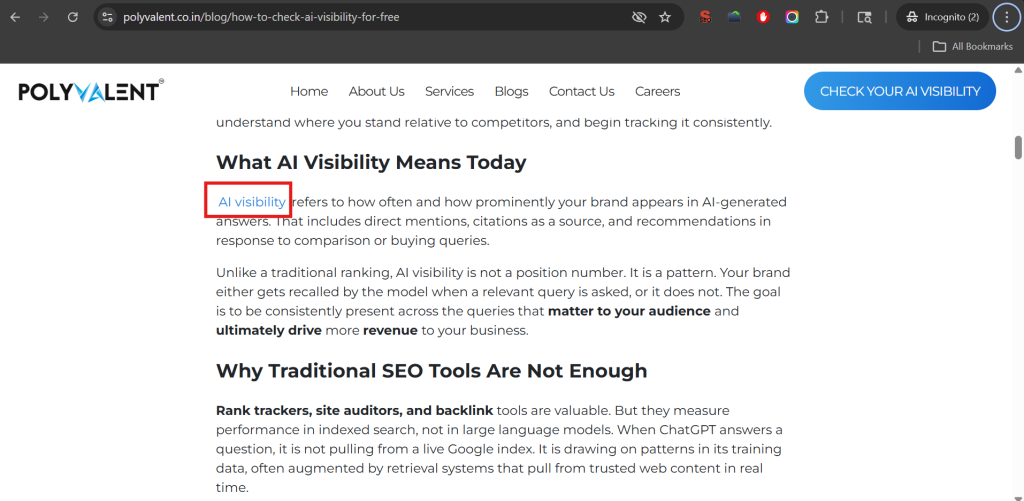
Search engines like Google/Bing use internal links to discover and index your pages. If a page has no internal links pointing to it, Search Engine may not even know it exists. Internal links hold your site together, both for users and for search engine crawlers.
Types of Internal Links
Lets understand now about the types of internal links. Not all internal links work the same way or carry the same weight. Here’s a breakdown of the main types:
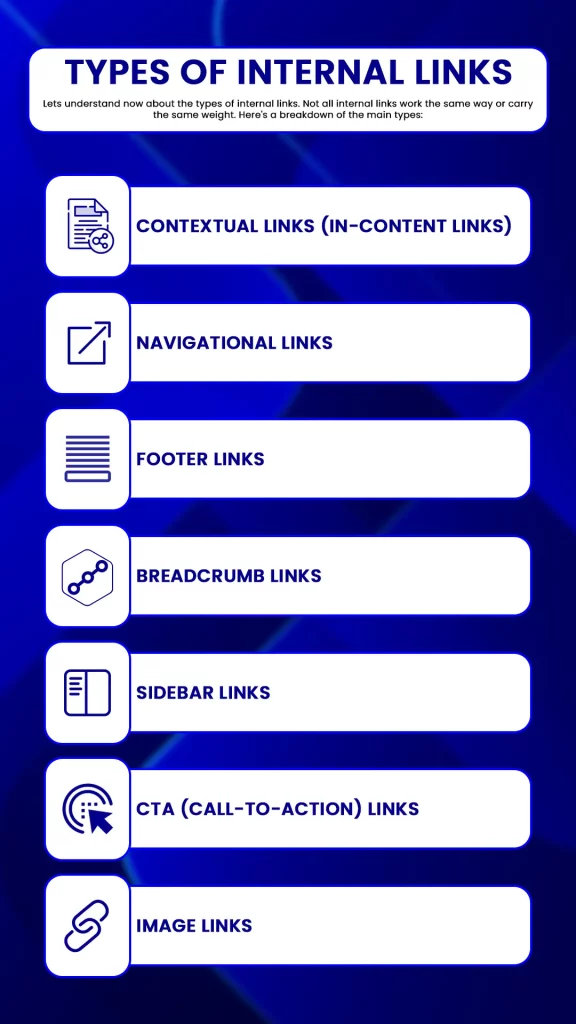
1. Contextual Links (In-Content Links)
These are links placed naturally within the body text of your content, inside a paragraph, woven into a sentence. They’re the most valuable type of internal link from an SEO standpoint because Google uses the surrounding text to understand what the destination page is about.
Example: A blog post about how to check your brand’s AI visibility for free (step-by-step guide) that links to your AI visibility checker page using the phrase “AI visibility checker” passes context and authority in a way a sidebar link never will.
2. Navigational Links
These are your main menu links header, sidebar navigation, and breadcrumbs. They appear site-wide and help users reach your most important pages from anywhere. Because they’re present on every page, they establish your site’s primary hierarchy. However, because they appear so often, each individual navigational link passes less weight than a single well-placed contextual link.
3. Footer Links
Footer links appear at the bottom of every page. They usually point to secondary pages Privacy Policy, Contact, Careers, Sitemap. They contribute to crawlability and accessibility but carry the lowest per-link SEO weight of all placement types.
4. Breadcrumb Links
Breadcrumbs are a navigational trail that shows users where they are in your site structure (e.g., Home > Blog > SEO > Internal Linking Strategy). They help both users and Google understand page hierarchy. They’re particularly valuable for large sites with deep content structures.
5. Sidebar Links
Common on blogs and resource sections, sidebar links point users to related posts, popular articles, or topic categories. They’re somewhere between navigational and contextual in terms of SEO value, more targeted than footer links, but less powerful than in-body contextual links.
6. CTA (Call-to-Action) Links
These are buttons or in-text prompts like “Get a Free SEO Audit” or “See Our Services.” Their primary job is conversion, but they also pass internal equity to the pages they point to.
7. Image Links
When an image is clickable and points to another page on your site, it functions as an internal link. Google uses the alt text of the image as a signal about the destination page, so well-written alt text on image links does carry some SEO value.
Internal Links vs. External Links
Understanding the difference helps you use both correctly.
| Internal Links | External Links | |
| Destination | Another page on your own domain | A page on a different domain |
| Control | Full control you decide where they go | Partial control you choose outbound links; incoming ones are earned |
| SEO Role | Distribute authority, establish hierarchy, aid crawling | Build domain authority (backlinks), signal credibility (outbound) |
| User Impact | Keep users on your site, guide them deeper | Direct users to external resources |
| Authority Flow | Passes link equity within your own site | Incoming links bring authority into your site |
Both matter. External backlinks build your overall domain authority the “bucket” of trust your site has earned. Internal links determine how that authority is distributed across your pages. If you earn a great backlink to your blog but that blog never links to your service pages, all that authority just sits in one place.
The most effective sites use both in combination: earn authority from outside, then route it strategically to the pages that need to rank.
Why Internal Links Are Important for Your Website’s SEO
Help Google Discover and Index Your Pages
Googlebot crawls the web by following links. When it visits a page, it queues up every linked page for future crawling. Pages that receive many internal links get crawled more frequently. Pages with few or no internal links may go weeks without being recrawled and any updates you make to them will take much longer to be picked up by Google.
Distribute Link Equity to Pages That Need It
Every page on your site has an authority budget. That budget is built from external backlinks and internal links from other strong pages. When a page links out, it shares a portion of its budget with each destination. This means your highest-traffic, most-linked pages are your authority sources and where you point their internal links directly affects which of your other pages can rank.
A page stuck on page two of Google often just needs one or two links from a stronger page on your site to cross the ranking threshold. The authority is already there. It just hasn’t been directed correctly.
Establish Topical Authority
When your blog post on Technical SEO links to your articles on Core Web Vitals, Crawl Budget, and JavaScript SEO and those articles all link back to the Technical SEO pillar Google sees a site that covers this topic with real depth. This signals topical authority, which is increasingly how Google decides which sites deserve to rank for competitive keywords.
Improve User Experience and Dwell Time
A user reading your blog post on SEO audits who finds a natural link to your detailed audit checklist will click it. They stay on your site longer. Their session deepens. That behavioral signal time on site, pages per session feeds back into how Google evaluates your content quality.
Reduce Your Bounce Rate
When a visitor lands on a page and finds no logical next step, they leave. Strategic internal links give them a reason to stay and explore. Lower bounce rates send a positive engagement signal to search engines.
Speed Up Indexing of New Content
Every time you publish something new, it starts with zero authority. Linking to it from existing, established pages puts it in Google’s crawl queue immediately and passes some initial equity to it, helping it get indexed and ranked faster than if it sat alone.
Internal Links Strategy
A solid internal linking strategy isn’t about adding links randomly. It’s about building a structure that routes authority where it needs to go. Here’s how to approach it.
Build a Pillar-Cluster Architecture
This is the most effective content structure for topical authority. Here’s how it works:
- Pillar page: A comprehensive, authoritative piece covering a broad topic (e.g., “AI Overviews Optimization Guide “)
- Cluster pages: Detailed articles covering specific subtopics (e.g., “How to Fix Crawl Budget Issues,” “Core Web Vitals Explained,” “JavaScript SEO for Developers”)
- Every cluster page links back to the pillar
- The pillar links out to every cluster page
- Related cluster pages link to each other where it makes sense
This creates what SEOs call a closed authority loop. Authority flows from the pillar down to clusters. It flows back up from clusters to the pillar. The whole group reinforces each other, and Google starts treating your pillar as the definitive hub on that topic.
Prioritize Your High-Authority Pages as Sources
Your highest-traffic posts and pages with the most external backlinks carry the most authority. These are your linking sources. When you publish new content or want to boost an underperforming page, get a contextual link from one of these authority pages first. One link from a strong page moves the needle faster than ten links from weak ones.
Use Descriptive Anchor Text and Vary It
The anchor text (the clickable words) of an internal link tells Google what the destination page is about. Generic phrases like “click here” or “read more” give Google nothing useful. Descriptive, keyword-relevant anchor text is far more effective.
But don’t use the exact same anchor text for every link pointing to one page that pattern looks unnatural. Vary it across different posts:
- “technical SEO audit”
- “how to audit your site’s technical health”
- “running a full site audit”
- “technical audit checklist”
All pointing to the same page. All natural. All descriptive. A reasonable rule of thumb: exact-match anchors should make up no more than 5-10% of your internal links to any given page.
Follow the 3-Click Rule
No important page on your site should be more than 3 clicks from your homepage. Pages buried 4-5 clicks deep get crawled infrequently and accumulate little internal authority. If your most important service pages or cornerstone content is buried deep, surface it with links from higher-level pages.
Aim for 2-5 Contextual Links per 1,000 Words
This isn’t a hard rule, but it’s a sensible target for most sites. Enough links to create meaningful connections across your content; not so many that every link gets diluted. A page with 200+ outbound links spreads its authority so thinly that none of the destinations benefit meaningfully.
Always Link New Content to Existing Content and Back
When you publish a new post, link it from at least one strong existing page. And within the new post, link to at least two relevant existing pages. This integrates new content into your site’s authority structure immediately rather than leaving it to sit as a disconnected page.
How to Audit Existing Website Internal Links
A link audit finds where authority is stuck, where pages are disconnected, and where easy wins exist. Here’s a process you can run right now:
Step 1: Crawl your site Use Screaming Frog (free up to 500 URLs) or Sitebulb [or ahref or semrush]. Export a full list of all internal links source URL, destination URL, anchor text, and status code.
Step 2: Map your authority sources In Google Search Console, go to Performance > Pages. Sort by clicks. Your top 10-20 pages are your authority sources. Note them down.
Step 3: Identify your priority target pages These are your service pages, high-value landing pages, and content you most need to rank. Check how many internal links each one receives (Screaming Frog shows this in the “Inlinks” column).
Step 4: Find the gap If a priority page is receiving links only from low-traffic, low-authority pages that’s your problem. Go to your authority source pages and find natural places to add a contextual link to your target page.
Step 5: Fix broken internal links Filter your Screaming Frog export for internal links returning 404 status. These pass zero authority and frustrate users. Fix them by updating the link to the correct URL or redirecting the broken destination.
Step 6: Check for over-linked pages If a single page is linking to 100+ other pages, its equity is spread paper-thin. Trim non-essential links and keep only those that genuinely serve the user or the SEO strategy.
Step 7: Repeat quarterly Sites change. New content is published, old pages are removed, structures shift. Quarterly audits keep things from deteriorating silently.
Link Attributes: Follow, Nofollow, and Sponsored
Link attributes tell Google how to treat a link. For internal links, this matters more than most people realize.
rel=”follow” (Default)
A standard internal link is followed by default Google crawls it and passes link equity through it. You don’t need to add any attribute for this. It’s the correct setting for almost all internal links.
rel=”nofollow”
This tells Google: “Don’t crawl this link and don’t pass authority through it.” Nofollow on internal links cuts off equity flow entirely. There are almost no good reasons to use nofollow on internal links. Only use it for pages you actively don’t want indexed, like a user login page, a filter page that generates duplicate content, or a thank-you page after form submission.
Some CMSs or plugins accidentally add nofollow to internal links. Check for this in your crawl audit. Any unintentional nofollow on a priority page is silently strangling its ranking potential.
rel=”sponsored”
This attribute is for paid or affiliate links. It’s rarely used for internal links but worth knowing: if you’re internally linking to an affiliate-landing page, using sponsored is the technically correct approach.
rel=”ugc”
Used for user-generated content (comments, forum posts). Not typically relevant for internal links in professionally managed sites.
The practical rule: Unless you have a specific reason to restrict a link, keep all your internal links standard followed links. Let the equity flow.
What are Orphan Pages
An orphan page is any page on your site that has zero internal links pointing to it.
Google discovers pages primarily by following links. If no page on your site links to a given URL, Googlebot only finds it through your XML sitemap or a direct external backlink. That might happen occasionally, but the page won’t get crawled regularly, won’t accumulate internal authority, and almost certainly won’t rank for anything competitive.
Orphan pages are more common than most site owners realize. They often build up during:
- Website redesigns where navigation is changed
- Content migrations where old posts lose their links
- New page creation without adding links from existing content
- Old category or tag pages that have been quietly de-linked
How to find orphan pages:
- Export all indexed URLs from Google Search Console (Coverage report > Valid pages)
- Run a crawl with Screaming Frog
- Compare the two lists. Any URL in Search Console that the crawl didn’t reach via links is an orphan.
Once identified, the fix is straightforward: find topically relevant existing pages and add a contextual link to each orphan. If a page has been orphaned and also has little content worth linking to, that’s a signal to either improve it or consolidate it into a stronger page.
A real-world case: One internal link restructuring audit of a 180-page site found 47 orphan pages. After connecting them to the appropriate topic clusters with zero new content written and zero new backlinks built, monthly organic traffic grew from 12,000 to 31,000 visitors in 90 days. No new content. No outreach. Just fixing orphan pages and improving internal link structure.
Crawl Depth: Why Buried Pages Don’t Rank
Crawl depth measures how many clicks it takes to reach a page from your homepage.
- 1-2 clicks: High priority. Crawled frequently by Googlebot. Accumulates authority well.
- 3 clicks: Acceptable for most content.
- 4+ clicks: Low priority. Crawled infrequently. Often starved of authority regardless of content quality.
The reason this matters: Google allocates a crawl budget to every site with a limit on how many pages it will crawl in a given period. Pages buried deep in your architecture use up that budget inefficiently. They also signal to Google that they’re less important than shallower pages.
Here’s what happens in practice: your most important service pages are the ones you need to rank, sometimes sitting 4 or 5 clicks deep because that’s where your navigation structure puts them. Meanwhile, your homepage and top-level category pages receive all the crawl attention and authority.
How to fix it:
- Audit crawl depth using Screaming Frog (it shows click depth for every crawled URL)
- Identify all pages sitting at depth 4 or deeper
- Prioritize which of those pages actually need to rank
- Add contextual links to those pages from pages at depth 1-2
You don’t need to flatten your entire architecture. You just need to create link pathways that bring your priority pages within 3 clicks of the homepage. Often, this means adding links from your pillar pages or from your highest-traffic blog posts.
Internal Redirects and Redirect Loops: The Silent Link Equity Drain
This is the technical issue most internal linking guides ignore and it’s costing sites more than they realize.
What is a Redirect Chain?
A redirect chain happens when your internal link points to URL A, which redirects to URL B, which redirects to URL C before landing at the actual destination.
Example:
Internal link → /old-blog-post → /2023/blog-post → /blog/current-title
Every hop in that chain adds delay and bleeds authority. Research suggests that even a 3-hop redirect chain passes only around 85% of the original link equity to the final destination. Multiply that across hundreds of internal links and you’re losing a meaningful amount of the authority you’ve built.
Additionally, Google follows a limited number of redirect hops during a single crawl session. After a certain point, it abandons the chain entirely meaning the final page may not get crawled at all.
What is a Redirect Loop?
A redirect loop is a closed chain Page A redirects to Page B, which redirects back to Page A. Neither page ever resolves. Users see “Too many redirects” errors. Googlebot abandons the URL and moves on. The page effectively disappears from the index.
Loops usually happen after site migrations when redirect logic conflicts across different system layers for example, an .htaccess rule that conflicts with a CMS plugin redirect setting.
How to Find and Fix Them
Finding chains: Run your site through Screaming Frog. Under Response Codes, filter for 3xx. For each redirect, Screaming Frog shows the full chain. Any chain longer than a single hop is a problem.
Finding loops: Screaming Frog also flags “redirect loop” as a specific error. Alternatively, use a browser extension like Redirect Path to trace individual URLs manually.
Fixing chains: The fix is to point your internal links directly to the final destination URL, bypassing intermediate redirects. Update the source link, not just the redirect rules. If redirect rules themselves need simplifying, update them to jump directly from origin to final URL in a single 301.
Fixing loops: Trace the full chain of conflicting redirect rules. Identify which system is generating the conflict (CMS plugin vs server config vs .htaccess). Remove the conflicting rule and retest.
Prevention: Any time you restructure URLs, change permalink structures, or migrate platforms, update your internal links to point to final destination URLs first. Don’t leave old links pointing to redirected URLs and rely on the redirect to “handle it.” The redirect handles the user but it costs your SEO every time.
Conclusion
Before you publish any new content, and quarterly for existing content, run through this:
- Does every new page receive at least one contextual link from an existing, relevant page?
- Do new posts link to at least 2-3 relevant existing pages using descriptive anchor text?
- Are all important pages within 3 clicks of your homepage?
- Does every page belong to a clear topic cluster with a defined pillar?
- Are all internal links standard followed links (no accidental nofollow)?
- Are there any orphan pages in your topic clusters?
- Are any internal links pointing to redirected URLs instead of final destinations?
- Are any redirect chains longer than a single hop?
- Is anchor text descriptive and varied across different source pages?
Internal linking is the one ranking lever you control completely. No waiting on other sites. No outreach campaigns. No budget. Just structure and the attention to get it right.
Frequently Asked Questions
1. How many internal links should I have per page?
There is no “magic number” from Google, but for most blog posts, 2-5 contextual links per 1,000 words is a healthy balance. The goal is to provide value to the reader. If you add 50 links to a single page, you dilute the “link juice” (authority) being passed to each one.
2. Should I use “nofollow” for my internal links?
Almost never. Using rel=”nofollow” on your own pages tells Google not to crawl or pass authority to that part of your site. The only exceptions are utility pages you don’t want to rank, such as login screens or “Thank You” pages. For everything else, keep them as standard “follow” links.
3. Does anchor text really matter for internal links?
Yes, it’s a major ranking signal. Using descriptive, keyword-rich anchor text (like “SEO audit checklist”) helps Google understand exactly what the destination page is about. Avoid generic phrases like “click here” or “read more,” as they provide zero context for search engines.
4. What is an “orphan page” and why is it bad for SEO?
An orphan page is a page on your website that has no internal links pointing to it. Because Google’s crawlers primarily move through links, these pages are hard for search engines to find. Even if they are indexed via a sitemap, they rarely rank well because they have no authority flowing to them from the rest of your site.