Blog

  • What Is a Digital Agency? 7 Key Services and How to Choose the Right One

    What Is a Digital Agency? 7 Key Services and How to Choose the Right One

    A digital agency helps businesses manage the parts of marketing and online growth that are difficult to handle with a small in-house team. Depending on the agency, that can include search engine optimization (SEO), paid advertising, social media, content, web design, email marketing, and analytics.

    The important point is that agencies are not all built the same. One may be strong in SEO and content but have little experience with paid media. Another may focus on website development and conversion optimization. Before hiring one, you need to understand what you actually need, how the work will be measured, and what you should expect from the relationship.

    What Is a Digital Agency?

    A digital agency is a company that provides seo services to help brands build, manage, and improve their presence across digital channels. The exact scope varies, but the work usually connects marketing, creative, technology, and measurement.

    For a local business, that might mean improving Google visibility, running search ads, and creating landing pages. For ecommerce, the work may involve product pages, shopping campaigns, social media, email, and conversion tracking. Larger companies may use an agency for one specialist function or several teams working together.

    A digital agency should not be judged only by how many services it lists. The better question is whether its team can connect the work to a business goal.

    7 Key Services a Digital Agency May Provide

    1. SEO and organic search

    SEO focuses on helping relevant pages appear in unpaid search results. Typical work includes technical SEO, keyword research, content planning, on-page improvements, internal linking, and digital PR or link acquisition.

    A sound SEO program should look beyond rankings. Organic leads, qualified traffic, conversions, and revenue are usually more useful measures.

    For basic search optimization principles, see Google’s SEO Starter Guide.

    2. Paid advertising

    Paid media includes campaigns on platforms such as Google Ads and Meta. Depending on the objective, campaigns can be built for leads, sales, website traffic, app installs, or awareness. Google explains that advertisers choose campaign goals, budgets, targeting, and bidding options based on the outcome they want to achieve.

    A digital agency managing paid media should be able to explain where the budget is going, which audiences are being targeted, and how conversions are tracked.

    3. Social media marketing

    Social media work can cover strategy, content calendars, creative production, community management, influencer activity, and paid social campaigns.

    The right mix depends on the audience. A B2B software company may need a different approach from a restaurant, education brand, or online retailer. Frequent posting is not the same as having a useful social media strategy .

    4. Content marketing

    Content can include blog posts, case studies, landing pages, guides, videos, emails, and other formats. Good content should answer real customer questions and support a clear stage of the buying journey.

    Google’s guidance on people-first content emphasizes original value, useful information, clear sourcing, and content created for readers rather than search engines.

    That is a useful standard when reviewing an agency’s content work. A large publishing calendar is less important than whether the content is accurate, relevant, and genuinely useful.

    5. Web design and development

    Some agencies also build or improve websites using practical web design techniques such as UX design, responsive development, landing page optimization, ecommerce development, speed improvements, analytics setup, and conversion rate optimization.

    The marketing and website teams should work together. Bringing more visitors to a page will not help much if the page is confusing, slow, difficult to navigate, or poorly matched to the campaign.

    6. Email and customer lifecycle marketing

    Email marketing helps businesses stay connected with prospects and existing customers. An agency may handle campaign planning, copy, design, segmentation, automation, and reporting.

    For ecommerce and subscription businesses, lifecycle work can be especially useful because marketing does not stop after the first purchase. Follow-up emails, onboarding, retention, and reactivation can all be part of the same customer journey.

    7. Analytics and conversion tracking

    Analytics is the part that ties the other services together. A digital agency may set up event tracking, conversion goals, dashboards, attribution reporting, and tests that show what is contributing to business outcomes.

    Google Analytics provides tools for measuring website and app activity. Google Search Console provides reports on search queries, clicks, impressions, indexing, and other search performance data.

    These are useful measurement sources an agency should be comfortable working with when they are relevant to the business.

    How Does a Digital Agency Work With a Business?

    A typical engagement starts with a review of the business, audience, current marketing activity, competitors, website, and existing data. From there, the agency and client agree on priorities, deliverables, timelines, and measures of success.

    The work is usually divided into planning, implementation, measurement, and ongoing improvement.

    A good reporting cycle should answer simple questions: What was done? What changed? What worked? What did not work? What will happen next?

    You should also know who owns important assets such as advertising accounts, analytics properties, domains, creative files, and audience data. Ownership should not depend on whether the relationship with the agency continues.

    When Should You Hire a Digital Agency?

    Hiring makes sense when the business has a clear need but lacks the in-house time, specialist skills, or capacity to handle it well.

    Common situations include launching a website, entering a new market, fixing weak lead generation, scaling paid campaigns, rebuilding SEO, or improving conversion rates.

    It may be less useful to hire an agency simply because competitors are doing it. If the business cannot define the problem, budget, audience, or desired outcome, the agency may spend too much time trying to establish basic direction.

    How to Choose the Right Digital Agency

    Start with the problem, not the service list.

    Ask each agency to explain how it would approach your specific situation. Look at relevant case studies and ask what the agency actually did, which channels were involved, how results were measured, and over what period.

    Pay attention to the people who will work on the account. The sales presentation may come from senior staff while the day-to-day work is handled by a different team.

    Also ask about reporting, meeting frequency, communication, turnaround times, revision limits, and contract terms. If paid advertising is involved, confirm whether the media budget is separate from the agency fee.

    A short trial project or clearly defined first phase can be useful when both sides are unsure whether a long-term relationship will work.

    How Much Does a Digital Agency Cost?

    There is no single standard price. Agencies commonly use monthly retainers, project fees, hourly billing, or a combination of these models.

    The total cost depends on the scope of work, number of channels, market, team size, technical requirements, and advertising budget. A small SEO engagement and a full ecommerce growth program are very different jobs.

    When comparing proposals, do not compare only the monthly fee. Compare the work included, deliverables, reporting, strategic input, and exclusions.

    What Should You Measure?

    The right KPIs depend on the business model and the work being done.

    For SEO, useful measures can include qualified organic traffic, leads, conversions, revenue, and visibility for commercially relevant searches. For paid advertising, businesses may track cost per lead, conversion rate, customer acquisition cost, revenue, and return on ad spend. For social media, reach and engagement can matter, but they should be connected to broader business goals when possible.

    Avoid reports filled with numbers that never affect a decision. A useful dashboard helps decide what to continue, change, or stop.

    Final Thoughts

    A digital agency can fill important gaps in strategy, execution, technology, and measurement, but the value of the partnership depends on the fit between the agency and the business.

    The strongest starting point is a clear business problem, a realistic budget, and a simple way to measure progress. From there, choose a team that can explain its work, show relevant evidence, communicate clearly, and work with the data and systems your business already uses.

    That makes it easier to compare agencies on substance rather than presentation alone.

    Frequently Asked Questions

    1. What does a digital agency do?

    A digital agency helps businesses improve their online presence and reach business goals through services such as SEO, paid advertising, social media marketing, content marketing, web development, email marketing, and analytics.

    2. How much does a digital agency charge?

    The cost varies depending on the services, project scope, market, and agency pricing model. Agencies may charge a monthly retainer, project-based fee, hourly rate, or a combination of these.

    3. Why should a business hire a digital agency?

    A business may hire a digital agency when it needs specialist skills, additional marketing capacity, or help managing multiple digital channels. An agency can also provide strategy, execution, and performance reporting.

    4. How do I choose the right digital agency?

    Compare agencies based on relevant experience, services, case studies, communication, reporting, pricing, and the team assigned to your account. Make sure the agency understands your business goals before starting the engagement.

    5. How long does it take to see results from a digital agency?

    The timeline depends on the service and business. SEO can take longer to show meaningful growth, while paid advertising and website changes may produce measurable results sooner. Results should be evaluated against agreed goals and KPIs.
  • Semrush vs Ahrefs vs Moz: Which SEO Tool Is Right for You in 2026?

    Semrush vs Ahrefs vs Moz: Which SEO Tool Is Right for You in 2026?

    Choosing the wrong SEO tool is an expensive mistake. You lock into an annual plan, spend weeks learning the interface, build your reporting around its metrics, and then discover it doesn’t track the one thing your clients actually care about. Multiply that by a $1,500 to $5,000 yearly subscription and the cost of guessing wrong becomes obvious. Here’s the honest starting point for any Semrush vs Ahrefs vs Moz comparison: there is no perfect tool. Each of the big three dominates a different part of the SEO workflow, and the right choice depends on what you do most, who you do it for, and what you can spend. This guide breaks down where each one wins, including a section on local SEO that most SEO software comparisons skip entirely.

    The Big Three: A Quick Overview

    Semrush positions itself as a massive, all-in-one digital marketing suite. Beyond core SEO, it covers PPC research, content marketing, social media scheduling, and competitive intelligence, with add-on toolkits for advertising, local, and AI visibility. It’s the natural fit for teams that want a unified workflow rather than stitching together five separate tools.

    Ahrefs is the industry standard for link building and competitor research. It boasts the largest backlink index in the business, with over 35 trillion known links, and a clean, fast interface that SEO professionals consistently praise for deep research.

    Moz is the pioneer of the industry and the creator of Domain Authority (DA), the metric that became shorthand for site strength across the entire SEO world. It remains the most beginner-friendly and accessible tool for small businesses, with the lowest entry price of the three and an education-first approach.

    Use this interactive matrix to easily visualize which tool dominates in specific feature categories.

    Keyword Research & Backlink Depth Compared

    Keyword Database

    On raw numbers, the two heavyweights are close. Semrush’s keyword database exceeds 27 billion keywords across 140+ geographic databases, while Ahrefs reports 28 billion or more. In practice, both will surface virtually any query with meaningful search volume, making them powerful tools for keyword research; the differences show up in how they present the data.

    Semrush leads with raw search volume and its Keyword Magic Tool, which groups thousands of related terms into subtopics and filters by intent. Ahrefs’ distinctive metric is Traffic Potential, which estimates the total traffic the top-ranking page receives across every keyword it ranks for, not just the one you searched. A keyword with 500 monthly searches might have a Traffic Potential of 5,000, because the page ranking for it also captures dozens of long-tail variants. That single number changes how you prioritize content.

    Both tools calculate keyword difficulty on different scales, so never compare a Semrush KD score directly to an Ahrefs one. Moz’s keyword database is smaller and simpler, fine for small sites but limiting for large-scale content planning and broader keyword research.

    Geo-Friendly Tactics: Which Tool Wins for Local SEO?

    Local SEO software has different requirements than national campaigns, and the big three diverge sharply here.

    The Moz Advantage

    Moz Local remains the gold standard for brick-and-mortar stores needing citation management. It pushes your Name, Address, and Phone data to dozens of directories and data aggregators, monitors for inconsistencies, and flags duplicate listings automatically. Priced per physical location, it’s affordable for single-location businesses and scales cleanly for multi-location brands. If your local search visibility depends on clean citations across the web, Moz Local does the tedious work better than anything Ahrefs offers.

    Semrush’s Granularity

    Semrush allows strict city-level and even ZIP-code-level rank tracking, which is vital for local service businesses that rank differently across neighborhoods. Its Local toolkit adds a Map Rank Tracker with geo-grid heatmaps, showing exactly where in a city you appear in the map pack and where you don’t, plus Google Business Profile management, listing distribution, and review monitoring. For agencies managing local clients, this combination of granular tracking and reporting is the most complete option of the three.

    Ahrefs’ Weakness

    Ahrefs’ Rank Tracker does support location targeting down to city and postal code, and it can monitor local pack positions. What it lacks is a dedicated local SEO toolkit: there’s no citation or listing management, no Google Business Profile integration, no review monitoring, and no geo-grid map tracking. For purely local campaigns, especially multi-location businesses, Ahrefs requires pairing with a separate local tool, which makes it less ideal as a standalone choice.

    2026 Pricing Breakdown: What Is the Real Cost?

    Entry-level SEO tool pricing tells only part of the story:

    • Moz Pro Starter: $49/month ($39/month billed annually), one site, 50 tracked keywords. Standard at $99/month is the realistic tier for most small businesses.
    • Ahrefs Lite: $129/month ($108/month annually), 5 projects, 750 tracked keywords. A stripped-down Starter plan exists at $29/month for testing.
    • Semrush Pro: $139.95/month ($117.33/month annually), 5 projects, 500 tracked keywords.

    Now the hidden costs. Ahrefs runs a metered credit system: Lite and Standard plans include monthly usage credits for reports and crawls, and heavy users can exhaust them mid-month or pay for overages. Content Explorer, its most powerful link-prospecting tool, only unlocks at Standard ($249/month). Extra user seats cost $40 to $80 per month each.

    Semrush’s pain point is additional user seats: $45 per user on Pro, $80 on Guru, and $100 on Business. A three-person team on Pro pays roughly $230/month, not $139.95. Its AI visibility features also sit in a separate Semrush One tier starting at $199/month, or as a $99/month per-domain add-on.

    Moz has the fewest surprises, though Moz Local is billed separately per location, and its lower tiers cap keyword tracking tightly.

    Not sure which plan fits your agency or freelance budget? Try out this interactive allocator to get a tailored recommendation.

    Frequently Asked Questions

    Which SEO tool is best for beginners?

    Moz is widely considered the most beginner-friendly of the three, thanks to its simplified dashboard, straightforward metrics like Domain Authority, extensive free learning resources, and the lowest starting price at $49/month.

    Do any of these tools offer a free version?

    Yes. Ahrefs offers Ahrefs Webmaster Tools for free, giving you site audits and backlink data for your own verified websites. Semrush has a limited free account allowing 10 requests per day. Moz offers a free version of Link Explorer with limited queries and the free MozBar Chrome extension for checking DA on any page.

    Which tool is better for agencies: Semrush or Ahrefs?

    Semrush is usually the better agency choice. It includes white-label reporting, client dashboards, and integrates PPC and social metrics alongside SEO data, so one platform covers every service line. Ahrefs is the better pick if the agency specializes in high-end link building, where its data depth matters more than reporting polish.

    How do these tools track AI search engines?

    Both Semrush and Ahrefs introduced AI visibility tracking in 2025 and 2026 to monitor how brands appear in ChatGPT, Perplexity, Google AI Overviews, and similar tools. Semrush requires its higher-priced Semrush One tier (or the AI Visibility Toolkit add-on) for full access. Ahrefs bundles basic Brand Radar with a small allowance of tracked AI prompts into its Lite, Standard, and Advanced plans, with expanded monitoring available as a paid add-on.

  • Ecommerce SEO: How to Drive High-Converting Traffic to Your Online Store

    Ecommerce SEO: How to Drive High-Converting Traffic to Your Online Store

    Most SEO advice is written for blogs: publish helpful articles, earn links, watch traffic grow. Ecommerce SEO is a completely different beast. An online store might have ten thousand product pages, hundreds of categories, and filters that spawn millions of URL variations, all competing for crawl budget and ranking signals.

    And the goal isn’t readers. It’s buyers with their wallets already out. Success depends far less on blog content and far more on product architecture, category pages, and capturing searches from people who are one click from checkout.

    Whether you run a Shopify store, a WooCommerce site, or a custom platform, this guide covers the online store SEO fundamentals that turn search visibility into revenue.

    The Core of Ecommerce SEO: Understanding Keyword Intent

    Every search query carries an intent, and ecommerce SEO keywords live at the bottom of the funnel.

    Informational intent describes someone gathering knowledge: “how to choose a laptop,” “best running shoes for flat feet,” “what is a mechanical keyboard.” These searchers may buy eventually, but not today, and the results they see are guides and comparison articles.

    Transactional intent describes someone ready to purchase: “buy Apple MacBook Pro M3 online,” “Nike Pegasus 41 size 10,” “mechanical keyboard under $100 free shipping.” The query itself contains a product, a model number, a price qualifier, or a purchase verb. These searchers want a product page, not an article.

    Between the two sits commercial search intent: “MacBook Pro M3 vs Dell XPS 15,” “best mechanical keyboards 2026.” The user is comparing options and will buy soon.

    Ecommerce SEO relies heavily on optimizing product and category pages for transactional and commercial keywords, because those are the searches where a single click can become a sale. A blog post ranking for “how to choose a laptop” might convert at 1%. A category page ranking for “buy gaming laptop” might convert at 5% or more. Map your product pages to model-specific and long-tail transactional terms, and your category pages to broader commercial terms, so every stage of buying intent has a page built to capture it.

    Optimizing Your Ecommerce Site Architecture

    Site structure determines whether crawlers can find your products and whether ranking authority reaches the pages that make money.

    The “3-Click Rule”

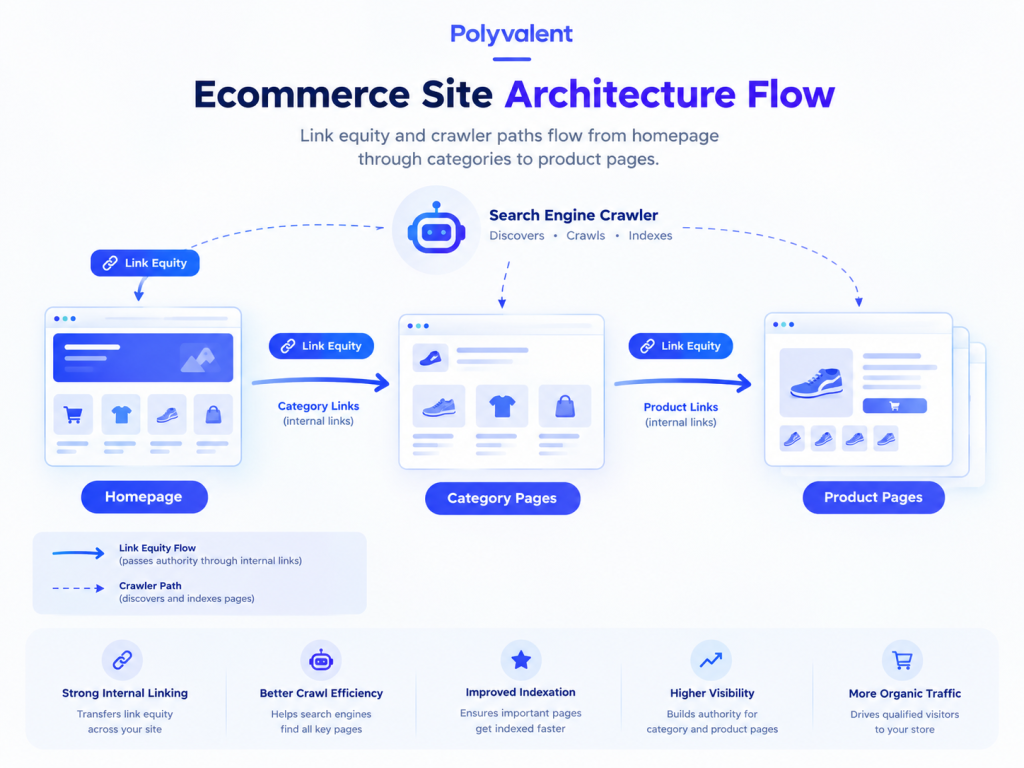
    Any product should be reachable within three clicks from the homepage: Home → Category → Subcategory → Product. Deeper pages receive less internal link equity and are crawled less often, which means new products can sit unindexed for weeks. A flat structure also helps shoppers, who abandon sites that bury products. Use breadcrumb navigation on every page to reinforce the hierarchy for both users and search engines.

    Category Page Optimization

    Category pages are often the most lucrative pages on an ecommerce site. They target broad commercial keywords with high volume (“women’s trail running shoes”), and they consolidate ranking signals from every product beneath them. Yet most stores leave them as bare product grids.

    Give each category page a unique, keyword-focused title tag and H1, plus 150 to 300 words of genuinely useful descriptive copy (above or below the grid) that explains what the category includes and helps shoppers choose. Add FAQ content where it fits. Build internal linking between related categories and from blog content back to categories, so authority flows toward the pages that convert.

    Handling Out-of-Stock Products

    Products run out, and how you handle it affects rankings:

    • Temporarily out of stock: Keep the page live with a clear back-in-stock date, an email alert option, and links to similar products. Deleting it throws away accumulated authority.
    • Permanently discontinued with a replacement: Use a 301 redirect to the newest equivalent product or the parent category. This preserves link equity and sends shoppers somewhere useful.
    • Discontinued with no equivalent and no backlinks: A 404 (or better, a 410 “gone”) is acceptable. Don’t redirect everything to the homepage; Google treats mass irrelevant redirects as soft 404s.

    Visualize how traffic naturally flows through a well-optimized ecommerce structure.

    Geo-Friendly Tactics: Localizing Your Ecommerce Brand

    Local ecommerce SEO matters whenever you have physical locations, regional shipping differences, or customers who care about where a product ships from.

    “Available Near Me”

    If you run a hybrid model with brick-and-mortar stores plus online sales, connect your point-of-sale inventory to Google Merchant Center and enable local inventory ads and free local listings. When someone nearby searches for a product you carry, Google can show it as “in stock at [your store, 2.1 mi]” in Shopping results and on Maps. This captures shoppers who want the item today and won’t wait for delivery, and it’s one of the few ways an online store can compete directly with big-box retailers on immediacy.

    Shipping & Location Pages

    Shoppers frequently search “[product] shipping to Canada” or “does [brand] deliver to Texas.” Create dedicated pages detailing shipping times, costs, and policies for specific regions or countries. These pages rank for location-qualified queries, reduce cart abandonment by answering questions before checkout, and give you a natural place to link to region-appropriate product categories. If you serve multiple countries, pair them with correct hreflang tags and localized currency.

    Local Schema Markup

    Implement LocalBusiness schema on store location pages (with address, hours, and geo-coordinates) and Product schema on every product page (with price, currency, availability, and ratings). When combined with Merchant Center data, this lets search engines display your local pricing and stock status directly in rich snippets, so a searcher sees “$89.99 · In stock · Pickup today” before ever clicking.

    The Biggest Technical SEO Issues for Online Stores

    Ecommerce platforms generate technical problems at a scale blogs never face.

    Duplicate Content from Faceted Navigation

    Product filters for size, color, price, and brand each append URL parameters (?color=blue&size=m&sort=price). A single category with a dozen filters can create thousands of parameter URLs, all showing nearly identical content. This is faceted navigation SEO’s central problem: crawlers waste budget on filter combinations while your real pages compete against their own duplicates.

    The fix has three layers. First, place a canonical tag on every filtered URL pointing to the clean category URL, so ranking signals consolidate. Second, apply noindex or block low-value parameter patterns in robots.txt (sorting and pagination parameters especially). Third, for filter combinations with genuine search demand (“blue running shoes”), create a proper indexable landing page with its own URL, title, and copy rather than relying on a parameter.

    Optimizing Product Images

    Google Image Search drives meaningful traffic for visual products like apparel, furniture, and décor. Compress images to keep pages fast (WebP format, under 100 KB for thumbnails), use descriptive file names (“navy-linen-sofa-3-seater.webp” instead of “IMG_4821.jpg”), and write alt text that names the product and its key attributes. Include multiple angles, submit an image sitemap, and make sure the Product schema references your primary image so it appears in rich results.

    Frequently Asked Questions About Ecommerce SEO

    What are the best types of keywords for an ecommerce site?

    Transactional and commercial keywords. Prioritize terms that include “buy,” “price,” “discount,” “free shipping,” or specific product model numbers, since they signal a searcher who is ready to purchase rather than research.

    How do I handle product pages for items that change every season?

    Don’t delete the URL. Use a 301 redirect to point the old seasonal URL to the new equivalent product or to the main category page. This preserves the SEO value and backlinks the old page earned and keeps shoppers on a relevant page.

    Should my ecommerce site have a blog?

    Yes. Product pages capture bottom-of-funnel buyers, but a blog captures top-of-funnel informational searches like “how to choose” and “best of” queries. This builds topical authority and gives you a natural place to internally link back to your product categories.

  • Search Engine Optimization Strategy: A 4-Step Framework for Lasting Traffic (Local & Global)

    Search Engine Optimization Strategy: A 4-Step Framework for Lasting Traffic (Local & Global)

    Most businesses don’t fail at SEO because they lack effort. They fail because they lack a plan. They publish a blog post here, fix a page title there, chase whatever keyword a competitor happens to rank for, and then wonder why traffic stays flat. A search engine optimization strategy replaces that scattershot approach with a deliberate sequence: fix the foundation, map the keywords, build the content, earn the authority. Done in order, each step makes the next one more effective. Whether you’re a national brand or a single-location business, the framework below gives you a repeatable roadmap for SEO planning that compounds over time.

    Developing Your Search Engine Optimization Strategy in 4 Steps

    The four steps build on each other. Technical health lets search engines see your content, keyword mapping tells you what to create, quality content earns rankings, and authority makes those rankings durable. Skipping ahead almost always means redoing work later.

    Step 1: The Technical Audit

    Before investing in a single new page, confirm that search engines can actually crawl and index the site. A technical audit answers a basic question: if Google visited today, would it find and understand every important page?

    Start in Google Search Console. The Pages report shows what’s indexed and, more importantly, what isn’t and why. Check that your XML sitemap is submitted and current, that robots.txt isn’t blocking critical resources, and that important pages aren’t accidentally tagged “noindex.” Run a crawler like Screaming Frog to surface broken links, redirect chains, and duplicate titles. Finally, test Core Web Vitals and mobile usability, since slow or unstable pages lose rankings regardless of content quality.

    Fix critical errors first. Everything that follows depends on this foundation, and it’s far cheaper to correct crawl problems before you’ve built fifty pages on top of them.

    Step 2: Topic Clusters & Keyword Research

    Traditional keyword research treats each term as an isolated target. Modern SEO planning groups keywords into topic clusters: a broad pillar page supported by tightly related subpages, all interlinked. This structure signals topical authority and lets a single content investment rank for dozens of related queries.

    The key to keyword mapping is organizing by search intent rather than by volume alone:

    • Informational intent seeks knowledge (“how does solar panel installation work”). These queries feed blog posts and guides.
    • Navigational intent looks for a specific brand or page (“SunPower dealer login”). Only target these for your own brand.
    • Transactional intent signals readiness to buy (“solar installation quote near me”). These belong on service and product pages.

    Map every keyword to one page and one intent. When two pages target the same intent, they cannibalize each other; when a page tries to satisfy two intents, it usually satisfies neither. A simple spreadsheet with columns for keyword, intent, target URL, and cluster is enough to keep the whole plan visible and prevent overlap as the site grows.

    Step 3: Content Creation

    With a keyword map in hand, content creation becomes execution rather than guesswork. Every page should be built around Google’s E-E-A-T framework: Experience, Expertise, Authoritativeness, and Trustworthiness.

    In practice, that means content written or reviewed by someone with real hands-on experience, supported by original examples, data, or case studies rather than recycled generalities. Include author bios with credentials, cite reputable sources, keep facts current, and make contact and business information easy to find. E-E-A-T matters most in “Your Money or Your Life” topics like health, finance, and legal advice, but it influences rankings everywhere.

    Structurally, match the format searchers expect. If the top results for a query are step-by-step tutorials, a 3,000-word essay won’t rank no matter how well written. Use clear headers, answer the core question early, and interlink cluster pages so authority flows through the whole topic.

    Step 4: Earning Authority

    Content that no one links to rarely ranks for competitive terms. The fourth step is a link building strategy that earns high-quality backlinks from relevant, trusted sites.

    Effective approaches include digital PR (creating original research, surveys, or data studies that journalists want to cite), guest contributions to respected industry publications, resource-page outreach (finding curated lists where your content genuinely belongs), and unlinked mention reclamation (asking sites that already mention your brand to add a link). Prioritize relevance and editorial quality over volume; ten links from authoritative sites in your industry outweigh hundreds from generic directories. Before pursuing any link, ask whether the site would send you real referral traffic if the link existed. If the answer is no, the link probably isn’t worth much to search engines either. Track referring domains monthly and watch for sudden spikes of low-quality links, which can signal spam you’ll need to disavow.

    Geo-Friendly Tactics: The Local SEO Strategy

    If your customers search by city or neighborhood, a local SEO strategy runs alongside the four steps above. The same principles apply, but the signals are geographic.

    City-Specific Landing Pages

    For every city or service area you cover, create a dedicated landing page such as “Roofing Services in Denver.” The critical rule is that each page must be unique and valuable. Swapping the city name into a template is a shortcut Google recognizes and discounts. Instead, include geo-targeted content that only applies to that location: local project photos, testimonials from customers in that city, neighborhood names you serve, local permit or climate considerations, and an embedded map. Interlink these pages from a service-area hub so search engines understand the relationship.

    Local Link Building

    Localized link building means earning backlinks from sources tied to your community. Sponsor a local youth sports team or charity run, and you’ll typically receive a link from the organization’s sponsors page. Join the local Chamber of Commerce and industry associations, most of which maintain member directories. Pitch local news outlets and community blogs with genuinely newsworthy stories, such as a grand opening, a charitable initiative, or expert commentary on a local issue. These links carry strong geographic relevance that national links can’t replicate.

    GBP Posts & Q&A

    Your Google Business Profile isn’t a set-and-forget listing. Publish GBP posts weekly with localized offers, event announcements, or seasonal updates; they appear directly in your profile and signal an active business. Monitor the Q&A section and answer community questions promptly, and seed it yourself with the questions customers ask most often. Respond to every review, positive or negative. Consistent activity here directly influences local pack rankings and conversion rates.

    Frequently Asked Questions About SEO Strategy

    How long does it take for an SEO strategy to show results?

    A brand-new site might take 6 to 12 months to gain traction, since it must build both content and authority from zero. Established sites with existing authority often see results from a new strategy in 3 to 6 months.

    How do LSI keywords improve my SEO strategy?

    LSI (latent semantic indexing) keywords are terms and phrases semantically related to your main keyword. They add context that helps search engines understand the exact meaning of your content, leading to higher relevance scores. They also let you cover a topic naturally without repeating the same phrase, which protects against algorithm penalties for keyword stuffing.

    Should I focus on high-volume keywords first?

    No. A good strategy targets low-competition, long-tail keywords first to build foundational traffic and authority. Once your site has proven it can rank and earn links, you can move up to the highly competitive core terms with a realistic chance of winning them.

  • Search Engine Marketing (SEM) Explained: How to Drive Immediate Traffic

    Search Engine Marketing (SEM) Explained: How to Drive Immediate Traffic

    SEO is a long game. Even with perfect execution, it usually takes months before a new page climbs into the top results, and there is no guarantee it stays there. Search engine marketing takes a different route: instead of earning your way to the top of the page, you buy it. Launch a campaign in the morning, and by the afternoon your ad can sit above every organic result for the exact keywords your customers are searching. That speed is why SEM marketing remains the go-to channel for product launches, seasonal promotions, and any business that needs leads this week rather than next quarter. This guide explains how paid search works, how to target it locally, and how to build your first campaign without wasting budget.

    What Is Search Engine Marketing? (SEM vs. SEO)

    Search engine marketing (SEM) is the practice of promoting a business through paid advertisements that appear on search engine results pages (SERPs). The most common model is pay per click (PPC): you bid on keywords, your ad appears when someone searches those terms, and you pay only when a user actually clicks. Google Ads dominates the space, with Microsoft Advertising (Bing) as the main alternative.

    The SEM vs SEO distinction comes down to how you get traffic:

    • SEO earns organic rankings through content quality, technical health, and backlinks. It’s slow to build, but the traffic is free once you rank, and it compounds over time.
    • SEM buys placement. Traffic starts the moment your campaign goes live and stops the moment your budget does. You’re renting visibility rather than owning it.

    Neither replaces the other. Most successful businesses run both, using paid search to capture demand immediately while SEO builds a durable foundation underneath it.

    Test out how allocating budget between the two strategies impacts short-term vs. long-term traffic.

    How SEM Campaigns Work

    Understanding the mechanics behind Google Ads is what separates profitable campaigns from expensive experiments.

    The Auction System

    Every time someone searches, Google runs an instant auction among advertisers bidding on that query. Your position isn’t determined by bid alone. Google calculates an Ad Rank for each advertiser by combining the maximum bid with the ad’s quality and expected impact. The highest Ad Rank wins the top spot, and you typically pay just enough to beat the advertiser below you, not your full maximum bid.

    Quality Score

    Quality Score is Google’s 1–10 rating of how relevant your keyword, ad copy, and landing page are to each other and to the searcher. It’s built from three components: expected click-through rate, ad relevance, and landing page experience. A high Quality Score lowers your cost-per-click (CPC) and improves your position, because Google rewards ads that satisfy users. In practice, an advertiser with a Quality Score of 8 can outrank a competitor bidding twice as much with a score of 4. Building tightly themed keyword groups with matching ad copy and dedicated landing pages is the single most effective way to raise it.

    Keyword Match Types

    Keyword bidding uses match types to control how closely a search must align with your keyword:

    • Broad match shows your ad for related searches, synonyms, and variations. It maximizes reach but can waste budget on loosely related queries.
    • Phrase match requires the search to include the meaning of your keyword phrase, allowing extra words before or after.
    • Exact match shows your ad only for searches with the same meaning or intent as your keyword.

    Most new campaigns should lean on phrase and exact match, then expand into broad match once conversion data reveals which queries actually convert.

    Geo-Targeting in SEM: Maximizing Local ROI

    Local SEM is where paid search delivers some of its highest returns, because you can restrict spending to the people who can actually become customers.

    Radius Targeting

    If you run a physical store, restaurant, or service business, there’s no reason to pay for clicks from people who will never visit. Geo-targeting ads let you set a radius (5, 10, or 20 miles) around your location so ads only appear to users inside it. Layer this with location intent settings so you reach people physically present in the area rather than those merely searching about it.

    Location Extensions

    Location assets (formerly location extensions) attach your business address, phone number, and a map pin directly to the ad. On mobile, users can tap to call or get directions without visiting your website. Linking your Google Business Profile to Google Ads enables these automatically and consistently lifts click-through rates for local PPC campaigns.

    Bid Adjustments by Location

    Not every neighborhood in your service area is equally valuable. Bid adjustments let you raise or lower bids by percentage for specific zip codes, cities, or radii. A home remodeling company might bid 30% higher in affluent zip codes where project values are larger, and 20% lower in areas that historically generate low-value leads. Review the Locations report monthly to identify which areas convert best and shift budget accordingly.

    Structuring Your First SEM Campaign

    A well-organized SEM strategy follows a clear sequence. Skipping steps here is the most common reason first campaigns burn budget with little to show for it.

    1. Research commercial-intent keywords. Focus on terms that signal readiness to buy: “buy,” “pricing,” “near me,” “quote,” or a specific product name. Use Google Keyword Planner to check volume and estimated CPC, and build a negative keyword list from the start to exclude terms like “free,” “jobs,” or “DIY.”
    2. Organize ad groups tightly. Each ad group should contain a small cluster of closely related keywords (5 to 15 is plenty) sharing one clear theme. “Emergency plumber” and “water heater installation” belong in separate ad groups, each with its own ad copy.
    3. Write compelling ad copy. Include the keyword in the headline, state a concrete benefit or offer, and end with a specific call to action. Use all available headline and description fields so Google can test combinations, and add sitelinks, callouts, and call assets to make the ad larger.
    4. Design high-converting landing pages. Never send paid traffic to your homepage. Each ad group needs a landing page whose headline mirrors the ad, loads quickly on mobile, and has one obvious action: a form, a call button, or a purchase. Landing page optimization directly improves Quality Score, so it lowers costs while lifting conversions.
    5. Set conversion tracking before launch. Without tracking calls, forms, or purchases, you can’t tell which keywords make money. Install tracking first, launch with a modest daily budget, and give the campaign two to three weeks of data before making major changes.

    Frequently Asked Questions About SEM

    What is the main difference between SEO and SEM?

    SEO focuses on earning free, organic traffic over time by improving your site’s content and authority. SEM focuses on buying immediate traffic through paid ads (PPC) that appear above or alongside organic results.

    How much does search engine marketing cost?

    It depends entirely on your industry and competition. Some clicks cost pennies, while highly competitive keywords in insurance, legal, or finance can cost $50 or more per click. You control total spend through daily budgets, so campaigns can start at almost any size.

    Does SEM help my SEO rankings?

    No. Google explicitly states that buying ads does not improve your organic search rankings. The two systems run independently, though paid campaign data can reveal which keywords convert, which is useful for guiding your SEO content strategy.

  • The Ultimate SEO Audit Guide: Find Hidden Traffic (Local & Global)

    The Ultimate SEO Audit Guide: Find Hidden Traffic (Local & Global)

    Think of an SEO audit as a health checkup for your website. You may feel fine on the surface, with pages loading and orders trickling in, but invisible problems could be quietly draining your organic traffic. A broken redirect here, a blocked page there, a competitor who fixed their site speed last month, and suddenly your rankings slip without any obvious cause. Whether you serve customers worldwide or in a single zip code, a thorough website health check reveals the technical errors, content gaps, and authority issues that are handing your traffic to someone else. This guide walks you through a complete SEO site audit, step by step.

    What Is an SEO Audit?

    An SEO audit is the process of evaluating how search-engine-friendly your website is across multiple areas: technical infrastructure, on-page content, off-page authority, and, for many businesses, local visibility. The output is a prioritized list of issues and opportunities that, once fixed, improve your organic performance. A good audit doesn’t just flag problems; it ranks them by impact, so you fix the crawl error blocking fifty pages before you rewrite a single meta description.

    A website audit is not a one-time project. Three forces make regular audits essential:

    • Algorithm updates. Google rolls out core updates several times a year, and each one can change which signals matter most. A site that ranked well in January may need adjustments by June.
    • Content decay. Articles lose relevance as facts change and competitors publish fresher material. Rankings erode gradually, often without anyone noticing.
    • Broken links and technical drift. Every site change, plugin update, or product removal can introduce 404 errors, redirect chains, or crawl issues.

    Regular audits catch these problems while they’re still small and cheap to fix.

    The 3-Step SEO Audit Checklist

    A complete audit covers three layers. Work through them in order, because technical issues can mask everything else: if Google can’t crawl a page, no amount of on-page polish will help.

    Step 1: Technical SEO Audit

    A technical SEO audit confirms that search engines can find, access, and render your pages. Check the following:

    • Indexability. Use Google Search Console’s Pages report to see which URLs are indexed and which are excluded. Look for important pages accidentally marked “noindex” and for crawl errors that stop bots cold.
    • XML sitemap. Make sure your sitemap is submitted, up to date, and free of redirected or broken URLs.
    • Robots.txt. Verify you aren’t blocking CSS, JavaScript, or entire directories that should be crawlable.
    • SSL certificate. Your site should serve every page over HTTPS with no mixed-content warnings.
    • Page load speed and Core Web Vitals. Run PageSpeed Insights to check Largest Contentful Paint, Interaction to Next Paint, and Cumulative Layout Shift. Slow, unstable pages lose both rankings and users.

    Step 2: On-Page SEO Audit

    An on-page SEO audit examines the content and HTML of individual pages:

    • Meta titles and descriptions. Flag any that are missing, duplicated, too long, or lacking the target keyword.
    • Duplicate content. Identical or near-identical pages split ranking signals. Consolidate them or apply canonical tags.
    • Keyword cannibalization. When two pages target the same keyword, they compete against each other. Merge them or differentiate their intent.
    • Image alt text. Missing alt attributes hurt accessibility and waste an easy relevance signal.

    Step 3: Off-Page Analysis

    Off-page analysis evaluates your site’s authority as seen through links from other websites:

    • Backlink profile health. Review the number, relevance, and quality of referring domains. A natural profile grows steadily and comes from topically related sites.
    • Toxic links. Identify spammy, paid, or irrelevant links that could trigger a penalty, and disavow them if necessary.
    • Domain authority. Compare your authority score against competitors ranking for your target keywords to understand the gap you need to close.

    Use this interactive tool to get an idea of how these factors combine to form a site health score.

    Geo-Friendly Tactics: The Local SEO Audit

    If customers find you by searching a city or “near me,” a local SEO audit deserves its own checklist. Local search rankings depend on signals that a standard crawl won’t surface, and a business with a clean technical site can still be invisible in the map pack if its local signals are inconsistent. The three checks below take an afternoon and often produce the fastest ranking gains of the entire audit.

    NAP Auditing

    Your Name, Address, and Phone number must match exactly everywhere they appear: your website, Google Business Profile, Yelp, Bing Places, Apple Maps, and industry directories. Even small inconsistencies, such as “St.” versus “Street” or an old phone number on a forgotten listing, dilute trust. Search each variation of your business name and correct every mismatch you find.

    Google Business Profile Audit

    Your Google Business Profile audit should cover three areas:

    1. Categories. Confirm your primary category is the most specific match for your core service, and that secondary categories cover everything else you offer.
    2. Reviews. Check your review count and rating against local competitors, look for unanswered reviews, and make sure you’re actively requesting new ones.
    3. Localized images. Upload recent photos of your storefront, team, and work. Profiles with fresh, geotagged images earn more clicks and calls.

    Localized Content

    Open each of your location pages and ask a simple question: would a reader know which city this page serves? Check that titles, headers, and body copy include specific geo-modifiers (for example, “SEO audit services in Austin”), that the embedded map and address are correct, and that each page has unique content rather than a template with the city name swapped in.

    The Best Tools for an SEO Audit

    You don’t need every tool on the market, but professionals rely on a core set of SEO audit tools:

    • Google Search Console (free). The single most important tool. It shows indexing status, crawl errors, Core Web Vitals, and the exact queries sending you traffic.
    • Screaming Frog SEO Spider (free up to 500 URLs, paid beyond). A desktop crawler that mimics Googlebot and surfaces broken links, redirect chains, missing metadata, and duplicate content across your whole site.
    • Semrush (paid). Its Site Audit tool crawls your site and produces a health score with categorized errors, warnings, and notices, plus backlink and keyword analysis.
    • Ahrefs (paid). Best known for backlink data, it also offers a strong Site Audit crawler and rank tracking.
    • Google PageSpeed Insights (free). Detailed Core Web Vitals diagnostics for any URL.

    For most small businesses, Search Console plus the free version of Screaming Frog covers the essentials. Larger sites benefit from a paid platform that schedules recurring crawls and tracks progress over time. Whichever tools you choose, export the findings into a single spreadsheet, assign an owner and a priority to each issue, and re-crawl after fixes to confirm the problems are actually resolved.

    Frequently Asked Questions About SEO Audits

    How often should I perform an SEO audit?

    At least twice a year, and immediately whenever you notice a sudden drop in organic traffic. Sites that publish frequently or run large e-commerce catalogs benefit from quarterly checks.

    Can I do an SEO audit myself?

    Yes. Basic audits using free tools like Google Search Console and PageSpeed Insights are well within reach for most site owners. Enterprise sites with thousands of pages usually need expert analysis using crawlers like Screaming Frog to catch issues at scale.

    What is a good site health score?

    Generally, a score above 80% on tools like Semrush or Ahrefs is considered good, meaning there are no critical technical errors blocking search engines. Focus on fixing errors first, then warnings; a perfect 100 is rarely necessary.

  • How to Identify and Fix 404 Broken Links

    How to Identify and Fix 404 Broken Links

    A website can lose traffic without experiencing a major ranking penalty or a visible server failure. Sometimes the problem is much simpler: visitors and search engine crawlers are reaching URLs that no longer exist.

    These URLs usually return a 404 Not Found status. A few 404 errors are normal on almost every website. The problem starts when broken URLs become common, especially when they affect important pages, internal links, backlinks, or URLs that previously received organic traffic.

    A 404 error means the server could not find the requested resource. It does not automatically mean that a website has an SEO problem. The correct response depends on why the URL is returning 404, whether the page should still exist, and whether there is a relevant replacement.

    This guide explains how to find 404 errors, decide which ones need fixing, choose between 301 redirects and 410 responses, create a useful custom 404 page, and prevent broken URLs from accumulating.

    Key Takeaways

    • A 404 means the requested URL cannot be found on the server.
    • Not every 404 needs to be redirected.
    • Use a 301 redirect when a relevant replacement page exists.
    • A 410 response can be used when content has been permanently removed with no replacement.
    • Broken internal links should usually be fixed at the source.
    • Important backlinks pointing to deleted URLs may justify a redirect.
    • Regular site crawls can catch broken links before they affect users.

    What Is a 404 Error?

    A 404 Not Found error is an HTTP status response indicating that the server cannot find the resource requested at a particular URL.

    For example, suppose a website previously had this page:

    polyvalent.com/services/seo-audit

    The page is later deleted, but someone visits the old URL. If the server cannot find a resource at that address, it can return a 404 response.

    A 404 can happen because:

    • A page was deleted
    • A URL was changed
    • An internal link contains a typo
    • An old URL was removed during a redesign
    • A product or service was discontinued
    • An external website still links to an old URL
    • A page was moved without a redirect
    • A URL was incorrectly entered by a visitor

    The important distinction is between an expected 404 and a broken 404.

    If a page was intentionally removed and has no useful replacement, returning 404 can be perfectly appropriate. If a valuable page was moved to a new URL and the old address now returns 404, the situation should usually be corrected.

    Are 404 Errors Bad for SEO?

    A 404 error by itself is not automatically harmful to SEO.

    Search engines expect websites to contain URLs that disappear over time. The problem is the underlying situation that caused the 404.

    For example, a deleted page with no traffic, no backlinks, and no relevant replacement may not require any action.

    A different case is an important service page that used to rank for valuable keywords and receive links from other websites. Allowing that URL to return 404 without considering a replacement can result in lost traffic and missed link value.

    Broken internal links are another concern. When a page on your website links to a URL that returns 404, users encounter a dead end. Search engine crawlers encounter the same broken path.

    That is why 404 management should be based on the value and purpose of the URL rather than the number of errors alone.

    How to Find 404 Errors on Your Website

    Finding broken URLs is the first step. The best approach is to combine search engine data with a complete website crawl.

    Google Search Console

    Google Search Console can reveal URLs that Google has encountered and that are returning errors.

    Review the indexing reports and inspect individual URLs to understand whether the page is currently accessible, indexed, redirected, or returning an error.

    Search Console is particularly useful because it shows problems from Google’s crawling perspective rather than only from the website’s internal link structure.

    Website Crawlers

    Tools such as Screaming Frog, Sitebulb, Semrush, and Ahrefs can crawl a website and identify links returning 404 responses.

    A crawl can reveal:

    • Broken internal links
    • Broken external links
    • Deleted pages still referenced internally
    • Redirects
    • Redirect chains
    • Broken images and resources
    • URLs returning server errors

    For large websites, a crawler is often much faster than checking URLs manually.

    Server Logs

    Server logs provide another layer of information.

    They can show which URLs are actually being requested, including URLs that may not appear in your current internal linking structure. This can reveal old URLs still being visited by search bots, users, or external websites.

    Manual Checks

    Manual testing is still useful when investigating a specific URL.

    Open the URL directly and check the HTTP response. Browser developer tools can help confirm the status code and identify whether other resources on the page are failing.

    How to Fix a 404 Error

    There is no single fix for every 404. The correct solution depends on what happened to the original page.

    1. Fix the Internal Link

    If the page still exists but an internal link points to the wrong URL, correct the link.

    For example:

    /services/seo-audi

    may have been linked instead of:

    /services/seo-audit

    In this situation, there is no reason to create a redirect. Correct the source link so users and crawlers reach the intended page directly.

    2. Use a 301 Redirect When a Relevant Replacement Exists

    A 301 redirect tells browsers and search engines that a URL has permanently moved to another location.

    Use a 301 when the old page has a genuine replacement.

    For example:

    /old-seo-guide → /seo-guide

    A redirect makes sense when:

    • A URL has changed
    • A website has been migrated
    • A page has been consolidated
    • A product has moved to a new URL
    • An old article has been replaced by a substantially relevant updated page

    The destination should match the original page’s purpose as closely as possible.

    Redirecting every deleted URL to the homepage is not a good substitute for proper URL management. If the homepage does not satisfy the intent of the old page, the redirect provides little value to the user.

    3. Use 410 When Content Is Permanently Gone

    A 410 Gone response can be used when a resource has been intentionally and permanently removed and there is no relevant replacement.

    The distinction is useful:

    • 404: The requested resource was not found.
    • 410: The resource has been intentionally removed and is no longer available.

    For example, a discontinued campaign page with no replacement may reasonably return 410.

    This provides a clearer signal that the URL is permanently gone rather than temporarily unavailable.

    4. Remove Dead URLs From XML Sitemaps

    Your XML sitemap should contain URLs that you want search engines to discover and consider.

    A deleted URL returning 404 or 410 should generally not remain in the sitemap.

    Keeping removed URLs in the sitemap creates conflicting signals. The sitemap effectively says, “Here is a URL you should know about,” while the server responds, “This URL does not exist.”

    After deleting or changing URLs, review the sitemap and remove obsolete entries.

    5. Update External Links Where Possible

    Sometimes a broken URL still receives valuable referral traffic or backlinks.

    If another website links to an old page on your domain, check whether the old page has a suitable replacement.

    If it does, a 301 redirect can preserve the user journey. In cases where the referring website is important and accessible, you can also contact its owner and request that the link be updated.

    This is particularly useful after major website migrations, URL restructures, or content consolidation.

    301 Redirect vs 404 vs 410

    Choosing the right response is easier when the purpose of the old URL is clear.

    SituationRecommended response
    Page still exists but link is incorrectFix the link
    Page moved to a relevant new URL301 redirect
    Several pages consolidated into one relevant page301 redirect
    Page permanently removed with no replacement410 or 404
    Temporary server problemFix the server issue
    Deleted page has a strong relevant replacement301 redirect
    Random URL or typo with no useful destination404

    The goal is not to eliminate every 404 response. The goal is to make sure every important URL has the correct response.

    How 404 Errors Happen During Website Migration

    Website migrations are one of the most common sources of broken URLs.

    Changing the CMS, domain structure, category system, permalink format, or website architecture can create hundreds or thousands of old URLs.

    For example:

    Old structure

    /blog/seo-guide

    New structure

    /resources/seo-guide

    If the old URL is simply deleted, users who have bookmarked it, search engines that know about it, and external websites linking to it may encounter a 404.

    This is why redirect mapping should happen before a migration goes live.

    Create a spreadsheet containing:

    Old URLNew URLRedirect TypeStatus
    /old-page/new-page301Tested
    /old-service/services/new-service301Tested
    /expired-offerNone410Tested

    After launch, crawl the new website and verify that important old URLs resolve correctly.

    A proper migration audit should not stop at redirects. Review internal links, XML sitemaps, canonical URLs, indexation, and navigation as well.

    Designing a Useful Custom 404 Page

    Even with careful maintenance, visitors will occasionally reach a URL that does not exist.

    A custom 404 page gives them a way forward.

    A basic server error saying only “404 Not Found” provides no context and no useful next action. A well-designed 404 page can turn that dead end into another opportunity to continue browsing.

    What Should a Custom 404 Page Include?

    Clear messaging

    Tell the visitor that the page cannot be found without blaming the user.

    Search functionality

    A search bar can help visitors find the information they originally wanted.

    Useful navigation

    Include links to important sections such as services, products, resources, or the homepage.

    Relevant content

    Popular articles, categories, or frequently visited pages can give users another route.

    A clear CTA

    If the website is designed to generate enquiries, include an appropriate contact or consultation option.

    The 404 page should still return an actual 404 HTTP status. A visually friendly error page should not pretend that the missing URL exists.

    Best Practices for Preventing 404 Errors

    Fixing broken URLs is useful, but preventing them is better.

    Plan Redirects Before Website Changes

    Whenever URLs will change, prepare a redirect map before the new website goes live.

    This is especially important for:

    • Website redesigns
    • CMS migrations
    • Domain changes
    • URL structure changes
    • Content consolidation
    • Category restructuring

    Do not wait until traffic drops to start investigating old URLs.

    Audit Internal Links Regularly

    Broken internal links are often a symptom of a larger site-architecture problem. When URLs change, links across older articles, service pages, category pages, and navigation elements can continue pointing to the previous address. This is why internal links should be reviewed whenever URLs are changed, rather than waiting for a crawler to report them as broken. 

    Crawl the Website Regularly

    A quarterly crawl is a reasonable starting point for many websites, while larger or frequently updated websites may benefit from more frequent checks.

    Look for:

    • 4xx errors
    • 5xx errors
    • Redirect chains
    • Redirect loops
    • Broken internal links
    • Broken external links
    • URLs in the sitemap returning errors

    A technical SEO audit should treat broken links as one part of the wider website health check rather than as an isolated problem.

    Monitor Important External Links

    Not every external backlink can be controlled, but valuable referring links can be monitored.

    If a high-quality website links to a URL that has been deleted, determine whether the old page should redirect to a relevant replacement.

    This can recover referral opportunities while preserving a cleaner user journey.

    404 Errors and AI Search Visibility

    Website accessibility matters beyond traditional search.

    AI-powered search systems and answer engines need to retrieve and process information from accessible web pages. If important content disappears, returns errors, or becomes difficult to discover through the site’s structure, its availability for retrieval can be affected.

    This does not mean every 404 directly causes an AI visibility problem. The more practical concern is broader technical accessibility.

    A site that consistently maintains working URLs, clear internal links, accurate sitemaps, and accessible content gives search crawlers and other retrieval systems a cleaner source to work with.

    This is one reason broken URLs should be considered alongside other technical SEO issues rather than treated as a purely cosmetic website problem.

    A Practical 404 Audit Checklist

    Before closing a 404 issue, ask:

    • Does the page still need to exist?
    • Is there a genuinely relevant replacement?
    • Should the old URL return 301, 404, or 410?
    • Are any internal links still pointing to it?
    • Is the URL still present in the XML sitemap?
    • Does the URL have valuable backlinks?
    • Did the error appear after a website migration?
    • Are there similar broken URLs elsewhere on the site?
    • Does the custom 404 page help users continue their journey?
    • Has the fix been tested after implementation?

    The answers will usually make the correct action clear.

    Frequently Asked Questions

    1. What does a 404 error mean?

    A 404 means the server cannot find the resource requested at that URL. The URL may have been deleted, moved, mistyped, or incorrectly linked.

    2. Are 404 errors bad for SEO?

    Not necessarily. A small number of expected 404s is normal. Problems arise when valuable pages, internal links, or important URLs return 404 without an appropriate solution.

    3. Should every 404 URL be redirected?

    No. Redirect a 404 when there is a relevant replacement. If no suitable replacement exists, keeping the URL as 404 or using 410 may be more appropriate.

    4. What is the difference between 301 and 404?

    A 301 tells search engines and browsers that a page has permanently moved to another URL. A 404 says that the requested resource cannot be found.

    5. What is a 410 error?

    410 Gone indicates that a resource has been permanently removed. It can be appropriate when a page has no replacement and the removal is intentional.

    6. How can I find broken links on my website?

    Google Search Console, Screaming Frog, Sitebulb, Semrush, and Ahrefs can help identify URLs returning 404 responses. Server logs can provide additional information about requests to missing URLs.

    7. Can broken internal links hurt user experience?

    Yes. A broken internal link takes visitors to a page that does not exist, interrupting their journey and potentially preventing them from reaching important information.

    8. Should 404 pages be included in an XML sitemap?

    No. XML sitemaps should contain the URLs you want search engines to discover and process. Deleted URLs returning 404 or 410 should generally be removed.

    9. How often should I check for 404 errors?

    A quarterly crawl is a useful baseline for many websites. Websites that publish frequently, change products regularly, or undergo development work may need more frequent monitoring.

    10. How do I prevent 404 errors during a website migration?

    Create a URL redirect map before launch, redirect old URLs to relevant new destinations, update internal links, remove obsolete sitemap entries, and crawl the new website after launch to verify the implementation.

    Conclusion

    404 errors are not automatically a sign of poor SEO. The real issue is failing to understand why a URL is broken and what should happen to it.

    Some URLs should be corrected. Some should redirect to a relevant replacement. Others should remain 404 or return 410 because the content is genuinely gone.

    The best approach is proactive. Monitor broken links, maintain clean internal linking, keep XML sitemaps accurate, plan redirects before migrations, and review important URLs regularly.

    A technically healthy website does not need to eliminate every 404. It needs to make sure that valuable pages remain accessible and that removed pages return the response that best reflects their current status.

  • What Is SEO Marketing? The Complete Blueprint for Organic Growth

    What Is SEO Marketing? The Complete Blueprint for Organic Growth

    Search is one of the first places people go when they need information, compare products, find a service provider, or decide what to buy. Yet most searchers focus on the first page of results, which makes organic visibility a serious business advantage.

    SEO marketing is the strategic process of improving a website and its online presence so that search engines can understand, rank, and surface its pages for relevant searches. The goal is not simply to increase rankings. Effective SEO marketing brings the right visitors to a website and turns that visibility into leads, sales, enquiries, or other business outcomes.

    For businesses, this makes SEO more than a traffic channel. It becomes a long-term system for building visibility, authority, and demand without paying for every individual visit.

    Key Takeaways

    • SEO marketing improves organic visibility for relevant searches.
    • It combines on-page, technical, and off-page SEO.
    • Search intent should guide keyword and content decisions.
    • Local SEO helps businesses reach customers in specific locations.
    • SEO requires continuous measurement, improvement, and content updates.
    • Strong SEO can support both traditional search and emerging AI-powered search experiences.

    Why SEO Marketing Matters for Your Business

    SEO marketing matters because it connects businesses with people who are already looking for something they provide.

    1. It Brings High-Intent Traffic

    Someone searching for “enterprise SEO services in India” has a different level of intent from someone casually reading about what SEO means.

    SEO helps businesses target these different stages of the buying journey. Informational searches can introduce a brand to potential customers, commercial searches can help users compare options, and transactional searches can capture people who are ready to take action.

    The value comes from matching the right page to the right search intent rather than trying to rank every page for the same broad keywords.

    2. It Builds Long-Term Search Value

    Paid advertising can generate immediate visibility, but that visibility generally depends on continued advertising spend.

    SEO works differently. A well-optimized page can continue attracting organic visitors after it is published. As a website builds useful content, relevant links, stronger internal connections, and greater topical authority, its overall search presence can improve.

    SEO is not free traffic. It requires investment in research, content, technology, and expertise. Its long-term advantage is that the value created by that investment can continue after the initial work is completed.

    3. It Strengthens Brand Credibility

    Users often associate prominent organic search results with businesses that are established and relevant to their query.

    Ranking well does not automatically make a business trustworthy, but strong search visibility can contribute to brand recognition. When a company consistently appears for useful, relevant searches, users have more opportunities to encounter and evaluate the brand.

    This is especially valuable when organic visibility is supported by reviews, authoritative third-party mentions, useful content, and a technically reliable website.

    4. It Improves the Website Experience

    Good SEO and good user experience often support the same goals.

    Clear navigation, readable content, fast-loading pages, mobile responsiveness, descriptive headings, accessible images, and logical page structures make a website easier for both users and search engines to understand.

    SEO therefore should not be treated as a layer added after a website is built. Search visibility should be considered when content, design, development, and site architecture are planned.

    The Three Pillars of Modern SEO Marketing

    A complete SEO strategy usually brings together three connected areas: on-page SEO, technical SEO, and off-page SEO.

    1. On-Page SEO: Content and Relevance

    On-page SEO focuses on the information and elements that exist on a website.

    The process begins with keyword research, but modern keyword research is about more than collecting phrases with high search volume. SEO teams need to understand why someone is searching, what information they expect, and what type of page should answer that need.

    Search intent generally falls into categories such as informational, commercial investigation, and transactional intent.

    Once the target intent is clear, important on-page elements include:

    • Page titles and meta descriptions
    • H1, H2, and H3 headings
    • Content structure and topical coverage
    • Internal links
    • Image alt text
    • URLs
    • Relevant entities and terminology
    • Clear calls to action

    Content should answer the user’s question directly and provide enough context to be genuinely useful.

    For a deeper look at how keyword research supports this process, see Polyvalent’s Keyword Research for SEO guide.

    2. Technical SEO: Performance and Structure

    Technical SEO deals with how efficiently search engines can access, crawl, render, and understand a website.

    Important areas include page speed, Core Web Vitals, mobile responsiveness, canonical URLs, XML sitemaps, robots.txt, redirects, structured data, indexation, JavaScript rendering, and site architecture.

    A technically strong website reduces barriers between its content and search engines.

    Technical problems can remain hidden because a website may look perfectly normal to a visitor while search engines encounter crawling, rendering, or indexing problems. A detailed review of technical SEO issues affecting AI visibility can be particularly useful for websites that want their content to remain accessible across both traditional and AI-powered search. 

    3. Off-Page SEO: Authority and Trust

    Off-page SEO focuses on signals generated outside the website.

    Backlinks remain an important part of this work, but quality matters more than simply collecting a large number of links. A relevant editorial mention from a respected website can be more meaningful than dozens of unrelated links.

    Off-page SEO can include:

    • Earning relevant backlinks
    • Digital PR
    • Industry publications
    • Brand mentions
    • Expert contributions
    • Reviews and reputation signals
    • Partnerships and relevant business listings

    The broader objective is to establish the website and brand as credible sources within their subject area.

    Local SEO: Winning Your Geographic Market

    For businesses serving specific cities or regions, ranking nationally may not be the main objective.

    A customer searching for “dentist near me,” “SEO agency in Gurugram,” or “best interior designer in Delhi” has a geographic requirement. Local SEO helps businesses become visible for these searches.

    Google Business Profile

    A properly configured Google Business Profile gives search engines and potential customers essential business information such as the business name, category, location, hours, website, phone number, photos, and reviews.

    The profile should accurately represent the real business and remain consistent with information published elsewhere.

    Local Citations and Reviews

    Consistent Name, Address, and Phone number (NAP) information helps maintain a clear business identity across directories and other websites.

    Reviews are equally important for local businesses. Genuine customer feedback can influence how potential customers evaluate a company and can strengthen the overall local presence of a business.

    Local SEO is particularly valuable for service businesses, healthcare providers, restaurants, retailers, professional firms, and companies with physical locations.

    The SEO Marketing Blueprint

    SEO becomes easier to manage when it is treated as a structured process rather than a collection of isolated tasks.

    Step 1: Conduct an SEO Audit

    Start by understanding the current state of the website.

    An audit should examine technical health, indexation, page performance, content quality, internal linking, metadata, site architecture, backlinks, and existing search visibility.

    The objective is to identify the issues that are limiting growth before new work begins.

    Step 2: Map Keywords and Competitors

    Next, identify the searches that matter to the business.

    Group keywords by intent, topic, location, funnel stage, and business value. Then compare the website with competitors to identify topics, pages, and search opportunities that are currently missing.

    This prevents content production from becoming a volume exercise.

    Step 3: Create and Optimize Content

    Each important search topic should have a clear page or content asset designed around the user’s needs.

    A strong SEO page answers the primary question early, explains the subject clearly, covers relevant subtopics, and gives readers a logical next step.

    Existing pages should not be ignored. Updating a page that already has search visibility can sometimes produce better results than creating another page targeting a similar query.

    Step 4: Build Authority

    Once the website has useful content and a sound technical foundation, authority building becomes more effective.

    Focus on earning relevant links, securing legitimate industry mentions, contributing useful expertise, and building relationships with publications or organizations that are relevant to the business.

    Authority building should support the site’s subject matter rather than operate as a separate numbers game.

    Step 5: Measure and Improve

    SEO needs measurement because rankings alone do not tell the whole story.

    Google Analytics 4 can help measure website engagement and conversions, while Google Search Console provides information about search queries, impressions, clicks, indexing, and search performance.

    Businesses should connect these metrics to commercial outcomes. A keyword ranking in position one has limited value if it attracts visitors who never become customers.

    The better question is: Which organic search activities are creating qualified business opportunities?

    SEO Best Practices for Long-Term Growth

    The strongest SEO strategies tend to follow a few consistent principles.

    Write for Search Intent, Not Keyword Density

    Repeating a keyword does not make a page more useful.

    Instead, understand what the searcher wants and build the page around that need. Use related concepts and terminology naturally so that both readers and search engines can understand the subject.

    Keep Important Pages Updated

    Search results change, industries change, and business information changes.

    Review important pages periodically. Update outdated statistics, product information, examples, references, screenshots, pricing information, and other details where necessary.

    Content freshness should have a purpose. Changing a publication date without improving the content does not create meaningful value.

    Build a Clear Site Architecture

    Search engines need to understand how pages relate to one another.

    A logical hierarchy helps distribute authority across important pages and makes it easier for visitors to find related information. Internal links should connect pages where the relationship is genuinely useful to the reader.

    For a deeper explanation, see Polyvalent’s Internal Linking Strategy for SEO guide.

    Prepare for AI-Powered Search

    Search is increasingly incorporating AI-generated answers, summaries, and conversational interfaces.

    This does not make traditional SEO irrelevant. Technical accessibility, useful content, authority, structured information, and strong site architecture remain important foundations.

    The opportunity is to create content that clearly explains a subject, demonstrates expertise, establishes relationships between entities, and provides information that search systems can confidently understand and reference.

    How Long Does SEO Marketing Take to Work?

    SEO does not have a universal timeline.

    A new website in a competitive industry may require significant time to establish authority, while an established website with strong technical foundations may see improvements sooner after fixing important issues.

    The timeline depends on factors such as competition, website history, technical condition, content quality, search demand, authority, and the amount of work being implemented.

    The most useful way to evaluate SEO is through progress over time across organic visibility, qualified traffic, conversions, rankings, and other business metrics.

    Frequently Asked Questions About SEO Marketing

    1. What is SEO marketing?

    SEO marketing is the process of improving a website and its online presence so it can appear more prominently in organic search results for relevant searches.

    2. What are the main types of SEO?

    The main areas are on-page SEO, technical SEO, and off-page SEO. Local SEO is another important specialization for businesses serving specific locations.

    3. Is SEO marketing the same as digital marketing?

    No. SEO is one part of digital marketing. Digital marketing can include SEO, paid advertising, social media, email marketing, content marketing, and other channels.

    4. Why is keyword research important for SEO?

    Keyword research helps identify what people search for, how they phrase their needs, and what type of content can satisfy those searches. It helps businesses prioritize topics based on relevance and intent.

    5. How does technical SEO affect rankings?

    Technical SEO helps search engines access, crawl, render, and index website content efficiently. Technical problems can prevent important pages from being properly discovered or understood.

    6. Are backlinks still important for SEO?

    Yes. Relevant, trustworthy backlinks can contribute to a website’s authority. However, acquiring large numbers of low-quality links is not a substitute for useful content and a strong website.

    7. What is local SEO?

    Local SEO focuses on improving visibility for searches connected to a specific geographic area. It is particularly useful for businesses with physical locations or defined service areas.

    8. How long does SEO take to show results?

    Results vary by website, industry, competition, authority, and the quality of the SEO work. SEO should generally be viewed as a long-term growth strategy rather than a short-term campaign.

    9. Does SEO help with AI search?

    Yes. Strong technical foundations, useful content, clear information, authority, structured data, and relevant mentions can support visibility across modern search experiences, including AI-assisted search.

    10. Can a small business benefit from SEO marketing?

    Yes. Small businesses can use SEO to target specific services, locations, customer needs, and niche topics where competition may be more manageable. Local SEO can be particularly valuable for businesses serving a defined geographic market.

    Conclusion

    SEO marketing is not a one-time optimization project. It is an ongoing process of understanding search demand, improving a website, publishing useful content, building authority, measuring outcomes, and adapting as search behavior changes.

    The strongest SEO programs connect technical performance with useful content and genuine business objectives. When these areas work together, organic search can become a reliable source of qualified traffic and long-term business growth.

  • Responsive Web Design Best Practices for Business Websites

    Responsive Web Design Best Practices for Business Websites

    A business website is no longer designed for one screen. Visitors may arrive from a smartphone, continue on a laptop, browse in landscape mode, use split-screen, or open the same website on a foldable phone.

    When a layout does not adapt properly, users may struggle to read content, complete forms, find navigation, or take the next step. That creates unnecessary friction and can affect engagement, conversions, and search performance.

    Responsive web design solves this by allowing a website to adapt its layout, content, images, and interactions to the available screen and viewport.

    What Is Responsive Web Design?

    Responsive web design is an approach to website development where the interface automatically adapts to the available screen size.

    Instead of maintaining separate desktop and mobile versions, a responsive website uses flexible layouts, scalable media, relative units, and CSS breakpoints to change how content is presented.

    A three-column desktop layout, for example, may become two columns on a tablet and a single column on mobile. Navigation can also change from a horizontal menu to a compact mobile menu.

    Typical reference sizes include:

    Device categoryExample resolution
    Small and medium mobile360 × 640 / 375 × 667
    Large mobile and phablets720 × 1280
    Laptops and tablets1366 × 768
    Large desktops1440 × 900 / 1920 × 1080
    Foldable phonesVaries by folded and unfolded state
    Split-screen layoutsDepends on available viewport

    These numbers should be treated as reference points, not fixed design targets. A good responsive layout responds to the space available to the browser rather than being built around a specific list of devices.

    Responsive Design Goes Beyond Mobile and Desktop

    Modern browsing creates situations that traditional responsive testing can easily miss.

    Split-Screen Browsing

    Users can run applications side by side on tablets, laptops, and some smartphones. In this situation, the browser may occupy only part of the device’s total screen width.

    A website designed around the assumption of full-width viewing can suddenly feel cramped. Columns may become too narrow, navigation may stop fitting, and tables or forms may create horizontal scrolling.

    Responsive layouts should therefore respond to the actual viewport width, not the device’s maximum screen size.

    Foldable Phones

    Foldable phones introduce another variation because the available screen can change significantly when the device is folded or opened.

    A website may need to transition from a narrow mobile layout to a wider layout without forcing users to reload or interact differently. Designers should also consider how important content behaves around hinges or screen divisions on supported devices.

    The best approach is not to create a separate design for every foldable phone. Flexible layouts and sensible breakpoints allow the interface to adjust naturally.

    Portrait and Landscape Modes

    A phone or tablet can also change dimensions simply because the user rotates it.

    Important content should remain accessible in both orientations. This matters particularly for forms, ecommerce pages, dashboards, product galleries, and media-heavy layouts.

    Why Responsive Web Design Matters for Businesses

    Responsive design affects more than appearance. It influences how easily visitors consume information and complete important actions.

    Better User Experience

    Visitors should not need to pinch, zoom, scroll sideways, or search for buttons.

    Navigation, typography, spacing, forms, images, and calls to action should adapt while maintaining a clear visual hierarchy. A consistent experience also helps users move between devices without having to relearn how the website works.

    Stronger SEO Foundation

    Google uses mobile-first indexing, so the mobile version of a website is particularly important for search visibility.

    Responsive design makes it easier to maintain consistent content and technical signals across devices. It also avoids the additional complexity of managing separate mobile URLs.

    Responsive design also affects how content is presented and understood. Headings, navigation, page sections, images, and supporting elements still need a clear structure on smaller screens. This becomes particularly important on pages that target multiple search intents, where on-page SEO helps organize information around what users are looking for.

    Lower Maintenance Costs

    A separate desktop and mobile website can require duplicated development and maintenance work.

    With responsive development, businesses can generally maintain one website and one content structure that adapts to different screens. This makes future design updates, content changes, analytics implementation, and testing easier to manage.

    Better Performance

    A responsive website should not simply rearrange content. It should also deliver the right resources for the device.

    Large images, unnecessary scripts, excessive fonts, and poorly optimized code can increase loading times. Technical issues can also affect how search engines crawl, render, and understand pages, which is why technical SEO problems should be checked alongside responsive design during a website audit.

    Higher Conversion Potential

    A website can have excellent traffic and still lose potential customers because its forms, buttons, product pages, or checkout experience are difficult to use on smaller screens.

    Responsive design helps remove these barriers by making important interactions accessible across devices.

    Responsive Web Design Best Practices

    1. Start With Mobile-First Design

    Designing for smaller screens first forces teams to prioritize essential content and functionality.

    Once the mobile experience is clear and usable, the layout can expand for tablets, laptops, and desktops. This approach also prevents teams from simply squeezing a complex desktop interface onto a phone.

    2. Use Fluid Layouts

    Fixed-width layouts can quickly become restrictive.

    Relative units such as %, vw, em, and rem, combined with CSS Flexbox and Grid, allow components to resize and reposition based on available space.

    The objective is not to make everything smaller. It is to make the layout respond intelligently.

    3. Wireframe and Prototype Early

    Responsive problems are easier and cheaper to fix during design than after development.

    Wireframes help teams decide how navigation, content blocks, forms, buttons, and other components should behave at different widths. Interactive prototypes can then be tested before the development team builds the final interface.

    4. Create Content-Based Breakpoints

    Do not choose breakpoints only around popular phone models.

    Instead, identify where content starts looking crowded or becomes difficult to use. That point should determine when the layout changes.

    This makes the website more adaptable to tablets, foldable devices, split-screen browsing, and future screen sizes.

    5. Optimize Images and Media

    Images can become one of the biggest contributors to page weight.

    Use techniques such as srcset and <picture> to deliver suitable image sizes. Compress media before publishing and consider formats such as WebP and AVIF where appropriate.

    This improves performance without unnecessarily reducing visual quality.

    6. Make Touch Interactions Comfortable

    Buttons, menus, filters, links, and form controls need sufficient space for touch interaction.

    Important actions should be easy to identify and tap without accidental clicks. This is particularly important for ecommerce, lead-generation forms, bookings, and account registration.

    Technical Testing and Optimization

    Responsive testing should happen throughout development, not just before launch.

    Performance testing should evaluate loading speed and Core Web Vitals across realistic mobile and desktop conditions.

    Cross-browser testing should cover major browsers, screen sizes, orientations, split-screen configurations, and relevant foldable devices. Real-device testing can reveal touch, scrolling, keyboard, and viewport issues that desktop emulators may miss.

    Accessibility testing should check readable text, sufficient contrast, keyboard navigation, focus states, and usable interactive elements.

    Technical implementation also matters for search engines. Structured data, for example, can help search engines understand specific types of information on a page. When implementing it, teams should understand how schema markup supports search visibility and rich results rather than treating it as a separate task from the website’s overall SEO structure.

    Frequently Asked Questions About Responsive Web Design

    1. What is responsive web design?

    Responsive web design allows a website’s layout and content to adapt to different screen sizes, orientations, and viewport widths.

    2. Why is responsive design important for businesses?

    It improves usability across devices, simplifies maintenance, supports mobile usability, and can reduce friction in the customer journey.

    3. Is responsive design the same as mobile-friendly design?

    No. A mobile-friendly website works well on mobile devices, while responsive design uses flexible layouts that adapt across a much broader range of screen sizes and viewing conditions.

    4. Does responsive design improve SEO?

    Responsive design supports mobile usability and makes it easier to maintain consistent content across devices. It does not guarantee higher rankings by itself, since SEO depends on many technical, content, authority, and user-experience factors.

    5. Should websites support foldable phones?

    Yes. Foldable devices can change the available viewport significantly between folded and unfolded states. Flexible layouts allow websites to respond to these changes without requiring separate designs for every device.

    6. What is split-screen responsive design?

    It means designing a website to remain usable when the browser occupies only part of the screen. The layout should respond to the browser’s actual viewport rather than assuming the device is being used at full width.

    7. How many responsive breakpoints should a website have?

    There is no standard number. Breakpoints should be introduced when the content or interface stops working properly rather than targeting every individual device.

    8. Can responsive design affect website speed?

    Yes, but not necessarily negatively. Proper image sizing, efficient code, responsive media delivery, and optimized assets can help maintain good performance across devices.

    9. How should a responsive website be tested?

    Test across different browsers, screen sizes, orientations, real devices, and narrow viewport situations such as split-screen. Forms, navigation, accessibility, performance, and conversion paths should also be checked.

    10. Can an existing website be made responsive?

    In many cases, yes. The required work depends on the existing code, CMS, templates, and technical structure. Older fixed-width websites may require a broader redesign.

    Conclusion

    Responsive web design is not simply about fitting a desktop website onto a phone. It is about creating a website that remains usable, fast, accessible, and conversion-focused as screens and browsing habits change.

    For businesses, responsive design should be considered alongside SEO, performance, accessibility, and conversion goals from the start.

    Is your website turning away mobile visitors? Polyvalent Digital Services can help design and develop responsive, performance-focused web experiences built around your business goals.

  • Content Marketing Guide: Drive Traffic and Leads for Your Business

    Content Marketing Guide: Drive Traffic and Leads for Your Business

    Content marketing works best when it is treated as part of the sales process, not as a publishing task. A useful article can bring someone to your website, answer a question they have been researching, establish your expertise, and give them a reason to take the next step.

    That is very different from putting up a sales message and waiting for visitors to respond.

    A good content strategy connects what people need to know with what your business sells. It covers search demand, customer questions, educational content, distribution, and conversion points. This guide explains how to build that process, from choosing the right topics to turning content into a consistent source of traffic and leads.

    What Is Content Marketing?

    Content marketing is the process of creating and distributing useful information to attract a specific audience and move potential customers closer to a purchase.

    Traditional advertising usually asks for attention first and provides the sales message immediately. Content marketing takes another route. It gives the audience something useful before asking for a sale.

    For example, a software company could publish a guide explaining how to compare project management tools. A financial service could explain how businesses should prepare their documents before applying for funding. A B2B agency could publish a practical guide to choosing an SEO partner.

    The subject changes, but the principle stays the same: answer a real question for the people you want as customers.

    Three elements make this approach work.

    Intent alignment: The topic should match something your audience genuinely wants to know.

    Editorial quality: The information needs to be accurate, clear, useful, and better organised than a generic explanation.

    Consistency: A single article may generate some traffic, but a well-planned collection of relevant content can build a much stronger acquisition channel.

    Keyword research plays a central role here because it helps identify the subjects people are actively searching for. A structured approach to finding those opportunities can also prevent a content calendar from becoming a collection of random topics.

    Why Content Marketing Matters for Business Growth

    The commercial value of content goes beyond page views.

    A strong article can attract visitors through organic search months after publication. It can answer objections before a sales conversation. It can support social media, email campaigns, sales presentations, and landing pages. It can also create useful entry points for people who are not yet ready to contact your business.

    Organic Traffic Without Paying for Every Visit

    Paid advertising can produce immediate visibility, but every additional visit has a cost. Content has a different model.

    Once a useful page earns search visibility, it can continue attracting relevant visitors without paying for each individual click. The result depends on competition, search demand, content quality, authority, and ongoing optimisation, but the underlying advantage is clear: content can keep working after its initial publication.

    A Shorter Path to the Sales Conversation

    People rarely arrive at a sales call with zero questions.

    They may want to know how a service works, what it costs, what mistakes to avoid, which option suits their situation, or how one provider compares with another. Content can address those questions before a salesperson gets involved.

    That makes the eventual conversation more focused. Instead of explaining the basics, the sales team can spend more time discussing the customer’s actual requirements.

    Content Builds Brand Equity

    A useful library of articles gives your business a body of knowledge that visitors can explore.

    Over time, people may encounter your brand through several different pieces of content. One page might answer an early research question, while another helps them evaluate solutions. This repeated exposure can make the company more familiar when the person eventually reaches the buying stage.

    Better Control Over Customer Acquisition Costs

    Content does not make customer acquisition free. Research, writing, design, optimisation, distribution, and maintenance all require resources.

    The difference is that a successful content asset can generate value repeatedly. That makes content useful for balancing paid campaigns with organic acquisition channels.

    The Content Matrix: 7 Formats Worth Using

    A content marketing strategy should not depend entirely on blog posts. Different formats serve different customer needs.

    1. Articles and Written Guides

    Detailed articles are useful for answering search queries, explaining complicated subjects, and building topical depth. They are especially valuable when customers need information before making a decision.

    2. Infographics and Visual Data

    Some information is easier to understand visually. Research findings, processes, comparisons, statistics, and frameworks can often be turned into graphics that are easier to share and reference.

    3. Social Media Content

    Social posts give businesses a way to distribute ideas beyond their website. Short explanations, observations, customer questions, industry commentary, and useful tips can bring people back to deeper resources.

    4. Video

    Video is particularly useful when showing something is easier than explaining it with text. Product demonstrations, tutorials, customer stories, and expert explanations can all support different stages of the buying process.

    5. Podcasts and Audio

    Audio content can work well for specialist audiences that prefer conversations and interviews. It can also give a brand more opportunities to demonstrate expertise in a natural format.

    6. Gated Resources

    eBooks, templates, research reports, checklists, and whitepapers can be used when the information has enough value to justify a form submission. The goal should be lead quality, not simply collecting large numbers of email addresses.

    7. PR and External Distribution

    Publishing on your own website is only part of content promotion. Relevant publications, industry communities, partnerships, newsletters, and digital PR can put useful content in front of audiences that may not have discovered your site through search.

    Match Content to the Buyer’s Journey

    The same piece of content should not be expected to convert every visitor.

    Someone discovering a problem needs different information from someone comparing providers.

    Discovery

    At the discovery stage, the reader is usually looking for education. They may not know which solution they need yet.

    Educational articles, social posts, introductory guides, and visual explainers work well here because they answer broad questions without pushing the reader directly into a sale.

    Evaluation

    The reader now understands the problem and is considering possible solutions.

    Comparison content, case studies, implementation guides, detailed service explanations, and practical toolkits become more useful. This is also where strong internal linking matters. Relevant pages should guide readers naturally from one subject to another instead of leaving them at the end of an article.

    A well-planned internal linking strategy for SEO can help connect related resources and make important pages easier for both users and search engines to find.

    Decision

    At the decision stage, uncertainty is usually the biggest obstacle.

    Reviews, proof of results, pricing information, consultations, free audits, demonstrations, and ROI calculations can help remove that friction.

    The closer the reader is to making a purchase, the more specific the content should become.

    A 6-Step Content Marketing Process

    1. Define the Business Outcome

    Start with the result you want. More qualified leads? Product sales? Demo requests? Organic traffic to commercial pages?

    A traffic target without a business objective can produce impressive numbers that have little commercial value.

    2. Research Your Audience

    Understand the questions customers ask before they buy. Sales calls, support conversations, reviews, community discussions, and search data can all reveal useful topics.

    3. Map Keywords to Search Intent

    Do not select keywords based only on volume. Understand what the searcher expects to find.

    Someone searching for “content marketing examples” needs a different page from someone searching for “content marketing agency in India.”

    4. Create Content With a Clear Purpose

    Every article should have a job.

    It might attract organic traffic, answer a sales objection, support a service page, generate leads, or strengthen authority around a subject. The purpose should influence the format, depth, structure, and call to action.

    5. Distribute Beyond the Website

    Publishing is not promotion.

    Repurpose useful ideas for social media, email, communities, presentations, and other relevant channels. The distribution method should match where your audience actually spends time.

    6. Measure and Improve

    Review organic traffic, engagement, rankings, conversions, assisted conversions, and lead quality.

    A page receiving thousands of visits but generating no meaningful business may need a different topic, stronger conversion path, or better alignment with search intent.

    Content performance should be reviewed as a business activity, not simply as a publishing activity.

    Content Marketing in the Age of AI

    AI tools can make parts of content production faster, particularly research organisation, outlining, brainstorming, and content analysis. They should not replace subject knowledge or editorial judgement.

    The strongest content still needs something worth reading.

    Original observations, first-hand experience, customer insights, proprietary research, expert opinions, useful examples, and clear explanations give an article substance. Simply producing more pages is unlikely to create a durable advantage.

    Search is also becoming more answer-oriented. People may encounter information through traditional results as well as AI-generated answers. That makes clarity and authority increasingly valuable. Businesses should focus on creating genuinely useful resources that can stand on their own rather than writing solely to satisfy a search algorithm.

    For businesses already investing in search, content and SEO should work together. A strong content strategy creates the information, while SEO helps that information reach people who are actively looking for it.

    Frequently Asked Questions About Content Marketing

    1. What is content marketing?

    Content marketing is a strategy where a business creates useful and relevant content to attract potential customers, answer their questions, build trust, and support business growth.

    2. Why is content marketing important for a business?

    Content marketing can help businesses attract organic traffic, educate potential customers, build authority, and generate leads without relying entirely on paid advertising.

    3. What types of content work best for marketing?

    Common formats include blog articles, guides, videos, infographics, social media posts, podcasts, case studies, ebooks, templates, and research reports. The right format depends on the audience and business goal.

    4. How does content marketing generate leads?

    Content attracts people who are researching a problem or solution. Relevant calls to action, forms, consultations, product pages, and downloadable resources can then move interested visitors toward becoming leads.

    5. How often should a business publish content?

    There is no fixed publishing frequency that works for every business. Consistently publishing useful content is more valuable than producing a large number of low-quality articles.

    6. Does content marketing help SEO?

    Yes. Useful content can target relevant search queries, attract organic traffic, strengthen topical relevance, and create opportunities to link users to important pages on a website.

    7. How long does content marketing take to produce results?

    Results vary depending on the industry, competition, website authority, content quality, and distribution. Some content can attract visitors relatively quickly, while competitive topics may require months of consistent work.

    8. Should businesses use AI to create marketing content?

    AI tools can assist with research, ideas, outlines, and content analysis. However, the final content should include accurate information, original insights, expert input, and meaningful value for the reader.

    9. How do you measure content marketing success?

    Useful metrics include qualified organic traffic, leads, conversions, engagement, keyword visibility, assisted conversions, and revenue influenced by content. Page views alone do not show whether content is contributing to business growth.

    Conclusion

    Content marketing works when every piece of content has a clear purpose. Understand what your audience needs, create genuinely useful resources, distribute them where they matter, and measure their contribution to business goals.

    With the right strategy and consistent execution, content can become a reliable source of traffic, trust, and qualified leads.