Most SEO advice is written for blogs: publish helpful articles, earn links, watch traffic grow. Ecommerce SEO is a completely different beast. An online store might have ten thousand product pages, hundreds of categories, and filters that spawn millions of URL variations, all competing for crawl budget and ranking signals.
And the goal isn’t readers. It’s buyers with their wallets already out. Success depends far less on blog content and far more on product architecture, category pages, and capturing searches from people who are one click from checkout.
Whether you run a Shopify store, a WooCommerce site, or a custom platform, this guide covers the online store SEO fundamentals that turn search visibility into revenue.
The Core of Ecommerce SEO: Understanding Keyword Intent
Every search query carries an intent, and ecommerce SEO keywords live at the bottom of the funnel.
Informational intent describes someone gathering knowledge: “how to choose a laptop,” “best running shoes for flat feet,” “what is a mechanical keyboard.” These searchers may buy eventually, but not today, and the results they see are guides and comparison articles.
Transactional intent describes someone ready to purchase: “buy Apple MacBook Pro M3 online,” “Nike Pegasus 41 size 10,” “mechanical keyboard under $100 free shipping.” The query itself contains a product, a model number, a price qualifier, or a purchase verb. These searchers want a product page, not an article.
Between the two sits commercial search intent: “MacBook Pro M3 vs Dell XPS 15,” “best mechanical keyboards 2026.” The user is comparing options and will buy soon.
Ecommerce SEO relies heavily on optimizing product and category pages for transactional and commercial keywords, because those are the searches where a single click can become a sale. A blog post ranking for “how to choose a laptop” might convert at 1%. A category page ranking for “buy gaming laptop” might convert at 5% or more. Map your product pages to model-specific and long-tail transactional terms, and your category pages to broader commercial terms, so every stage of buying intent has a page built to capture it.
Optimizing Your Ecommerce Site Architecture
Site structure determines whether crawlers can find your products and whether ranking authority reaches the pages that make money.
The “3-Click Rule”
Any product should be reachable within three clicks from the homepage: Home → Category → Subcategory → Product. Deeper pages receive less internal link equity and are crawled less often, which means new products can sit unindexed for weeks. A flat structure also helps shoppers, who abandon sites that bury products. Use breadcrumb navigation on every page to reinforce the hierarchy for both users and search engines.
Category Page Optimization
Category pages are often the most lucrative pages on an ecommerce site. They target broad commercial keywords with high volume (“women’s trail running shoes”), and they consolidate ranking signals from every product beneath them. Yet most stores leave them as bare product grids.
Give each category page a unique, keyword-focused title tag and H1, plus 150 to 300 words of genuinely useful descriptive copy (above or below the grid) that explains what the category includes and helps shoppers choose. Add FAQ content where it fits. Build internal linking between related categories and from blog content back to categories, so authority flows toward the pages that convert.
Handling Out-of-Stock Products
Products run out, and how you handle it affects rankings:
- Temporarily out of stock: Keep the page live with a clear back-in-stock date, an email alert option, and links to similar products. Deleting it throws away accumulated authority.
- Permanently discontinued with a replacement: Use a 301 redirect to the newest equivalent product or the parent category. This preserves link equity and sends shoppers somewhere useful.
- Discontinued with no equivalent and no backlinks: A 404 (or better, a 410 “gone”) is acceptable. Don’t redirect everything to the homepage; Google treats mass irrelevant redirects as soft 404s.
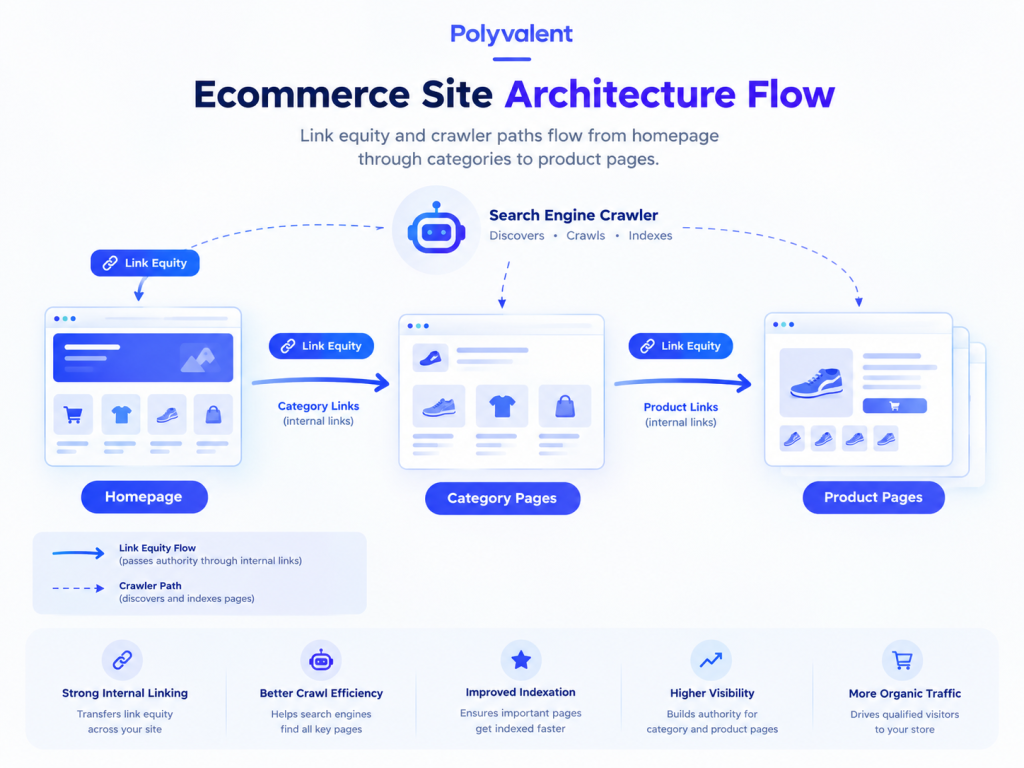
Visualize how traffic naturally flows through a well-optimized ecommerce structure.
Geo-Friendly Tactics: Localizing Your Ecommerce Brand
Local ecommerce SEO matters whenever you have physical locations, regional shipping differences, or customers who care about where a product ships from.
“Available Near Me”
If you run a hybrid model with brick-and-mortar stores plus online sales, connect your point-of-sale inventory to Google Merchant Center and enable local inventory ads and free local listings. When someone nearby searches for a product you carry, Google can show it as “in stock at [your store, 2.1 mi]” in Shopping results and on Maps. This captures shoppers who want the item today and won’t wait for delivery, and it’s one of the few ways an online store can compete directly with big-box retailers on immediacy.
Shipping & Location Pages
Shoppers frequently search “[product] shipping to Canada” or “does [brand] deliver to Texas.” Create dedicated pages detailing shipping times, costs, and policies for specific regions or countries. These pages rank for location-qualified queries, reduce cart abandonment by answering questions before checkout, and give you a natural place to link to region-appropriate product categories. If you serve multiple countries, pair them with correct hreflang tags and localized currency.
Local Schema Markup
Implement LocalBusiness schema on store location pages (with address, hours, and geo-coordinates) and Product schema on every product page (with price, currency, availability, and ratings). When combined with Merchant Center data, this lets search engines display your local pricing and stock status directly in rich snippets, so a searcher sees “$89.99 · In stock · Pickup today” before ever clicking.
The Biggest Technical SEO Issues for Online Stores
Ecommerce platforms generate technical problems at a scale blogs never face.
Duplicate Content from Faceted Navigation
Product filters for size, color, price, and brand each append URL parameters (?color=blue&size=m&sort=price). A single category with a dozen filters can create thousands of parameter URLs, all showing nearly identical content. This is faceted navigation SEO’s central problem: crawlers waste budget on filter combinations while your real pages compete against their own duplicates.
The fix has three layers. First, place a canonical tag on every filtered URL pointing to the clean category URL, so ranking signals consolidate. Second, apply noindex or block low-value parameter patterns in robots.txt (sorting and pagination parameters especially). Third, for filter combinations with genuine search demand (“blue running shoes”), create a proper indexable landing page with its own URL, title, and copy rather than relying on a parameter.
Optimizing Product Images
Google Image Search drives meaningful traffic for visual products like apparel, furniture, and décor. Compress images to keep pages fast (WebP format, under 100 KB for thumbnails), use descriptive file names (“navy-linen-sofa-3-seater.webp” instead of “IMG_4821.jpg”), and write alt text that names the product and its key attributes. Include multiple angles, submit an image sitemap, and make sure the Product schema references your primary image so it appears in rich results.
Frequently Asked Questions About Ecommerce SEO
What are the best types of keywords for an ecommerce site?
Transactional and commercial keywords. Prioritize terms that include “buy,” “price,” “discount,” “free shipping,” or specific product model numbers, since they signal a searcher who is ready to purchase rather than research.
How do I handle product pages for items that change every season?
Don’t delete the URL. Use a 301 redirect to point the old seasonal URL to the new equivalent product or to the main category page. This preserves the SEO value and backlinks the old page earned and keeps shoppers on a relevant page.
Should my ecommerce site have a blog?
Yes. Product pages capture bottom-of-funnel buyers, but a blog captures top-of-funnel informational searches like “how to choose” and “best of” queries. This builds topical authority and gives you a natural place to internally link back to your product categories.